The anticipation builds every July. Emails flood your inbox. Notifications ping constantly. Then November arrives, and it starts all over again.
You’ve likely felt it: that strange pressure to buy tech at specific times of year. But here’s what most people don’t realize — timing your tech purchases isn’t about being a savvy shopper. It’s about understanding retail cycles.
Tech holidays aren’t just random sale events. They’re structural moments in the retail calendar when product inventory, manufacturing cycles, and consumer behavior align in predictable ways. Master this timing, and you won’t just save money. You’ll get better products, wider selection, and genuine peace of mind with your purchases.
This guide cuts through the noise. We’re not selling you anything. We’re showing you exactly when to buy every category of tech in 2026 — and more importantly, why those timings matter.
What Are Tech Holidays? (And Why They’re Nothing Like Christmas)
When we say “tech holidays,” we don’t mean December 25th.
Tech holidays are marketing and retail events built around online shopping and consumer buying patterns. They include major events like Cyber Monday, which is observed on the first Monday after Thanksgiving Day in the United States. Calendar-365
Think of them as strategic windows. Retailers open their inventories. Manufacturers release new products. Prices drop — sometimes genuinely, sometimes artificially.
The five major tech holidays are:
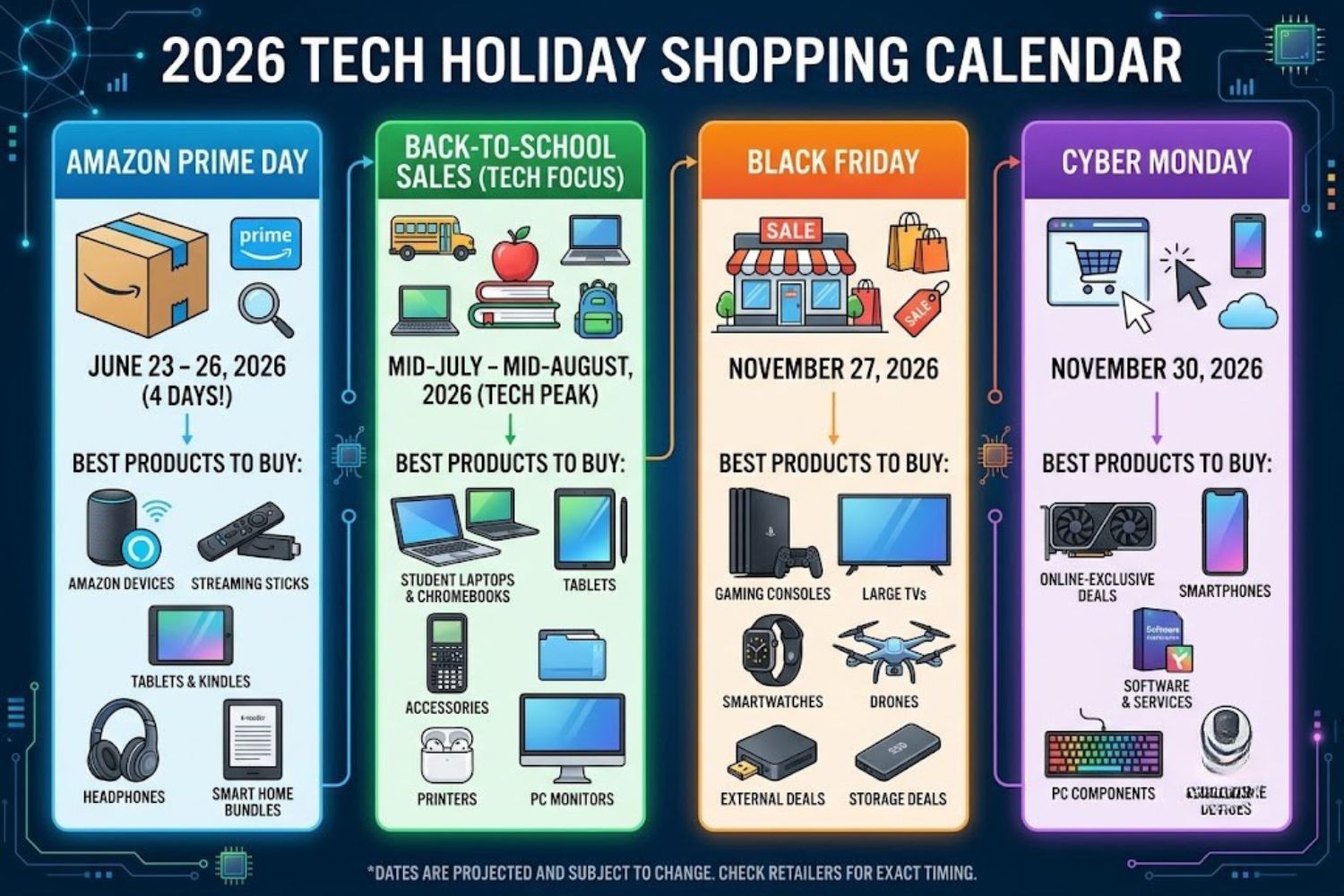
- Black Friday (November 27, 2026)
- Cyber Monday (November 30, 2026)
- Amazon Prime Day (July, annually)
- Back-to-School Sales (July-August)
- Year-End Clearance (December 26-31)
Each serves a different purpose in the retail ecosystem.
Why These Holidays Exist (The Retail Cycle Truth)
Here’s something retailers don’t advertise: The period between Thanksgiving through Cyber Monday — called “Cyber Week” — is projected to draw north of $43 billion in sales, a massive number for just five days of shopping. Rolling Stone
But that’s not random. It’s intentional.
Black Friday emerged from retail inventory problems. After summer sales, retailers sit on excess stock. Post-Thanksgiving represents the official start of holiday shopping — a cultural moment when millions of people are mentally ready to spend. Retailers use deep discounts to clear old inventory and lock in customers for holiday shopping.
Cyber Monday addresses a different problem. The term “Cyber Monday” was first used within the e-commerce community during the 2005 holiday season and was coined by Ellen Davis, based on research in 2004 that showed that the Monday after Thanksgiving was “one of the biggest online shopping days of the year.” It became official with this reasoning: people skip Black Friday in-store chaos but want deals later. Online retailers needed a way to reach them. Calendar-365
Prime Day follows inventory cycles too. Amazon Prime Day is Amazon-exclusive and lasts roughly two days, typically in July, designed specifically to drive Amazon device adoption during mid-year when people plan summer purchases. ShopBack
Back-to-School sales align with academic calendars and the refresh cycles of older tech (last year’s laptops are discounted to clear space for new models).
Year-End Clearance is pure inventory cleanup. Retailers need to close books on old inventory before January 1st. Discounts get aggressive.
The 5 Major Tech Shopping Holidays: Ranked by Value
Not all tech holidays are equal. Here’s what actually matters:
#1: Black Friday (November 27, 2026) — Best Overall Value
Why it wins: Black Friday is the most retailer-diverse window of the three. Amazon, Walmart, Best Buy, Target, Home Depot, and most major brands run competing sales the same week, which pushes doorbuster pricing on TVs, consoles, headphones, and appliances. ShopBack
Deepest discounts on:
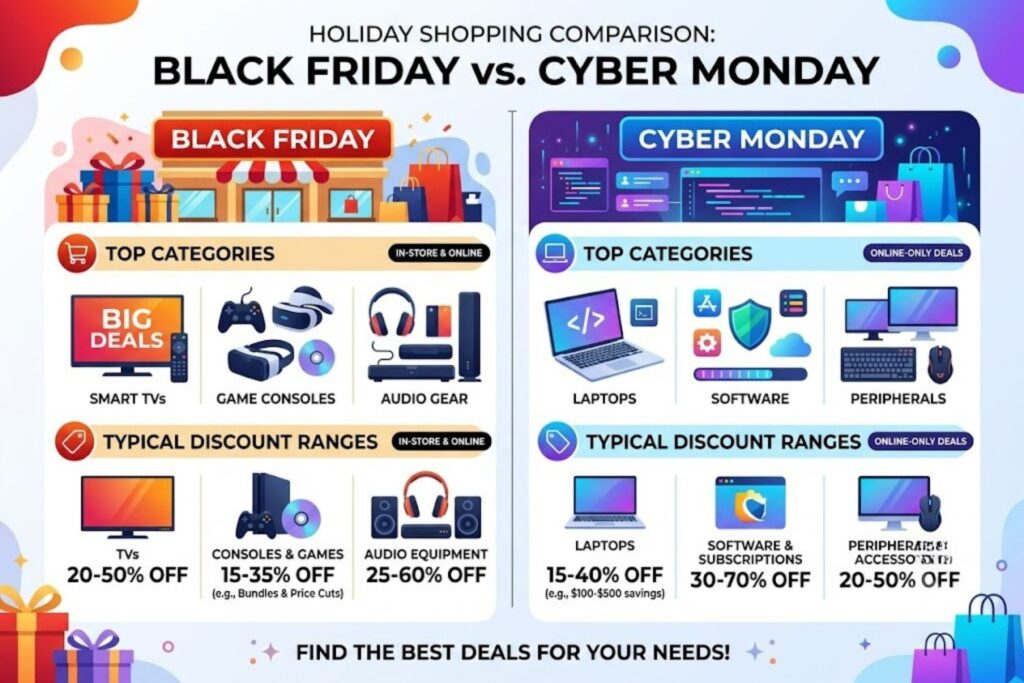
- TVs: 25-40% off (consistently)
- Large appliances: 20-35% off
- Gaming consoles: 10-20% off
- Headphones: 30-50% off
- Laptops: Limited (wait for Cyber Monday for better laptop deals)
Why these discounts? Retail competition reaches peak intensity. When Walmart undercuts Amazon on a TV, Amazon responds. Target responds. Best Buy responds. Prices spiral downward in a race for market share. TVs become loss leaders — products sold at minimal or zero profit just to drive foot traffic.
Who should prioritize Black Friday: Anyone buying big-ticket items like televisions, major appliances, gaming systems, or high-end audio equipment. The selection is broadest here.
Red flag: Don’t buy everything on Black Friday just because there’s a sale. Laptops, for instance, often see better deals on Cyber Monday. Smartphones don’t typically get massive Black Friday discounts — you’re better served waiting for carrier promotions or next-generation release sales.
#2: Cyber Monday (November 30, 2026) — Best for Laptops & Software
Why it’s different: Cyber Monday is best for laptops, peripherals, and software. Cyber Monday is best for laptops, peripherals, software, and online-only retailers. ShopBack
Cyber Monday exists because many people skip Black Friday entirely. Monday morning, they return to work and think, “I should have gotten a deal.” Online retailers respond aggressively to capture this demand.
Deepest discounts on:
- Premium laptops (MacBooks, high-end Windows machines): 15-25% off
- Software & subscriptions: 30-50% off
- Peripherals (keyboards, mice, monitors): 20-40% off
- Online-exclusive brands: 30-50% off
- Refurbished/certified products: 25-40% off
Why Cyber Monday > Black Friday for these categories? Online retailers dominate peripherals and software. They can offer deals without the overhead of brick-and-mortar locations. They also cater to professionals who skipped Black Friday and are shopping from the office.
Real insight: Premium TVs, laptops, and name-brand fashion still trail the deeper Black Friday and Cyber Monday cuts to come. If you waited and didn’t score a laptop deal, Cyber Monday is your second chance — and it’s often better than Black Friday. ShopBack
#3: Amazon Prime Day (July) — Best for Amazon Ecosystem Only
Who should shop: Prime members buying Amazon-branded devices.
Deepest discounts on:
- Echo speakers: 20-50% off
- Fire tablets: 25-40% off
- Kindle devices: 15-35% off
- Ring doorbells/security: 20-40% off
- Amazon-branded basics: 15-30% off
Why it exists: Amazon uses Prime Day to strengthen ecosystem lock-in. If you own an Echo, you’re more likely to buy more Amazon services. If you own a Kindle, you’re more likely to use Kindle Unlimited. Prime Day is less about clearing inventory and more about customer acquisition and retention.
Who shouldn’t prioritize Prime Day: Anyone not planning to buy Amazon-branded products. The deals on third-party items are mediocre compared to Black Friday. If you want a Samsung TV or Sony headphones, Black Friday > Prime Day.
Real insight: The best time of year to buy home tech includes shopping events like Black Friday, Cyber Monday, and Amazon Prime Day. Prime Day is the “secondary” event — valuable if Amazon devices are on your list, otherwise skip it. Asurion
#4: Back-to-School Sales (July-August) — Underrated Gem
This is where most people miss opportunity.
Best for:
- Laptops: 15-25% off (colleges refresh inventory)
- Tablets & e-readers: 20-30% off
- Monitors & stands: 20-40% off
- Printers: 20-30% off
- Webcams & microphones: 15-25% off
Why it matters: Millions of students need tech. Retailers stock heavily. Back-to-school promotions compete with back-to-work purchases. The result? Legitimate discounts on categories that don’t move much during Black Friday.
Who should know about this: People who plan ahead. Most shoppers ignore summer sales entirely, so inventory is deep and selection is wide. You get quality plus choice.
#5: Year-End Clearance (December 26-31) — Best for Bargain Hunters
Deepest discounts on:
- Returned/holiday exchange items: 30-60% off
- Older model inventory: 25-50% off
- Bundle deals: 20-40% off
- Clearance electronics: Up to 70% off (rare, but possible)
The catch: Selection is terrible. Popular items are gone. You’re choosing from what’s left. Good for: “I need something now and don’t care what” purchases. Bad for: specific product hunting.
Real insight: Use this window for gift card spending and last-minute replacements, not planned purchases.
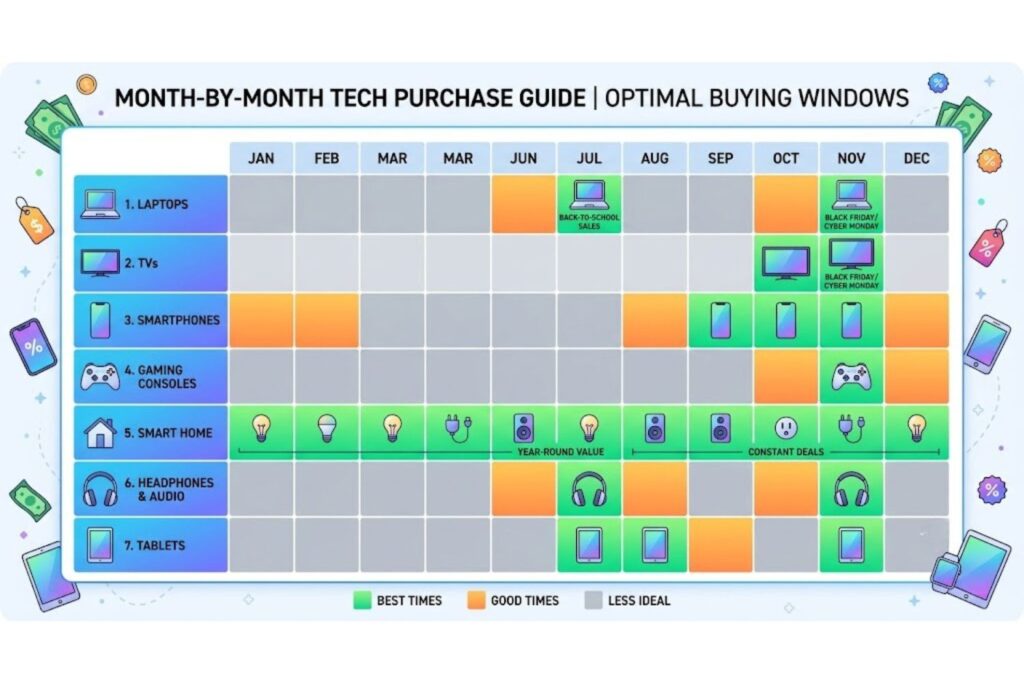
The Complete 2026 Tech Shopping Calendar
Here’s exactly when to buy each type of tech this year:
| Month | Event | Best Tech to Buy | Typical Discount | Strategy |
|---|---|---|---|---|
| January | New Year Clearance | Overstocked holiday inventory, refurbished items | 20-35% | Low priority; limited selection |
| February | Presidents’ Day Sale | Gaming peripherals, some laptops | 10-20% | Skip for tech; better for furniture |
| March | Spring Sales (minor) | Monitors, webcams | 10-15% | Monitor if you need these |
| April | Tax Refund Season (no official event) | Trending items | Market rates | Skip; no real discounts |
| May | Memorial Day Weekend | Gaming monitors, mechanical keyboards, smart home basics | 15-25% | Good for PC enthusiasts |
| June | End of fiscal year | Refurbished devices, service plans | 15-25% | Viable but not peak |
| July | Amazon Prime Day + Back-to-School | Amazon devices, laptops, tablets, back-to-school tech | 20-40% | MAJOR EVENT — plan here |
| August | Back-to-School Peak | Laptops, monitors, software for students | 15-30% | Second priority after July |
| September | Labor Day Weekend | Appliances, outdoor smart home tech | 15-25% | More for appliances than tech |
| October | Early Holiday Deals | Gaming products, TV early releases | 10-20% | Avoid buying here for tech |
| November 27 | Black Friday | TVs, appliances, consoles, audio, gaming gear | 20-50% | PEAK EVENT #1 |
| November 30 | Cyber Monday | Laptops, software, peripherals, online exclusives | 15-40% | PEAK EVENT #2 |
| December 1-24 | Holiday Season | Gift bundles, some discounts on slow movers | 10-25% | Don’t wait; most deals done by Dec 1 |
| December 26-31 | Year-End Clearance | Overstocked inventory, returns, bundles | 20-60% | Low priority; poor selection |
Two dates to circle: November 27 (Black Friday) and July (Prime Day/Back-to-School). These are when serious savings happen.
Strategic Tech Category Guide: Best Time to Buy Everything
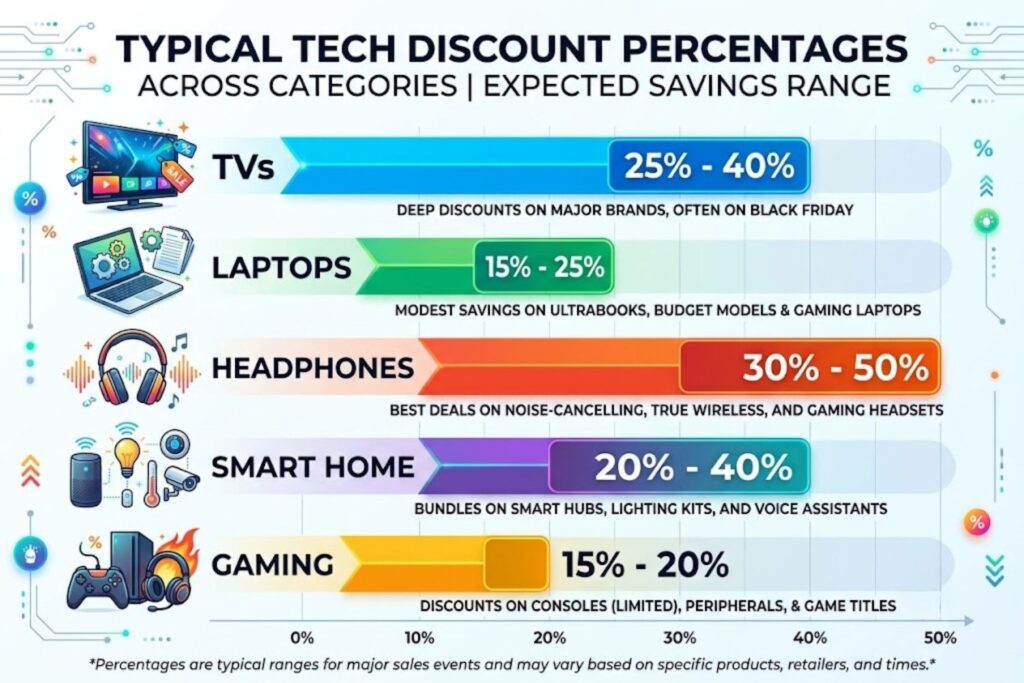
This is where the real value lives. Different tech categories follow different discount patterns.
Laptops & Computers
Best time: Cyber Monday (November 30) OR Back-to-School (July-August)
Why: New laptop models release in September/October. Last year’s models get clearanced November-December. Cyber Monday specifically attracts laptop shoppers looking for premium deals online.
Discount range:
- Budget laptops: 10-20% off (minimal)
- Mid-range laptops: 15-25% off
- Premium/gaming laptops: 20-35% off on Cyber Monday
- MacBooks: 15-25% off Cyber Monday (Apple rarely discounts)
Insider tip: If you’re buying a MacBook, don’t expect huge discounts anywhere. Apple controls pricing. The 15-20% you see at Cyber Monday is likely the year’s best deal. Don’t wait for Black Friday hoping for more.
Budget consideration: A $1,200 laptop at 20% off saves you $240. That’s real money. Wait for these windows.
Televisions & Displays
Best time: Black Friday (November 27)
Why: TVs are loss leaders during Black Friday. Retailers use massive TV discounts to drive traffic. Prices don’t get as deep anywhere else.
Discount range:
- 4K TVs (55-65″): 25-40% off
- QLED/high-end TVs: 30-40% off
- Budget 4K TVs: 20-30% off
- Smart displays: 15-25% off
Real data: Premium TVs, laptops, and name-brand fashion still trail the deeper Black Friday and Cyber Monday cuts to come. Black Friday is the only time TVs see truly deep cuts. ShopBack
Decision framework: Do you need a TV? Buy on Black Friday. If you miss it, wait until next year. That’s not pessimistic — it’s financial wisdom.
Smartphones & Tablets
Best time: Carrier promotions (scattered) or flagship release sales (September-October)
Why tech holidays aren’t best for phones: Phone pricing is controlled by carriers and manufacturers. They don’t follow retail sale cycles. Your best deals come from carrier promotions (“buy one, get one free”) or from buying last-generation phones when new models release.
Discount range: 5-15% off (rarely more)
Real talk: If you’re buying an iPhone, iPad, or Galaxy phone, tech holidays aren’t your advantage. Carrier promotions and manufacturer rebates are. Check your carrier’s promotions first.
Headphones & Audio Equipment
Best time: Black Friday (November 27)
Why: Audio equipment sees competitive pricing during Black Friday because retailers use it as a complementary category (buy a TV, add good speakers).
Discount range:
- Budget headphones (<$100): 25-40% off
- Premium headphones ($100-$300): 30-50% off
- High-end audio systems: 20-35% off
- Bluetooth speakers: 25-40% off
Insider tip: Noise-canceling headphones see their deepest discounts here. If you’ve been wanting AirPods Pro or Sony XM5s, Black Friday is the right timing.
Smart Home Devices
Best time: Prime Day (July) for Amazon devices OR Black Friday for everything else
Why: Amazon dominates smart home with Echo, Ring, and Alexa devices. Their discounts peak on Prime Day. Non-Amazon smart home products (Google Nest, Apple HomeKit) see better deals on Black Friday.
Discount range:
- Echo speakers: 30-50% off (Prime Day)
- Ring doorbells: 25-40% off (Prime Day)
- Google Nest: 20-35% off (Black Friday)
- Thermostats: 15-30% off (Black Friday)
Decision framework: If your ecosystem is Amazon, wait for Prime Day. If you’re ecosystem-agnostic, Black Friday offers broader options.
Gaming Consoles & Accessories
Best time: Black Friday (November 27)
Why: Gaming reaches peak consumer interest November-December. Retailers compete heavily on console bundles.
Discount range:
- Gaming consoles: 10-20% off (if available)
- Gaming monitors: 25-40% off
- Gaming headsets: 30-50% off
- Mechanical keyboards: 30-45% off
- Gaming mice: 25-40% off
Real insight: Console availability is limited on Black Friday. Don’t bank on scoring a PS5 at discount unless you pre-order. Accessories, however, see genuine deep cuts.
Cameras & Photography Gear
Best time: Black Friday or Cyber Monday
Why: Photography equipment doesn’t have seasonal urgency like TVs or laptops. Discounts are moderate, but Black Friday still edges others out.
Discount range:
- Mirrorless cameras: 10-20% off
- DSLR cameras: 15-25% off
- Lenses: 10-20% off (rarely deeper)
- Tripods & accessories: 25-40% off
Consideration: Photography gear rarely drops 40%+ because the market is specialized. Don’t expect massive discounts. A 15% discount on a $2,000 camera is still $300 saved.
Wearables & Fitness Tech
Best time: Black Friday (November 27)
Why: Wearables hit peak consumer interest during holiday season when people buy gifts.
Discount range:
- Smartwatches: 20-40% off
- Fitness trackers: 25-40% off
- Wireless earbuds: 30-50% off
- Sports watches: 15-30% off
Insight: Wearables see some of the deepest percentage discounts because they’re high-margin products. Retailers can afford to cut prices significantly.
How to Spot Fake Deals (The Skill Nobody Teaches You)
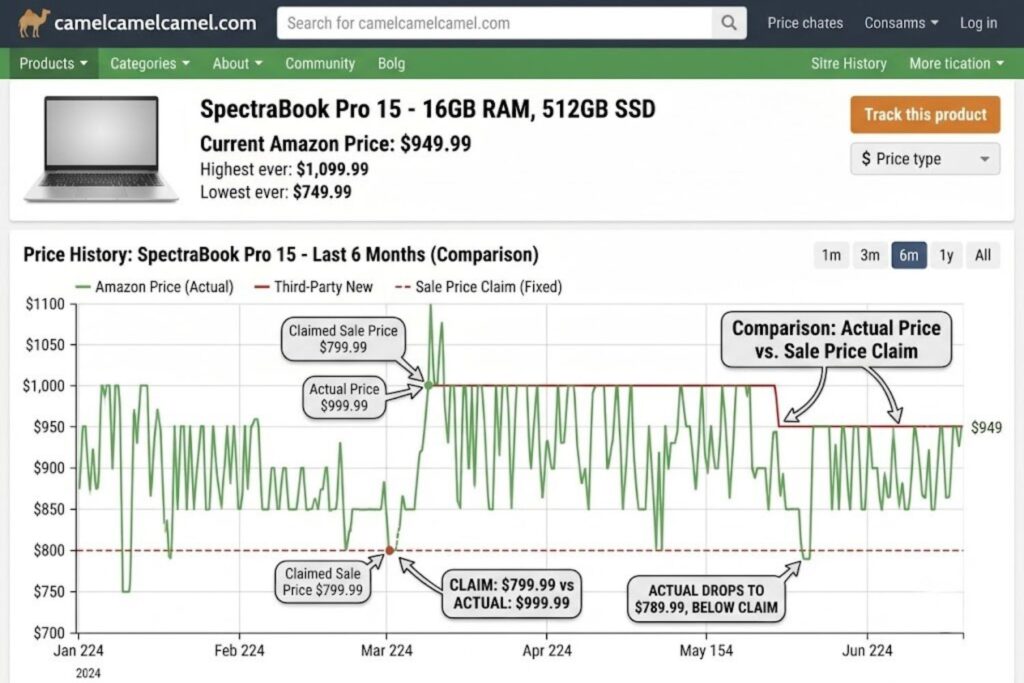
Here’s something the retail industry doesn’t want you to know: not all “deals” are real.
Retailers use a tactic called price anchoring. They inflate the “regular” price, then discount from that inflated price. The discount looks huge. The actual savings? Minimal.
Example: A Bluetooth speaker listed at $150 “on sale for $99 (33% off)” sounds impressive. But if that speaker normally sells for $89, you’re actually paying more than usual.
The Price Manipulation Trick (Explained)
Here’s how it works:
- Retailer lists a product at an inflated “was” price
- They discount from that price for the sale
- The discount % looks huge (40% off!)
- Your actual savings compared to historical price? Often 5-10%
This is legal. It’s also deceptive.
How to Verify Real Discounts
Tool #1: CamelCamelCamel (for Amazon purchases)
Go to CamelCamelCamel.com. Enter any Amazon product URL. You’ll see a price history graph showing exactly what that product cost on any given date for the past several years.
Why this matters: You can instantly see if a “sale” price is actually lower than historical prices, or if it’s inflated.
Example: You see a laptop “on sale” for $899 on Black Friday. CamelCamelCamel shows it was $799 on July 15th. That’s not a deal. That’s a markup.
Tool #2: Keepa (also for Amazon)
Keepa.com does similar tracking with more detailed data. It shows price changes hour-by-hour, seller price history, and even historical review counts.
Tool #3: Google Shopping (for price comparison)
Search for a product on Google Shopping. You’ll see current prices across multiple retailers and historical price indicators on many products.
Tool #4: BrickSeek (for in-store retail)
For Walmart, Target, Best Buy purchases, BrickSeek tracks inventory and historical pricing in real-time.
Red Flags You Should Know
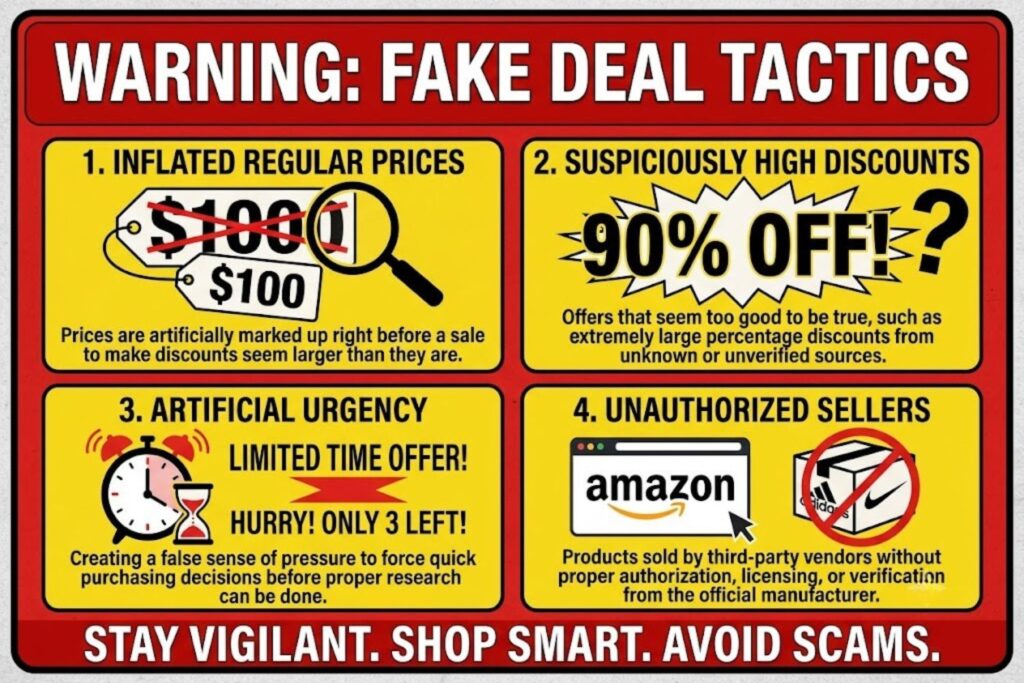
Red flag #1: “Regular price” seems suspiciously high
If you’ve never seen a product at that price before, it’s probably inflated for the sale.
Red flag #2: Discount % is suspiciously high
Real discounts on most tech: 15-40%. If you see 70% off a major brand product, verify immediately. It’s often a manipulated “regular” price.
Red flag #3: “Limited time” combined with “low stock”
This creates artificial urgency. Real deals don’t need psychological pressure.
Red flag #4: Clearance + closeout + sale all in the same listing
Too many words. Real deals are stated simply. Multiple urgency words = manipulation.
Red flag #5: Seller isn’t the manufacturer or authorized retailer
Buy from Amazon, Best Buy, Walmart, Target, or the manufacturer’s official store. Third-party sellers sometimes list counterfeit products.
The Quick Verification Checklist
Before buying on any holiday sale:
- ✓ Use CamelCamelCamel to check Amazon price history
- ✓ Compare price on 2-3 other retailers
- ✓ Search for “[product name] price history” to find recent comparisons
- ✓ Read reviews from this year (not old reviews — products change)
- ✓ Check return policy for this specific sale
- ✓ Verify seller legitimacy
Takes 5 minutes. Saves $50-200+ frequently.
The Holiday Tech Shopping Playbook (Step-by-Step)
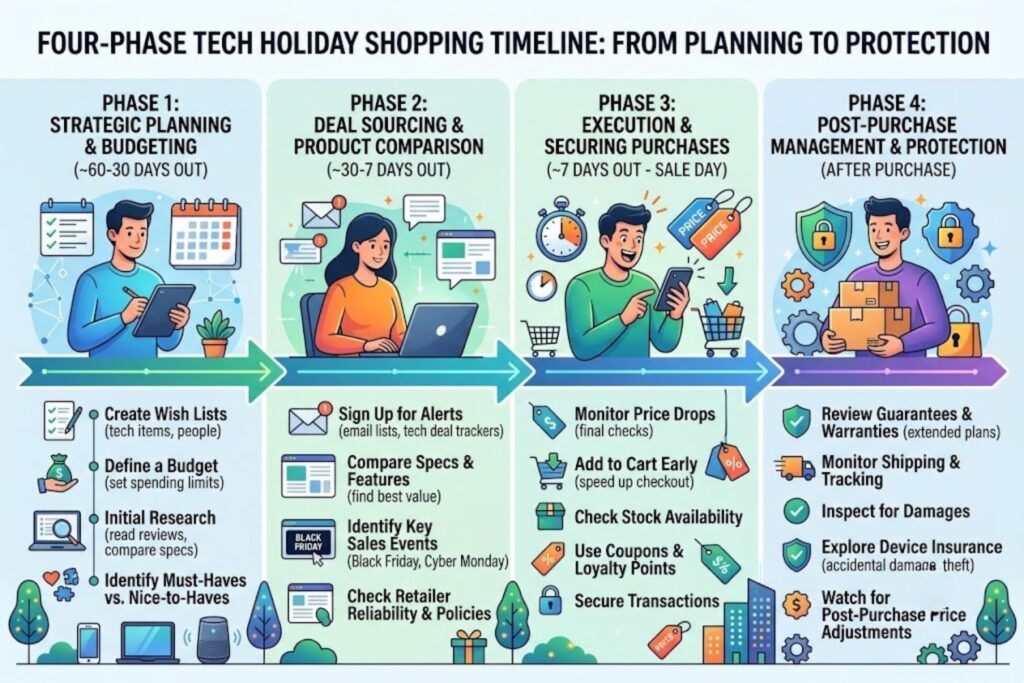
This is your action plan. Follow it, and you’ll never overpay during tech holidays again.
Phase 1: 60 Days Before (Planning — September for Black Friday)
Week 1: Identify what you need
Don’t shop yet. Just think.
- What tech do you actually need right now?
- What’s been on your wishlist for 6+ months?
- What needs to be replaced?
Write it down. Be honest. “Want” ≠ “need.”
Week 2: Research products
For each item on your list:
- Read 5+ independent reviews
- Check YouTube comparisons
- Note 2-3 top options per category
Use a spreadsheet. Keep it simple.
Week 3: Set price targets
For each product, research:
- What’s the current price?
- What was the lowest price historically? (Use CamelCamelCamel)
- What’s a realistic discount % for this product type?
Calculate: Historical low price × (1 + realistic discount %) = your target price
Example: A laptop’s historical low is $899. Realistic Black Friday discount for premium laptops: 20%. Target price: $1,079 × 0.80 = $863 max.
Week 4: Set up alerts
- CamelCamelCamel alerts for Amazon products
- Google Shopping price drop alerts
- Retailer emails (Best Buy, B&H Photo, etc.)
- RetailMeNot for coupon codes
Alerts let you sleep. They’ll notify you if prices drop before the official sale.
Phase 2: 30 Days Before (Preparation — October for Black Friday)
Week 1: Review your list
Look at your research. Anything changed? New products released? Price drops already happening?
Update your list. Refine your targets.
Week 2: Plan financing (if needed)
If you’re spending $500+:
- Research 0% APR credit card offers
- Compare Buy Now Pay Later (BNPL) options
- Check if financing makes sense for your situation
Don’t overextend. A 15% discount doesn’t justify bad financial decisions.
Week 3: Understand return policies
Different retailers have different holiday return windows:
- Amazon: Often extended to January 31st during holidays
- Best Buy: Usually extended 30 days
- Walmart: Varies by product
- Target: Extended returns during holidays
Write down the return deadline for each retailer you plan to use. Circle it on your calendar.
Week 4: Create your shopping schedule
Make a simple document:
Black Friday (Nov 27):
- TV: Target or Best Buy (compare both)
- Headphones: Amazon (check CamelCamelCamel first)

Cyber Monday (Nov 30):
- Laptop: Amazon or Best Buy (wait for Monday)
- Monitor: Newegg or Amazon
This prevents impulse purchases and keeps you focused.
Phase 3: 1 Week Before (Monitoring — November 20-26 for Black Friday)
Day 1-2: Check early deals
Many retailers start sales 1-2 weeks early to capture traffic. Check:
- Amazon’s “Deals of the Day”
- Best Buy’s weekly deals
- Target’s prelisting
- Walmart’s online deals
Don’t buy yet, but note what’s already on sale.
Day 3-4: Verify prices
For your target products:
- Check current prices on 3 retailers
- Verify against historical lows (CamelCamelCamel)
- Note if prices are already lower than your targets (buy now, don’t wait)
Day 5-6: Set notifications
Put your phone reminders for:
- Black Friday start time (usually 12:01 AM or store opening)
- Cyber Monday start time
- Any retailer-specific start times
Add to calendar.
Day 7: Rest
You’ve planned well. Resist the urge to shop before the official event. Most early deals are mediocre compared to the actual event.
Phase 4: During the Sale (Execution — November 27-30)
Black Friday Morning:
- Log into all relevant accounts (Best Buy, Amazon, Walmart, Target, Newegg)
- Add items to cart (don’t check out yet)
- Wait 15 minutes
- Verify prices haven’t changed (they sometimes do mid-sale)
- Check for coupon codes (often emailed on Black Friday morning)
- Check your price targets (are these actually good deals?)
- Proceed to checkout
This sounds paranoid. It’s not. Retailers change prices dozens of times during sales.
During Cyber Monday:
Repeat the above. This is your second-chance window for laptops and software.
Key rule: If you didn’t need it before the sale, you don’t need it now. A discount doesn’t create utility.
Phase 5: After Purchase (Protection)
Within 7 days:
- Keep your packaging
- Note receipt numbers
- Test everything thoroughly
- Read the warranty (print it)
- Take photos of contents (proof of condition)
If you see a price drop (within return window):
- Contact customer service for a price adjustment (most offer this)
- If not, return it and repurchase at the lower price
Extended warranty consideration:
- For products over $300 that you’ll keep 3+ years, extended warranties often pay for themselves
- Read the terms carefully (most exclude accidents)
Common Holiday Tech Shopping Mistakes (Don’t Make These)
Mistake #1: Buying Before Black Friday
Every year, people buy “good deals” in October and November.
Then Black Friday happens. The same products cost 20-30% less.
The trap: “This is a good deal today.” Relative to what? Not relative to Friday.
The solution: Wait. If something goes out of stock before Black Friday, it wasn’t meant to be yours. There will be other products.
Exception: If you absolutely need something before November 1st, buy it. Otherwise, patient 60-day waiting is worth $100-300+ in savings.
Mistake #2: Ignoring Return Windows
Holiday return windows are temporary. They’re typically extended to January 31st, but some retailers only extend to December 26th.
People buy, forget the return window, then get stuck with a product that doesn’t meet expectations.
The solution: Screenshot or write down the return deadline immediately upon purchase. Set a phone reminder 1 week before the deadline.
Real scenario: You buy a laptop on November 27th. Extended return window: January 31st. You test it for 2 months, decide it’s not right, but don’t return it until February 2nd. Return denied.
Mistake #3: Confusing Discounts with Value
A 40% discount on a bad product is still bad.
A 10% discount on a great product is still great.
The mistake: People buy things just because they’re on sale. Then the product sits unused.
The solution: Only buy what you researched and planned to buy. Sale prices are for products you wanted anyway.
Example: You weren’t interested in smart speakers. They go 50% off. You buy one because of the discount. It sits on a shelf. Money wasted.
Mistake #4: Skipping Warranty Options
Tech breaks. Sometimes it’s your fault (accidents). Sometimes it’s manufacturing defects.
Holiday sales often offer extended warranties at lower prices than usual. Most people skip them.
The reality:
- Laptops: 20% failure rate in first 3 years (excluding accidents)
- Smartphones: 15% failure rate in first 3 years
- Headphones: 10% failure rate in first 3 years
If you’re buying a $1,200 laptop and there’s a 20% chance it needs repair, warranty protection is rational, not paranoid.
The solution: Read warranty terms carefully. Extended warranties should cover defects, not just accidents. If they don’t, they’re often not worth it.
Mistake #5: Forgetting Shipping Deadlines
The holidays have cutoffs. If your package doesn’t ship by December 18-19, it won’t arrive by December 25th.
People order on December 23rd expecting delivery by Christmas. It doesn’t happen. Frustration follows.
The solution: Check shipping deadlines at checkout. Most retailers display them. If it’s December 20th and you haven’t checked, don’t order.
Warranty & Return Strategies for Holiday Tech
Extended Holiday Return Windows
Most major retailers extend returns during the holiday season:
- Amazon: Returns extended to January 31st (verify current year)
- Best Buy: 15-day return window, sometimes extended to 30 days
- Target: Extended returns through January 31st (verify current year)
- Walmart: 15-day window (varies by department)
Real benefit: This window gives you time to test products thoroughly. Use it.
Strategic advantage: If you’re unsure between two laptops, buy both. Test both for 2 weeks. Return the one you don’t like. Retailers expect this.
Why You Need Coverage on Premium Tech
Here’s the financial math:
Scenario: You buy a $2,000 laptop.
- No warranty: If it fails in year 2, you either pay $800-1200 for repairs or buy a new one. $2,000 loss.
- Extended warranty ($200): If it fails in year 2, repairs are covered. $200 cost.
That extended warranty is a break-even at year 2. After that, it’s pure savings.
Rule of thumb: For tech over $500 that you’ll keep 3+ years, extended warranties usually pay for themselves.
What to Look For in Warranties
Good warranty covers:
- Manufacturing defects
- Component failures
- Technical issues
- Accidental damage (varies)
- Replacement/repair (not just refund)
Bad warranty covers:
- Only manufacturing defects
- Only in-store service
- Only partial coverage
- Does not cover battery degradation (especially important for laptops)
Red flag: “Warranty covers everything except…”—often has so many exceptions it’s useless.
Budget-Friendly Tech Holiday Strategy
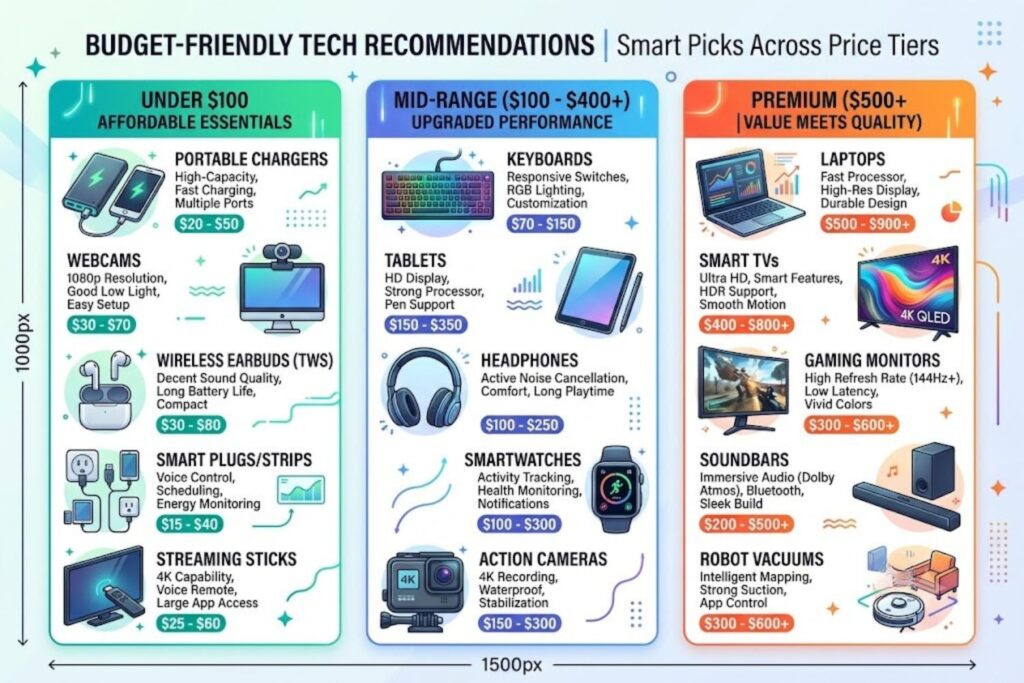
Not everyone can spend $2,000 on Black Friday. Here’s how to maximize value at any budget level.
Under $100: Maximum Impact Purchases
These are items that provide genuine value at sale prices:
- Wireless earbuds ($30-80): Every model in this range is competent. Soundcore, Anker, TaoTronics all work well.
- Portable chargers ($20-50): Essential for travel. Any brand works; focus on capacity (20,000 mAh+).
- Bluetooth speakers ($30-80): Great gift, practical tool. JBL and UE Boom are solid.
- USB hubs ($15-40): Boring but essential for laptops.
- Webcam ($30-60): Critical if you work from home.
Strategy: Buy 2-3 items in this range instead of stretching for one expensive item.
$100-$300: The Sweet Spot
This is where value meets quality:
- Mechanical keyboards ($80-150): Huge improvement if you type daily.
- 4K monitor (24-inch, $150-250): Better than any laptop screen.
- Mid-range headphones ($100-200): Night-and-day difference from cheap ones.
- Tablet ($150-300): iPad, Samsung Tab alternatives offer real value.
- Action camera (GoPro Hero equivalent, $200-300): Durable, versatile.
- Smart thermostat ($150-250): Pays for itself in energy savings within 2 years.
- Portable projector ($150-300): Entertainment value is real.
Strategy: This is where to concentrate your budget. These prices offer the best value-to-cost ratio.
$300+: Premium Purchases (Be Selective)
- Laptop ($800-1500): The discount has to be meaningful (15%+ off).
- TV ($400-1000): Black Friday only.
- Gaming console bundle ($400-600): Usually limited stock.
- High-end headphones ($300-500): Only if you’re an audio enthusiast.
Strategy: These are big purchases. The discount needs to be real (verified with CamelCamelCamel), the product needs to be researched, and the warranty needs to be considered.
Rule: If you’re not saving at least $100 on a $500+ purchase, wait or don’t buy it.
Mobile & Desktop Readiness (Make Shopping Easy)
Browser Tools & Extensions
Honey (Browser extension)
- Automatically applies coupon codes at checkout
- Shows price history on Amazon
- Tracks price drops
Free and worth it.
CamelCamelCamel (Website or browser extension)
- Price history for Amazon
- Instant charts showing whether current price is good
- Set alerts for specific price targets
This is your most important tool.
Capital One Shopping (Browser extension)
- Compares prices across retailers
- Finds coupon codes automatically
- Tracks your deals
Invisible Hand (Browser extension)
- Price comparisons
- Price drop alerts
- Coupon finder
Pick one or two. Don’t overload your browser.
Apps Worth Using
Rakuten
- Cash back (1-40% depending on retailer)
- Connects to your credit card
- Gets you free money on purchases you’d make anyway
Seriously, use Rakuten. 2-5% cash back adds up.
ShopSavvy
- Barcode scanner for in-store price comparison
- Price history
- Local store inventory
Useful for Best Buy, Target, Walmart shopping.
RetailMeNot
- User-submitted coupon codes
- Read reviews on codes (verified, expired, etc.)
- Saves frustration
Email Setup
Create a separate email for shopping deals (if you want to stay organized):
- Best Buy alerts
- Amazon deals
- Target deals
- Manufacturer emails
Keep this separate from your primary email. Unsubscribe from everything else. This email is only for Black Friday/Cyber Monday alerts.
FAQ: 12 Questions People Actually Ask About Tech Holidays
Q1: Is Black Friday or Cyber Monday better for tech?
A: Black Friday for TVs, gaming, audio, and appliances. Cyber Monday for laptops, software, and peripherals. They’re complementary, not competitive.
Q2: When is Amazon Prime Day 2026?
A: Typically mid-July. Dates vary yearly. Amazon announces dates usually in May. Mark your calendar once announced.
Q3: Do I need to be a Prime member to get Prime Day deals?
A: Most deals require Prime membership. A free trial (30 days) lets you shop Prime Day. Cancel after if you want.
Q4: Will prices drop more after Black Friday?
A: Rarely. Black Friday and Cyber Monday are the deepest sale windows. Year-End Clearance has inventory left, not deals.
Q5: Is it ever worth buying tech full-price?
A: Yes—if you need it before the next major holiday, or if it’s a niche product with limited sales. Don’t wait 6 months for a discount on something you need now.
Q6: How do I know if a discount is real?
A: Use CamelCamelCamel for Amazon. Check Google Shopping for historical prices. If the “original price” seems suspiciously high, verify it.
Q7: What’s the best way to return holiday tech?
A: Purchase within return window (note the deadline immediately). Test the product thoroughly within 2 weeks. Return if needed before the deadline. Keep packaging until deadline passes.
Q8: Should I buy extended warranty on tech?
A: For products over $400 that you’ll keep 3+ years, generally yes. Read terms carefully—it should cover defects, not just accidents.
Q9: Is refurbished tech worth buying during sales?
A: Certified refurbished from authorized sellers? Yes. Unknown refurbished from third-party sellers? No. The discount isn’t worth the risk.
Q10: Can I price match if I find a better deal after purchase?
A: Most retailers offer price adjustments within 7-14 days of purchase. Call customer service with proof of the lower price. They’ll usually match.
Q11: What tech shouldn’t I buy during holiday sales?
A: Smartphones (carriers control pricing, not retailers). Niche products without competitors (limited discounts). Products you don’t need (sales don’t create utility).
Q12: Is there a tech holiday in January?
A: Year-End Clearance (Dec 26-31) and sometimes New Year sales (early January), but no major official event. CES (Consumer Electronics Show) in January announces new tech, but sales aren’t deep.
Final Thought: Why This Matters
Retail is a $6+ trillion industry. Retailers spend billions optimizing their sales events to maximize profit, not your savings.
They use psychology. They use artificial urgency. They use manipulated pricing.
But here’s what they can’t control: an informed shopper.
When you understand retail cycles, verify prices, plan 60 days ahead, and follow a checklist, you transform from a consumer into a strategic buyer.
The discounts become real because you know what real looks like.
The savings become substantial because you’re buying the right things at the right times.
The experience becomes less stressful because you have a plan.
This is how you win the tech holiday game. Not by shopping more. By shopping smarter.