
In 2024, enterprise automation has shifted from “nice-to-have” to competitive necessity. Organizations are drowning in repetitive tasks—approvals that could be instant, data entry that consumes hours, customer inquiries cycling through manual workflows. Droven.io emerges as a powerful platform designed to bridge the gap between legacy business processes and AI-driven automation.
But what exactly is Droven.io, and more importantly, can it solve your business problems? This guide walks through the platform’s capabilities, real-world applications, pricing, and strategic implementation—giving you everything you need to make an informed decision.
What Is Droven.io? (Definition & Core Function)
Droven.io is an AI-powered business automation platform designed to streamline complex workflows, reduce manual work, and integrate disparate systems without deep coding expertise. It sits in the commercial automation space—more capable than no-code connectors like Zapier, yet more flexible and user-friendly than enterprise RPA solutions that require extensive implementation.
At its core, Droven.io enables teams to:
- Build intelligent workflows that handle multi-step business processes
- Connect data across hundreds of business applications
- Automate decision-making based on business rules and AI logic
- Monitor performance in real-time and optimize on the fly
The platform targets medium to large enterprises, operations teams, and technically-savvy small businesses seeking to reduce operational overhead and eliminate repetitive manual work.
How Droven.io Works: The Technology Behind the Platform
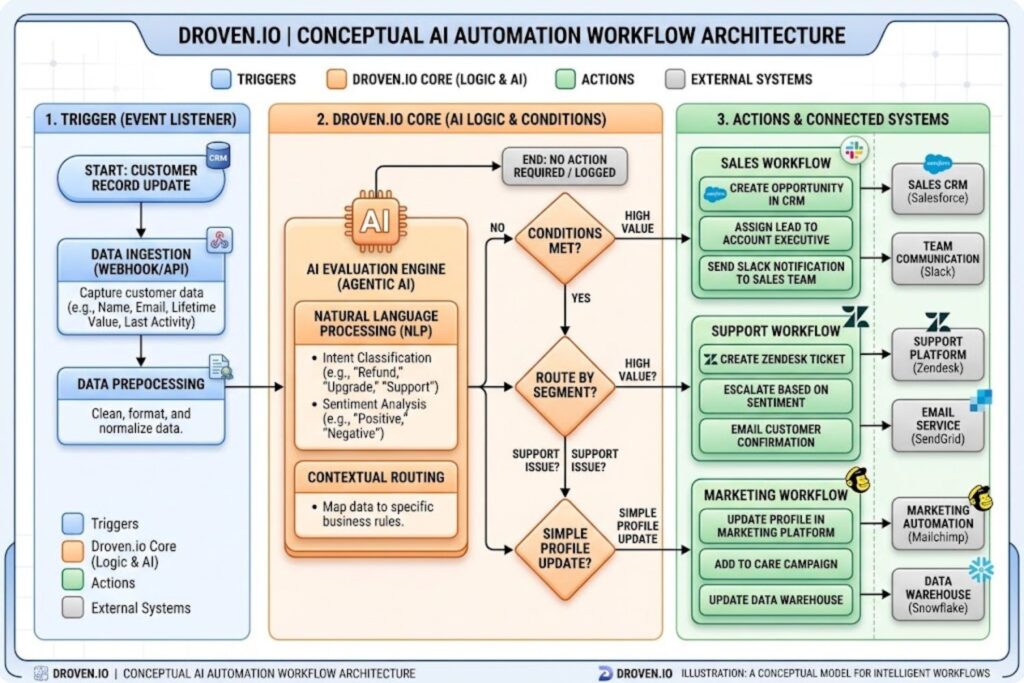
Droven.io operates on a trigger-action-condition framework, but with significantly more sophistication than basic automation tools:
- Trigger Definition — An event initiates the workflow (new customer record, incoming email, API call, scheduled time)
- Condition Evaluation — The system evaluates business logic and conditional statements
- AI-Powered Decision Making — Machine learning models can analyze data and make contextual decisions
- Action Execution — The platform executes actions across connected systems—data updates, notifications, approvals
- Monitoring & Logging — Every step is recorded, audited, and available for optimization
Unlike traditional workflow tools, Droven.io includes built-in AI capabilities, meaning workflows can learn patterns, handle edge cases, and adapt without constant manual rule updates.
Key Differentiators From Traditional Automation Tools
Several factors set Droven.io apart in a crowded market:
Depth of Integration — Droven.io’s API-first architecture connects to enterprise systems (SAP, Oracle, custom databases) that no-code tools often struggle with. Traditional connectors offer 100 integrations; Droven supports custom API connections for unlimited sources.
AI Within Workflows — Most automation platforms execute predetermined actions. Droven.io incorporates machine learning, allowing workflows to evaluate complex business scenarios, extract meaning from unstructured data, and make intelligent decisions.
Enterprise Scalability — Zapier handles SOHO workflows effectively. Droven.io is built for high-volume, mission-critical operations at scale—processing thousands of records per minute with guaranteed performance.
Security & Compliance — Droven.io includes enterprise-grade security (SOC 2, ISO 27001), audit trails, and compliance controls required for regulated industries (finance, healthcare, legal).
Core Features That Drive Business Value
Intelligent Process Automation
Droven.io’s core strength lies in automating complex, multi-step business processes. Unlike simple task automation, intelligent process automation understands context, handles exceptions, and adapts to edge cases.
Practical Example: A procurement workflow might involve purchase request approval (with rules based on amount and department), vendor matching against an approved supplier list, creating purchase orders, and notifying finance. A simple automation tool executes each step blindly. Droven.io adds logic: “If amount exceeds $10K and requestor is new, escalate for manual review. If vendor is flagged as risky, trigger audit review.”
This capability reduces manual intervention by 60-80% compared to workflows in tools like Zapier or Make.
Multi-Step Workflow Execution
Business processes rarely involve one action. Droven.io orchestrates sophisticated workflows with dozens of steps, parallel branches, and error handling.
Features include:
- Conditional logic branches (if-then-else structures)
- Parallel execution (multiple actions happening simultaneously)
- Error handling and retry logic
- Loop and batch operations
- Time-based delays and scheduled actions
- Human-in-the-loop approvals when needed
A typical HR onboarding workflow in Droven.io might include 30+ steps: creating system accounts, setting permissions, scheduling training, notifying managers, integrating with payroll—all orchestrated as a single, trackable process.
Real-Time Data Integration
Data silos kill productivity. Droven.io acts as a unified data layer, pulling from CRM systems, ERP platforms, databases, and cloud storage, then synchronizing data across systems in real time.
Integration scenarios:
- Customer data in Salesforce syncs instantly to fulfillment, billing, and support systems
- Supply chain data aggregates from multiple warehouses into a single decision dashboard
- Employee data updates across 15+ HR, finance, and communication systems simultaneously
This eliminates data inconsistency, reduces manual data entry by 90%+, and ensures teams work with current information.
Analytics and Performance Monitoring
Droven.io provides built-in dashboards showing:
- Workflow success rates and failure points
- Cycle time for processes (how long from trigger to completion)
- Cost per execution
- Exception handling rates
- System performance and bottlenecks
Operations teams use this data to identify optimization opportunities. For example, if a workflow consistently fails at step 7, the team investigates and fixes the underlying issue. If cycle time is 4 hours but 3 of those hours are waiting for a single approval, automating that approval becomes the clear priority.
API-First Architecture
While Droven.io offers a visual workflow builder (good for no-code users), power users can leverage its robust API to:
- Trigger workflows programmatically
- Access workflow data for analysis
- Build custom applications on top of Droven.io
- Integrate Droven.io into existing development pipelines
This flexibility means Droven.io scales from business analyst to enterprise architect.
Real-World Use Cases for Droven.io
Customer Service & Support Automation
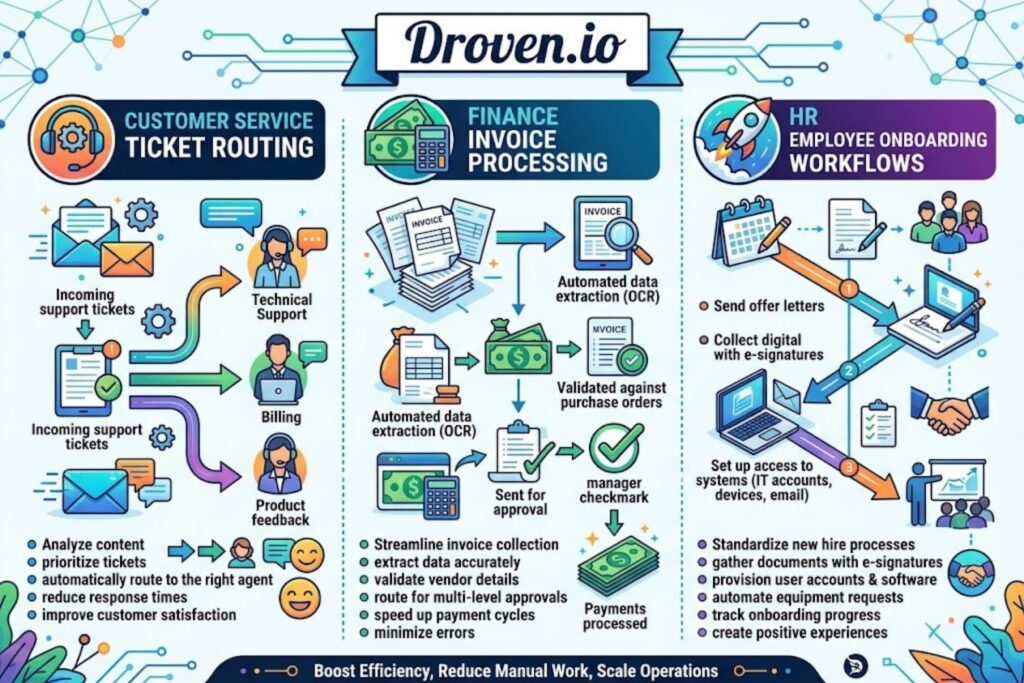
The Problem: Support tickets flood in through email, chat, phone, and social media. Each channel requires manual routing, creating bottlenecks and delayed responses.
Droven.io Solution:
- Aggregate support tickets from all channels into a unified system
- Automatically categorize issues using AI-powered text analysis
- Route tickets to the appropriate team based on complexity and expertise
- Escalate urgent issues instantly
- Trigger automatic responses for common questions
- Create follow-up tasks when issues are resolved
Expected Outcome: 40-60% reduction in manual ticket routing, faster response times, improved customer satisfaction.
Finance & Accounting Operations
The Problem: Accounts payable teams manually process invoices, match them to purchase orders, approve payments, and record transactions—work that’s repetitive but requires rule-based decision making.
Droven.io Solution:
- Extract data from incoming invoices (OCR + AI)
- Match invoices to purchase orders and receipts automatically
- Flag discrepancies for review
- Route for approval based on amount and vendor
- Generate accounting entries and post to ERP
- Produce compliance reports
Expected Outcome: Invoice processing time drops from 2-3 weeks to 24-48 hours. Fraud detection improves by catching discrepancies humans might miss. Finance teams focus on analysis instead of data entry.
Supply Chain & Logistics Optimization
The Problem: Supply chain visibility is fragmented across spreadsheets, email chains, and legacy systems. Delays, shortages, and overstocking persist because teams lack real-time data.
Droven.io Solution:
- Aggregate inventory data from warehouses, suppliers, and systems
- Trigger reorders automatically when stock falls below thresholds
- Update shipping and tracking information across fulfillment and customer-facing systems
- Alert teams to supply chain disruptions instantly
- Generate reports for stakeholders
Expected Outcome: Inventory carrying costs drop 15-25%. Stockouts decrease. Customer visibility into delivery status improves.
Human Resources & Employee Onboarding
The Problem: Onboarding involves 50+ manual steps across IT, HR, finance, and departments. New hires wait days or weeks for system access.
Droven.io Solution:
- Trigger workflows when an employee is hired
- Automatically provision system accounts and licenses
- Send orientation materials and training schedules
- Set up compliance training and certifications
- Notify managers and teams
- Create first-day logistics (parking, desk assignment, badge)
Expected Outcome: Onboarding time reduces from 3-4 weeks to days. New hire productivity improves. Compliance training completion rates increase.
Data Processing & Analytics
The Problem: Building analytics reports requires manual data extraction, cleaning, and transformation—work that’s repetitive and error-prone.
Droven.io Solution:
- Extract data from source systems on a schedule
- Clean and standardize data using rules and AI
- Transform data into analysis-ready formats
- Load into data warehouse or BI tools
- Generate reports automatically
- Distribute to stakeholders on schedule
Expected Outcome: Reports become real-time or near-real-time instead of delayed. Data quality improves. Analysts focus on insights rather than data prep.
How Droven.io Compares to Alternatives
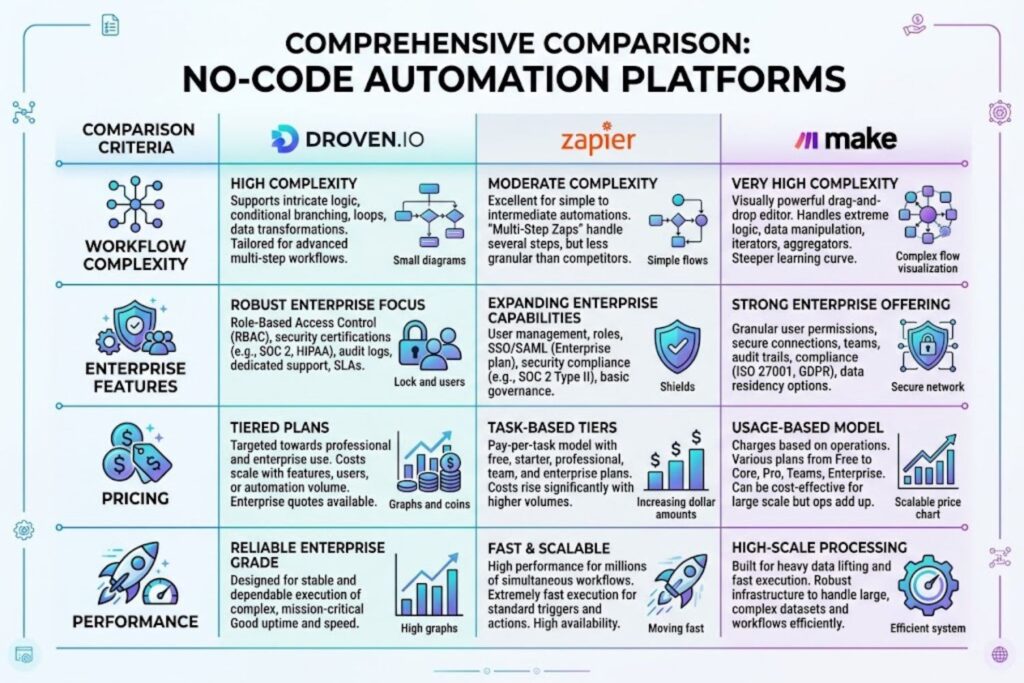
Choosing an automation platform isn’t one-size-fits-all. Here’s how Droven.io stacks up against competitors.
Droven.io vs. Zapier
Zapier is the market leader for small businesses and simple integrations. It excels at basic workflows: “When X happens in app A, do Y in app B.”
| Factor | Droven.io | Zapier |
|---|---|---|
| Complexity | Multi-step, branching workflows | Simple linear workflows |
| Learning Curve | Moderate (more powerful, more to learn) | Very low (intuitive) |
| Pricing | Usage-based or subscription tiers | Monthly plans, per-Zap pricing |
| Enterprise Features | Yes (compliance, audit trails, SSO) | Limited to basic features |
| Custom Logic | Built-in AI and code execution | Code/Webhook only |
| Integration Depth | Deep API connections, custom sources | 7,000+ pre-built integrations |
Best For: Choose Droven.io if you need complex workflows, enterprise security, or deep integrations. Choose Zapier if you’re automating simple, linear processes and want minimal setup time.
Droven.io vs. Make (formerly Integromat)
Make bridges the gap between Zapier and RPA, offering more complexity than Zapier but easier setup than Droven.io.
| Factor | Droven.io | Make |
|---|---|---|
| Workflow Complexity | Enterprise-grade (unlimited steps) | Moderate (many steps, but slower) |
| Visual Builder | Advanced interface | Intermediate interface |
| AI Capabilities | Built-in ML models | Limited (requires custom coding) |
| Pricing Transparency | Clear per-workflow or subscription | Complex operations-based pricing |
| Performance | High throughput (thousands/min) | Medium throughput (hundreds/min) |
| Support | Enterprise support tiers available | Community + support plans |
Best For: Choose Droven.io if you’re automating mission-critical processes at scale. Choose Make if you need moderate complexity without enterprise overhead.
Droven.io vs. Native RPA Solutions (UiPath, Automation Anywhere)
RPA (Robotic Process Automation) tools automate by controlling applications at the UI level—like having a robot click through screens. They’re powerful but complex to build and maintain.
| Factor | Droven.io | RPA (UiPath/AA) |
|---|---|---|
| Build Time | Days to weeks | Weeks to months |
| Implementation Cost | Lower (less training needed) | Higher (specialized developers) |
| Maintenance | Lower (less code, easier updates) | Higher (UI changes break bots) |
| Scalability | Easy (cloud-native) | Requires infrastructure planning |
| Technical Skill Required | Moderate (business analysts can build) | High (developers needed) |
| **Cost | $$$ | $$$$ |
Best For: Choose Droven.io for faster deployment and lower costs. Choose RPA if you’re automating legacy systems that lack APIs or require physical UI interaction.
When Droven.io Is the Right Choice
Droven.io is the right choice when:
- Complexity is moderate-to-high — Your process involves 5+ steps, conditional logic, and data transformation
- You need speed — Implementation should take weeks, not months
- Enterprise requirements matter — You need compliance, security, audit trails, and SSO
- You’re integrating modern systems — Your stack includes APIs, SaaS, and cloud infrastructure
- You want flexibility — You need to adjust workflows quickly as business needs evolve
- Scale matters — You’re processing thousands of transactions daily
If your needs are simple (Zapier), deeply legacy (RPA), or specialized (vertical-specific tools), alternatives may be better.
Implementation Strategy: Getting Started With Droven.io
Assessment Phase: Is Droven.io Right for You?
Before investing, evaluate your readiness:
Does your team have the right skills?
- Business Analyst: Can translate business requirements into workflows
- Integration Engineer: Understands APIs and data architecture
- Operations Lead: Can identify automation priorities
If you lack these roles, plan for training or hiring.
Are your processes well-defined? Automating a chaotic process just automates the chaos faster. Before implementing Droven.io, document your current workflows. Where are bottlenecks? What requires manual intervention? Where do errors occur?
Do you have stakeholder buy-in? Automation changes jobs. Get support from department heads and frontline staff who’ll use these tools. Their input makes workflows better, and their ownership increases adoption.
What’s your budget? Factor in licensing, integration costs, training, and ongoing management. A $5K automation might save $100K annually—strong ROI. A $100K implementation that saves $20K annually is harder to justify.
Onboarding & Initial Setup
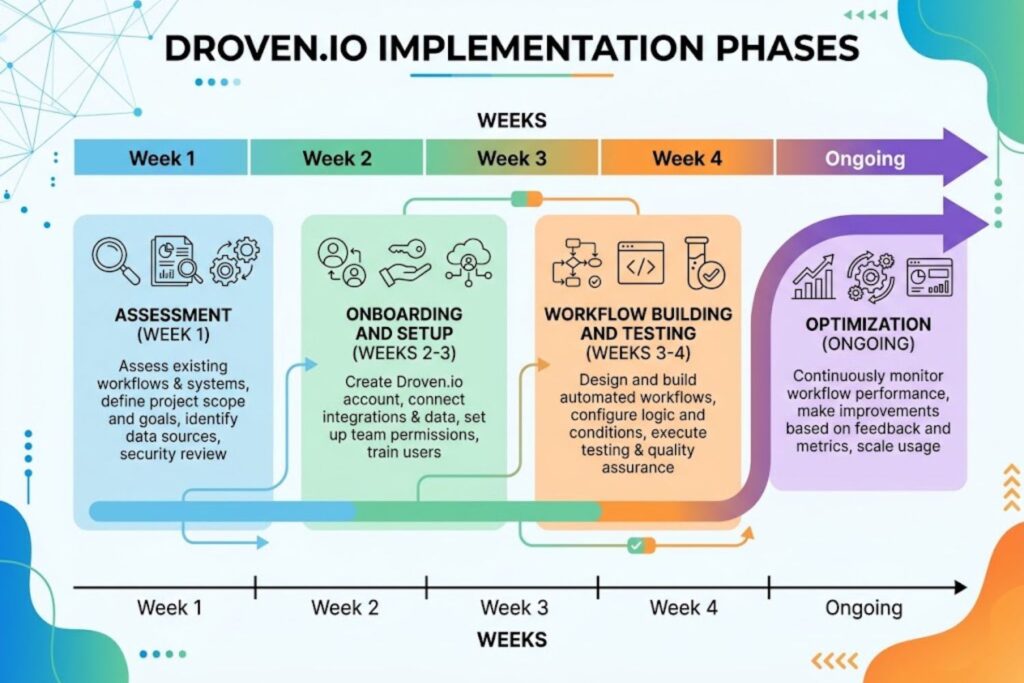
Once you’ve decided to proceed:
- Establish governance — Who approves new workflows? What’s the change management process?
- Set up environments — Most teams need development, staging, and production environments
- Configure integrations — Connect your core systems (CRM, ERP, databases)
- Train your team — Invest in formal training, not just documentation
- Plan security — Ensure SSO, audit logging, and access controls align with your security standards
Building Your First Automation Workflow
Start simple. Pick a high-impact process that’s easy to automate—something with clear ROI and few dependencies.
Example: Automating sales lead routing might be your first workflow:
- Trigger: New lead submitted through website form
- Condition: Check company size and product interest
- Action: Route to appropriate sales team
- Notification: Email sales rep and create CRM task
This workflow has clear business value (faster response), easy measurement (% of leads routed automatically), and few moving parts. Success here builds momentum for more complex automations.
Testing & Optimization
Before going live:
Test thoroughly — Run the workflow against real data in your staging environment. Identify edge cases and fix issues.
Measure baseline — Before automation, measure how long the current process takes and how often it fails. This is your benchmark.
Run parallel testing — Run the automation alongside the manual process for a period. Compare results. If confidence is high, switch over. If issues emerge, debug before full launch.
Plan monitoring — Set up dashboards to track success rates, cycle time, and costs. Monitor for anomalies.
Scaling Across Your Organization
Success with one workflow creates opportunities. To scale:
- Identify your next automation — Prioritize by impact and ease
- Reuse components — Build libraries of reusable workflow pieces (approval flows, data transformations)
- Create centers of excellence — Dedicate a team to manage automation centrally, ensuring quality and consistency
- Continuously optimize — Use performance data to identify bottlenecks and improvements
Organizations mature in automation journey typically follow this curve: first workflow is slow, second speeds up, third and beyond become rapid due to process knowledge and reusable components.
Pricing Models and ROI Expectations
Droven.io Pricing Structure
Droven.io typically uses one of two models:
Subscription-Based Pricing:
- Monthly fee based on the number of active workflows or execution volume
- Scales with your use (more workflows = higher cost)
- Predictable budgeting
Consumption-Based Pricing:
- Pay per workflow execution or API call
- Only pay for what you use
- Variable costs based on volume
Most enterprises negotiate custom pricing based on annual commitments and volume forecasts. Request a demo to discuss your specific needs.
Total Cost of Ownership Analysis
Direct costs are only part of the picture. True TCO includes:
| Cost Category | Typical Range |
|---|---|
| Licensing (annual) | $20K – $200K+ |
| Implementation & Integration | $10K – $100K+ |
| Training & Change Management | $5K – $30K |
| Internal Resources (FTE) | 0.5 – 2 FTE annually |
| Maintenance & Optimization | 10-20% of annual licensing |
ROI Timeline: When Do You See Returns?
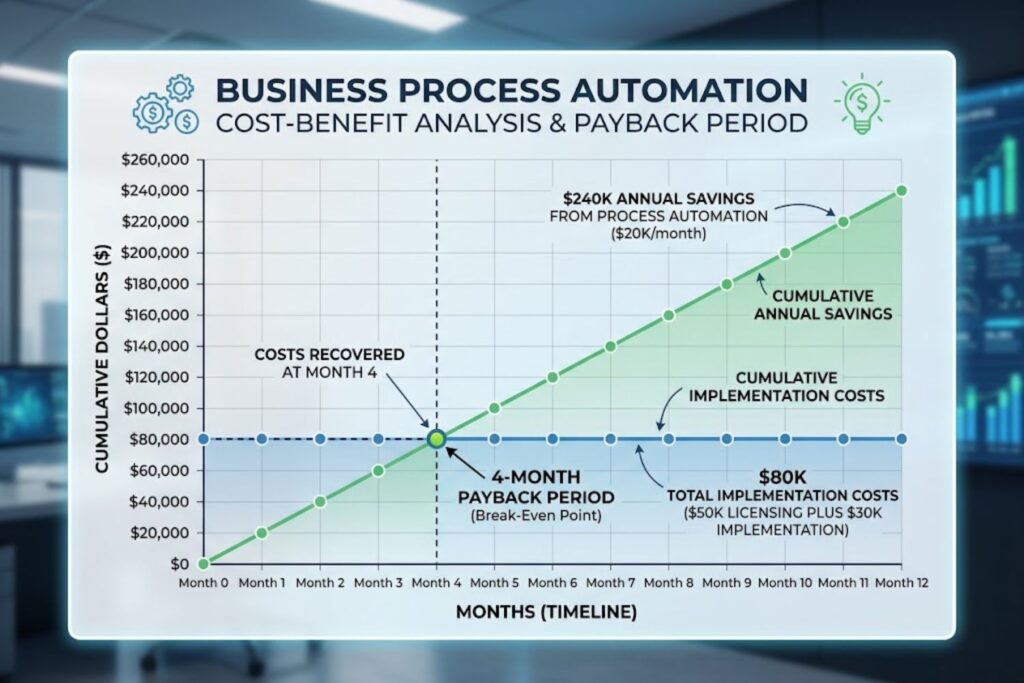
Conservative Estimate (6-12 month payback):
- One FTE eliminated = ~$80K annual savings
- One automation eliminates 8 hours/week
- Cost: $50K licensing + $30K implementation
- Breakeven: ~4 months
Realistic Estimate (3-6 automations per year):
- Year 1: 3 FTE equivalent eliminated ($240K savings) vs. $150K cost = $90K net benefit
- Year 2+: Continuing savings with lower incremental costs
The key is that automation ROI often comes from efficiency gains (faster turnaround, fewer errors) rather than headcount elimination. A process that took 3 days might take 4 hours—freeing staff for higher-value work.
Hidden Costs and Budget Considerations
Be realistic about costs often underestimated:
Change Management — People resist change. Budget for communication, training, and the adjustment period where productivity dips before it rises.
Integration Complexity — Your ideal systems integration might be harder than expected. APIs change. Legacy systems have quirks.
Ongoing Optimization — You’ll continuously tweak workflows based on performance data and changing business needs.
Talent — Finding skilled automation engineers is harder than finding general developers. You might need to compete on salary or invest in developing internal talent.
Common Mistakes When Using Droven.io
Building Overly Complex Workflows
Temptation: Build one massive workflow handling every possible edge case.
Reality: Complex workflows are hard to test, maintain, and debug. If something breaks, troubleshooting a 100-step workflow takes hours.
Better Approach: Break complex processes into smaller, reusable workflows. Connect them through APIs or shared data layers. Simpler workflows = easier maintenance.
Failing to Plan Data Architecture
Automation moves data between systems constantly. If your data architecture is chaotic (inconsistent field names, missing validation, poor integration points), automation magnifies the problems.
Better Approach: Before building automations, spend time mapping your data. Standardize naming conventions, ensure validation at the source, and create clean API contracts between systems.
Neglecting Monitoring and Optimization
A workflow that works on day one might fail silently six months later when data patterns change or an integration updates.
Better Approach: Set up continuous monitoring. Track success rates, cycle times, and failure types. Create alerting for anomalies. Schedule quarterly optimization reviews.
Insufficient Training and Change Management
The best automation means nothing if your team doesn’t use it or doesn’t trust it.
Better Approach: Invest in training. Show frontline staff the business case. Gather their feedback. Involve them in building workflows that affect their work. Create documentation and ongoing support.
Security, Compliance, and Data Protection

Enterprise Security Features
Droven.io includes:
- Encryption in transit and at rest — Data is protected whether moving between systems or stored
- API authentication — OAuth, API keys, and token management for secure connections
- Access controls — Role-based access limits who can view/edit workflows
- Audit logging — Every action is logged with timestamps and user information
- VPN/Private connectivity options — Connect to on-premise systems securely
Compliance Certifications
Verify that Droven.io meets your compliance requirements:
- SOC 2 Type II — Demonstrates security and availability controls
- ISO 27001 — Information security management
- GDPR — For EU data subjects
- HIPAA — For healthcare data (if applicable)
- PCI DSS — For payment card data (if processing payments)
Data Privacy and Protection Measures
Data Retention: Workflows can manage how long data is retained and automate deletion Data Residency: Confirm whether data is stored in your region/country Third-party Access: Understand what partners have access to your data Encryption Standards: Verify encryption algorithms meet your security standards
Audit Trails and Accountability
Every workflow execution creates an audit trail:
- Who triggered the workflow
- What data was processed
- What actions were taken
- When each step completed
- Any errors or exceptions
This is critical for regulated industries and for troubleshooting when something goes wrong.
Expert Tips for Maximizing Droven.io ROI
Start Small, Scale Strategically
Pick one automation with clear ROI. Prove the concept. Use that success to build organizational support and momentum for additional automations.
Prioritize High-Impact, Repeatable Processes
Not all processes are worth automating. Focus on:
- High volume (happening hundreds/thousands of times)
- Repetitive (same steps every time)
- Rule-based (decision logic is clear)
- Error-prone (manual process creates mistakes)
Automating a process that happens once a year isn’t cost-effective. Automating a process that’s deeply chaotic and ill-defined will fail.
Invest in Training and Skill Development
The difference between a $50K automation and a $500K integration failure often comes down to team skills. Invest in training your people. Create centers of excellence. Build knowledge repositories.
Leverage Analytics to Drive Continuous Improvement
Your workflows produce data about how your business actually operates:
- Which processes have the most failures?
- Where do bottlenecks occur?
- What edge cases keep causing problems?
Use this insight to improve not just automation, but your underlying business processes.
Frequently Asked Questions
Q: How long does it take to implement Droven.io?
A: Simple automations (5-10 steps) can be built and deployed in days. Complex implementations involving 10+ system integrations and sophisticated logic typically take 2-4 weeks. Enterprise-scale implementations with change management and organizational rollout might take 2-3 months.
Q: Can Droven.io integrate with legacy systems?
A: Yes, if they have APIs or database connections. Droven.io can also integrate with systems that only support SFTP or EDI through custom connectors. The more modern your technology stack, the easier integration becomes.
Q: What happens if Droven.io goes down?
A: Droven.io maintains 99.9% uptime SLAs with disaster recovery. For critical workflows, you might implement fallback procedures (manual processing, alternate automation). Discuss specific requirements during implementation.
Q: Can I build Droven.io workflows without coding?
A: Yes. The visual workflow builder is designed for business analysts. However, some advanced use cases benefit from custom code. You can typically avoid deep coding.
Q: How much training do my team members need?
A: Droven.io has moderate learning curve. Business analysts typically need 1-2 weeks of training to build intermediate workflows. Your team’s technical background matters—developers often pick it up faster than non-technical staff.
Q: What’s the difference between Droven.io automation and traditional RPA?
A: RPA controls applications at the UI level (like a robot clicking buttons). Droven.io works at the API/data level, making it faster, more reliable, and easier to maintain. Use RPA for legacy systems without APIs; use Droven.io for modern systems.
Q: Can Droven.io handle my high-volume processes (100K+ transactions/day)?
A: Yes. Droven.io is built for scale. Performance depends on workflow complexity and system integration, but the platform handles enterprise volumes effectively.
Q: How do I handle errors in my Droven.io workflows?
A: Droven.io provides error handling mechanisms: retry logic, dead letter queues, escalation to humans. Build workflows assuming failures will occur and design graceful handling.
Q: Can multiple teams use Droven.io, or is it single-team?
A: Multi-team deployments are standard. Use role-based access controls to restrict visibility and editing. Different teams can have their own workflows while sharing integrations and data sources.
Q: What’s the learning curve for non-technical staff?
A: Moderate. A motivated business analyst can build simple-to-intermediate workflows in 2-3 weeks with good training. Complex workflows benefit from technical input.
Q: How do I measure ROI from my Droven.io implementation?
A: Track before/after metrics: process cycle time, error rates, manual effort (hours), cost per execution, and business outcomes (revenue, customer satisfaction). Most organizations see measurable ROI within 3-6 months.
Q: Can I use Droven.io for real-time data sync across systems?
A: Yes. Webhooks and API-based triggers enable near-real-time synchronization. True real-time (sub-second) depends on system capabilities, but most workflows achieve subsecond to few-second sync times.
Q: What’s the difference between Droven.io and build-it-yourself with APIs?
A: Building APIs yourself requires development resources, more time, and ongoing maintenance. Droven.io provides pre-built connectors, visual interface, monitoring, and support—allowing you to deploy 10x faster.
Q: Can Droven.io help us with data migration projects?
A: Yes. Droven.io can be used as an ETL tool to extract data, transform it according to rules, and load into new systems. Many migrations combine Droven.io with purpose-built migration tools.
Q: How does Droven.io handle evolving integrations?
A: If a connected system updates its API, Droven.io typically handles backward compatibility. Notify your integration team of planned updates, and test changes in staging before production.