
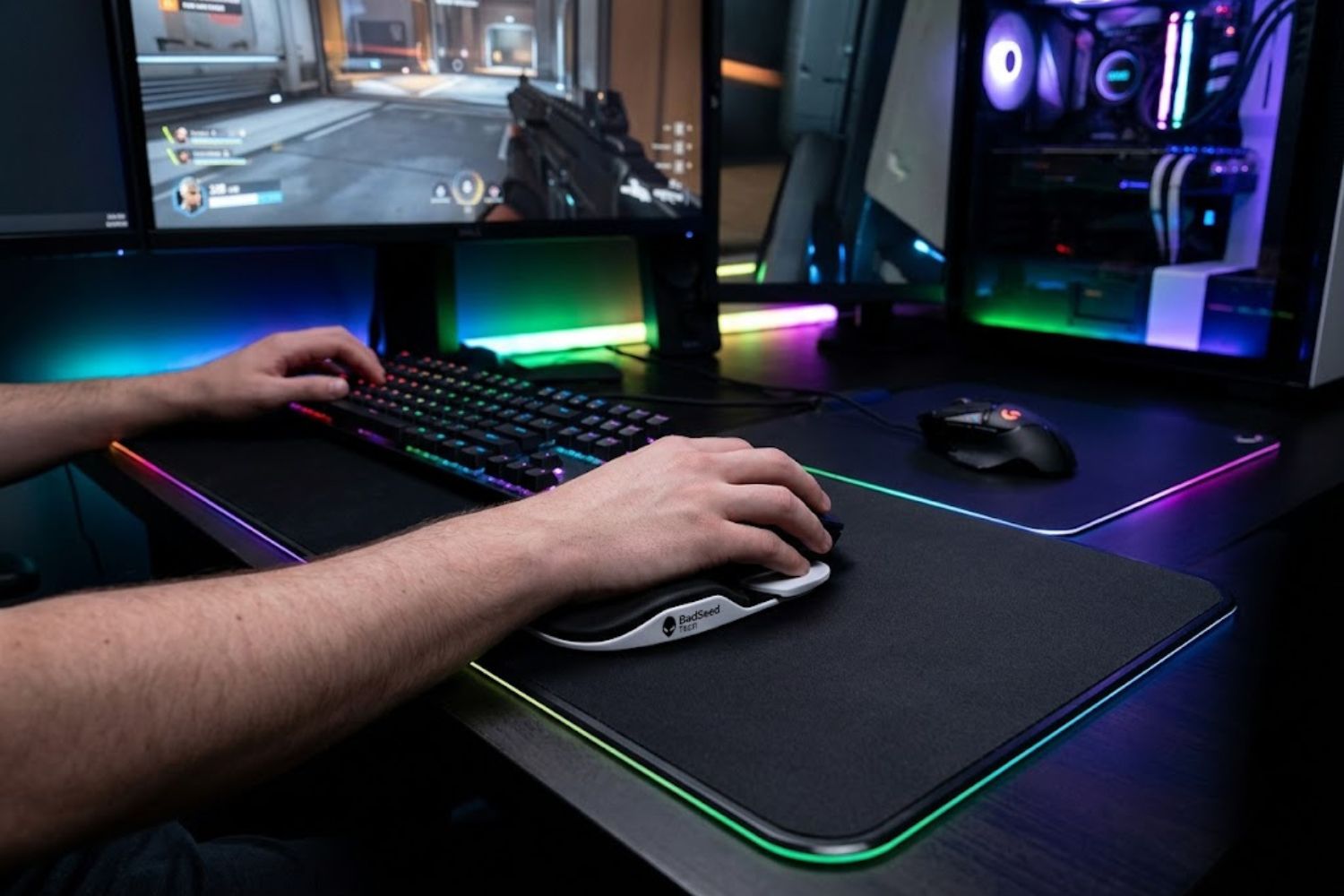
If you’ve ever finished a long gaming session or intense work day and felt your wrist throb, you’re not alone. Millions of people spend 8+ hours daily gripping a mouse while their wrist stays locked against a static pad. The result? Strain, ache, and in severe cases, long-term injury.
The BadSeed Tech Carpio approaches wrist support differently.
Instead of pinning your wrist in one spot, this gliding wrist rest moves with your hand. That single design choice addresses a fundamental problem with traditional wrist rests: they force your wrist to adapt to the pad, rather than letting your hand move naturally.
But does it actually work? And is the BadSeed Tech Edition worth the investment?
We’ll dive deep into the ergonomic science, real-world performance, and whether this $35–40 wrist rest deserves a place on your desk.
What Is the BadSeed Tech Carpio?
The BadSeed Tech Carpio is a limited-edition colorway of DeltaHub’s Carpio 2.0, an ergonomic wrist rest built through a collaboration with the BadSeed Tech YouTube channel. BadSeed Tech is known for PC hardware reviews and builds, so this partnership reflected their audience: gamers, content creators, and tech enthusiasts who spend serious time at the desk.
Here’s what sets it apart from a typical office wrist rest:
It glides across your desk mat. The entire unit slides with your hand as you move your mouse, instead of staying fixed in one position. Your wrist tracks naturally, maintaining a neutral angle throughout your gaming session or workday.
It uses engineered materials. PTFE gliders (Teflon) sit on the underside, creating a smooth, low-friction surface. The top features silicone pads that grip your palm. The base is durable ABS plastic.
It came from two years of medical collaboration. DeltaHub worked with physicians specializing in occupational medicine and carpal tunnel surgery, tested 3D hand scans and MRI comparisons, and refined prototypes based on feedback from over 20,000 users.
The BadSeed Tech Edition adds style for darker setups. It’s black with BadSeed Tech branding, designed to complement gaming rigs and minimalist dark desks. Functionally, it’s identical to the standard Carpio 2.0—the collaboration changes appearance and included pads, not the core ergonomic mechanism.
The Difference Between Gliding and Static Wrist Rests
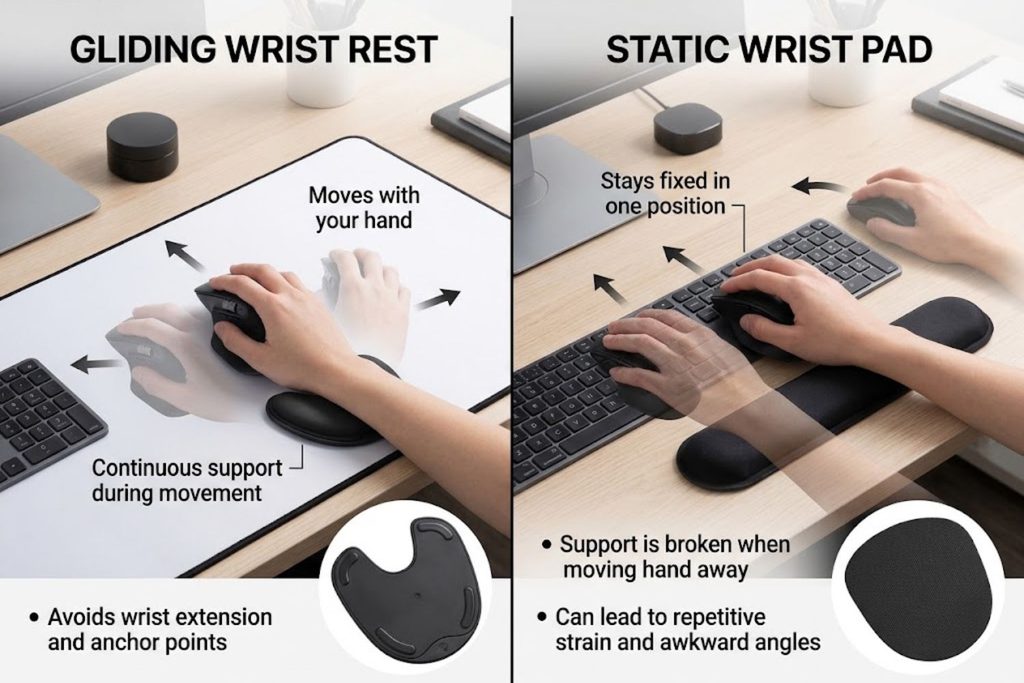
Most wrist rests fall into one category: static. You rest your wrist or lower palm on the pad, and the pad never moves. Your hand does all the adjusting, bending, and twisting around it. This works fine for 30-minute sessions, but after hours, your wrist fatigues.
The Carpio inverts this logic.
Your palm sits on the Carpio’s silicone top, but the unit itself isn’t anchored. As you move your mouse, the gliders allow the entire pad to slide across your desk mat with your hand. Your wrist maintains closer to its neutral, “at-rest” position instead of constantly bending around a fixed object.
Think of it like the difference between walking in tight shoes (static) versus shoes that flex and move with your foot (gliding). Neither is bad, but one reduces strain over time.
Creator Collaboration vs. Standard Carpio 2.0
DeltaHub has released multiple creator collaborations: BadSeed Tech, Linus Tech Tips, Cozy K (creator-focused), and Liv Limited Edition. Each has its own color scheme and branding but uses the identical Carpio 2.0 ergonomic core.
If you already want a Carpio 2.0, choosing the BadSeed Tech Edition makes sense if:
- You prefer dark-toned desk aesthetics
- You follow BadSeed Tech content and want to support the creator
- You like limited editions and exclusive designs
If you’re purely focused on ergonomics and don’t care about aesthetics, the standard black or white Carpio 2.0 will serve you identically at a similar price point.
How the Gliding Mechanism Actually Works
Understanding the engineering behind the Carpio explains why it performs differently than static rests.
PTFE Gliders Explained
PTFE (polytetrafluoroethylene), commonly known as Teflon, is the same low-friction material used in high-end mouse skates and sliding mechanisms. DeltaHub engineered PTFE gliders into the Carpio’s underside, creating a smooth interface between the wrist rest and your desk mat.
The key: gliding requires a very low-friction coefficient. Too much friction, and the pad sticks, defeating the purpose. PTFE is one of the most slippery materials available, which is why it works here.
When you move your hand across your mouse pad, the Carpio glides along, following your hand’s natural movement. There’s minimal resistance, so you’re not fighting the pad—it’s working with you.
Why Movement Matters for Wrist Health
Your wrist is a complex joint with multiple bones, tendons, and nerves. When stationary, your wrist rests in its neutral position—roughly straight, with minimal bending or twisting. This is the position that requires the least muscular effort and puts the least stress on the carpal tunnel (the narrow tunnel in your wrist where your median nerve passes).
Static wrist rests keep your wrist anchored in one spot. If your desk height isn’t perfect, or if your mouse placement isn’t ideal, your wrist stays “bent” around the pad. After hours, this isometric tension accumulates.
A gliding wrist rest allows your wrist to maintain closer to neutral throughout the day. As your hand naturally moves to reach different parts of your mouse pad, the pad moves with it. Your wrist doesn’t have to work as hard to adapt.
This is particularly important for people with existing wrist issues or those at high risk for carpal tunnel syndrome.
The Science Behind Neutral Wrist Position
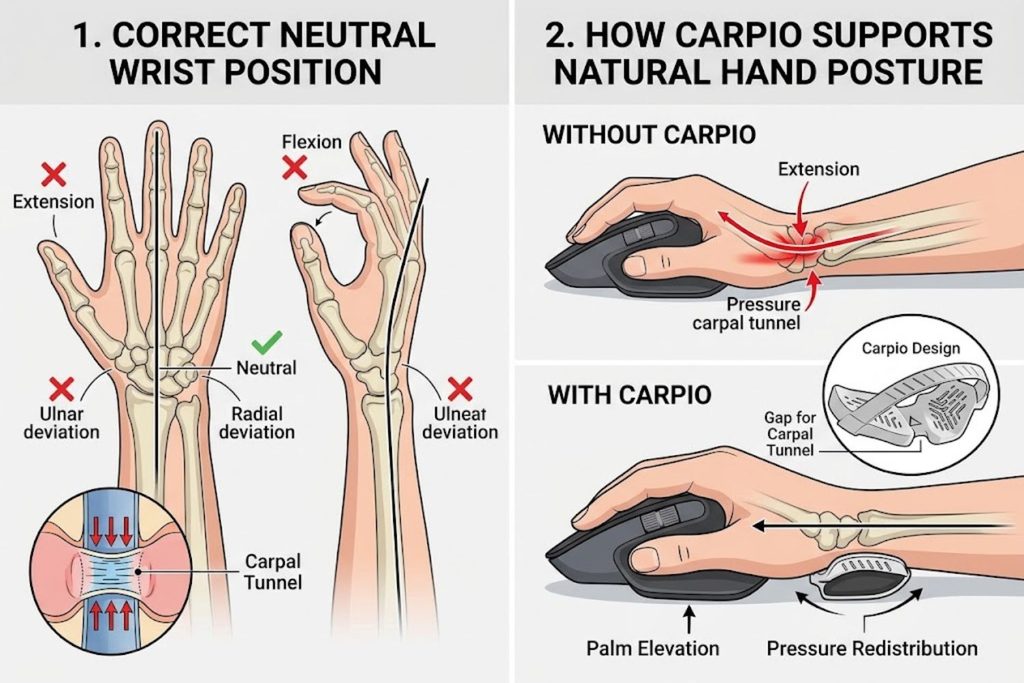
Medical literature on ergonomics emphasizes that neutral wrist position—roughly straight, without radial or ulnar deviation—minimizes strain on the median nerve and reduces carpal tunnel compression.
DeltaHub consulted with Dr. Marko Mikša, a specialist in Plastic and Reconstructive Surgery with extensive carpal tunnel expertise, and other occupational medicine physicians. The Carpio 2.0’s design was built to support this neutral position through movement rather than static support.
That doesn’t mean the Carpio is a medical device or a cure for carpal tunnel—it’s designed to reduce the conditions that contribute to wrist strain over time.
Who Benefits Most From a Gliding Wrist Rest
The Carpio isn’t universally necessary, but it solves a real problem for specific use cases.
Gamers and Extended Gaming Sessions
Gaming is where gliding wrist rests shine. Competitive gaming requires rapid, precise mouse movements for 6+ hours straight. Your wrist is always in motion, always bending and repositioning. Static pads become uncomfortable fast—they either slide across the desk (defeating their purpose) or stay fixed while your wrist works overtime to move around them.
Gamers report that a gliding wrist rest like the Carpio removes the friction between wrist position and mouse movement. You’re less conscious of your wrist, which means you can focus on gameplay instead of discomfort.
The BadSeed Tech Edition’s dark coloring also fits gaming aesthetics, appealing to the audience that typically upgrades their desk setup.
Content Creators and Video Editors
Video editors, 3D artists, and graphic designers spend entire days using their mouse with precision. Unlike gaming, the mouse movements are often slower but still constant. Hours of subtle adjustments without moving your wrist off the pad lead to sustained tension.
Creators also benefit because gliding pads allow quick repositioning. If you need to reach different areas of your dual-monitor setup, the pad moves with you instead of requiring you to lift your hand and replant it elsewhere.
Office Workers and Remote Employees
Remote workers often have less-than-ideal desk setups. Home office desks are frequently too high or too low. Even with ergonomic adjustments, 8 hours of static mouse use accumulates strain.
Gliding wrist rests appeal to remote workers and office employees because they reduce the dependency on perfect desk geometry. Even if your desk height isn’t ideal, the moving pad allows your wrist to find a more natural position throughout the day.
Anyone With Carpal Tunnel Concerns
If you have existing wrist pain, diagnosed carpal tunnel, or a family history of it, static pads may aggravate symptoms. The constant angle constraint creates persistent tension that worsens symptoms over time.
A gliding pad isn’t a treatment, but it can reduce the mechanical stress that contributes to pain. People with wrist issues often report that gliding rests are more comfortable than static alternatives.
BadSeed Tech Edition vs. Other Carpio Colorways
DeltaHub has released several Carpio collaborations. Understanding the differences helps you choose the right one.
What Makes the BadSeed Tech Edition Unique
The BadSeed Tech Carpio features:
- Dark black colorway optimized for dark, RGB-heavy gaming setups
- BadSeed Tech branding and exclusive pads
- Limited-run availability (creator collaborations are typically not permanent)
- Performance branding emphasis—marketed toward gamers wanting sharper aesthetics
It’s designed for creators and gamers who prefer minimal, performance-focused desk aesthetics.
Comparison: BadSeed Tech, Linus Tech Tips, Standard Carpio 2.0
| Feature | BadSeed Tech | Linus Tech Tips | Standard Carpio 2.0 |
|---|---|---|---|
| Color | Black (dark) | Gray/tech-forward | Black, white, grey options |
| Creator | BadSeed Tech | Linus Tech Tips | DeltaHub (no collaboration) |
| Price | $34.90–39.90 | Similar | $34.90+ |
| Availability | Limited edition | Limited edition | Always in stock |
| Design Philosophy | Gaming-focused | Tech professional | Neutral ergonomic |
| Ergonomic Function | Identical gliding mechanism | Identical gliding mechanism | Identical gliding mechanism |
The honest take: All three Carpio 2.0 editions use the same ergonomic gliding mechanism. You’re paying for aesthetics and brand alignment, not different ergonomic performance.
Should You Pay Premium for Limited Editions?
Limited editions typically cost $5–10 more than standard Carpio 2.0 models. That premium buys you:
- Exclusive colorway and branding
- Collector’s appeal if you follow the creator
- Aesthetic alignment with your desk setup
If you don’t care about aesthetics or creator affiliation, a standard Carpio 2.0 saves you money while delivering identical ergonomic benefits.
If you’re an existing BadSeed Tech fan or your desk aesthetics matter to your content (streams, YouTube videos, social media), the BadSeed Edition makes sense.
Build Quality, Materials, and Durability
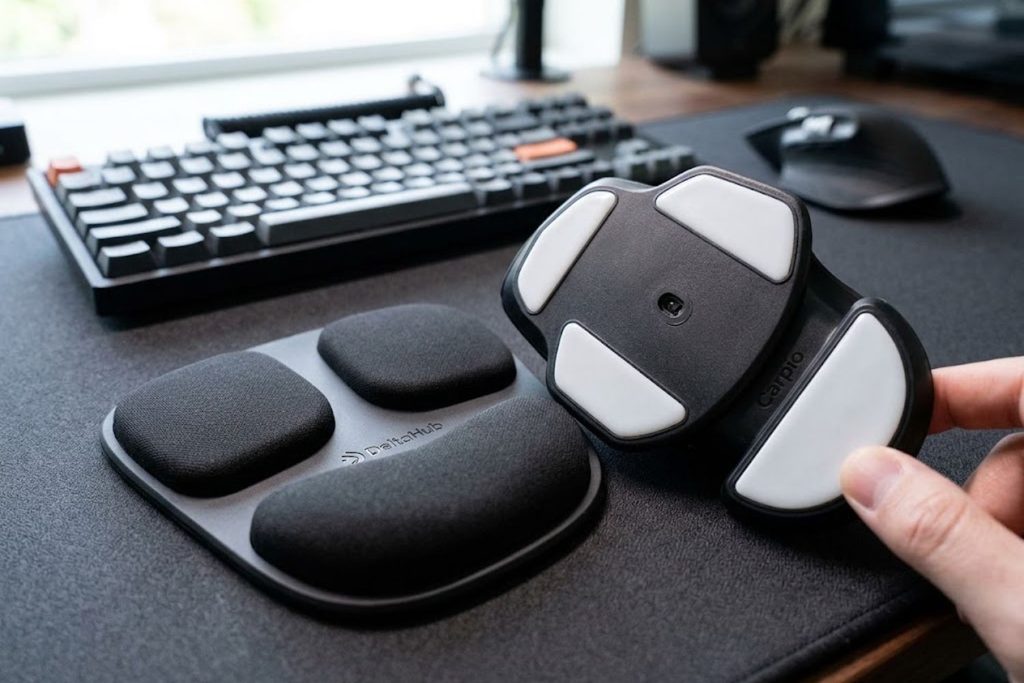
The Carpio uses premium materials designed for long-term use.
PTFE Gliders and Long-Term Performance
PTFE gliders are engineered to handle thousands of hours of sliding friction with minimal degradation. Unlike foam pads that compress and degrade, PTFE maintains its low-friction properties for years.
Real-world users report that Carpio gliders remain smooth after 2+ years of daily use. The gliding doesn’t slow down or become sticky—it performs identically whether you’ve owned it for a month or two years.
This durability justifies the higher price point compared to budget foam pads.
ABS Base and Silicone Pads
The Carpio’s base is durable ABS plastic—the same material used in protective cases and automotive components. It’s impact-resistant and doesn’t warp or degrade under normal use.
The top surface features silicone pads that grip your palm without being sticky. This provides the tactile feedback your hand expects while preventing the pad from sliding out from under your palm mid-use.
How Long Do Replaceable Pads Last?
One of the Carpio’s advantages is that you can replace the silicone pads independently of the gliding base. DeltaHub sells replacement pads separately.
Most users report that pads last 12–24 months before showing noticeable wear, depending on daily usage and humidity (moisture softens silicone faster). Since replacements cost $10–15, you’re extending the Carpio’s lifespan affordably.
Maintenance and Care Tips
To maximize durability:
Keep it dry. Moisture degrades silicone and can affect gliding smoothness. Avoid using your Carpio near drinks or in humid environments.
Clean gliders occasionally. Dust and debris under the PTFE gliders reduce smoothness. Flip it over and wipe the undersides with a soft cloth every few months.
Replace pads proactively. Don’t wait until they’re completely worn—replace them when you notice reduced grip, as worn pads can cause your hand to slide during use.
Store properly. If you’re not using it, store it in a cool, dry place. Extreme heat or moisture affects material longevity.
Real-World Performance: Gaming vs. Work
Performance in actual use differs slightly between gaming and work scenarios.
Performance in Gaming Sessions
Gamers note that the gliding mechanism reduces the cognitive load of wrist positioning. Instead of consciously maintaining your wrist on a static pad while reaching for different areas of your mouse mat, the pad follows your hand naturally.
This is particularly noticeable in competitive gaming where millisecond precision matters. Eliminating the wrist-positioning friction translates to faster, more intuitive mouse movements.
Duration matters: gaming sessions of 2–3 hours show minimal difference between gliding and static pads. Sessions exceeding 4 hours show significant difference, with gliding pads reducing wrist fatigue noticeably.
Effectiveness During Long Workdays
Office work involves more subtle, precision mouse movements than gaming. The benefit here is sustained comfort—after 6–8 hours, your wrist feels less fatigued with a gliding pad than a static one.
Content creators (video editors, designers) report that gliding pads reduce hand cramping and allow longer work sessions before needing breaks.
The effectiveness increases with session length and desk setup imperfection. If you have perfect ergonomic alignment, the benefit is marginal. If your desk is less-than-ideal (which most home offices are), the improvement is noticeable.
Mouse Pad Compatibility
The Carpio works best on felt or soft neoprene desk mats (the same surfaces it’s tested on). These provide consistent gliding friction.
On hard surfaces (glass, polished wood) or textured surfaces (rough fabric), gliding is either too fast or irregular. Your mouse pad choice matters.
DeltaHub recommends pairing the Carpio with a standard gaming mouse pad for optimal results. This is an important consideration—the Carpio isn’t a standalone solution.
Common Concerns and Honest Answers
Real questions from potential buyers, answered straightforwardly.
Does It Actually Prevent Wrist Pain?
Honest answer: The Carpio reduces wrist strain, but it’s not a pain treatment. If you currently have carpal tunnel or wrist pain, a gliding pad might reduce your symptoms, but it won’t cure the condition.
Think of it like supportive shoes for runners—they reduce impact and strain, but they don’t heal a stress fracture. The Carpio removes a contributing factor (static wrist positioning) but doesn’t address underlying conditions.
If you have chronic wrist pain, consult a physician. If you want to prevent future issues or reduce strain during recovery, the Carpio helps.
Will It Work With My Desk Setup?
The Carpio requires:
- A desk mat or mousepad (works on felt, neoprene; questionable on hard surfaces)
- Adequate desk space (it needs to glide freely)
- A compatible mouse (any mouse works, but heavier mice glide more smoothly)
If your desk is cramped or you use a hard surface without a mat, the Carpio won’t perform optimally.
Price Justification: Is $35–40 Worth It?
This depends on your use case and budget:
Worth the investment if:
- You game or work 6+ hours daily
- You have existing wrist issues
- You’re committed to ergonomic optimization
- You spend time on camera (YouTube, Twitch) and aesthetics matter
Not necessary if:
- You use your mouse fewer than 4 hours daily
- You have no wrist discomfort
- You’re budget-constrained
- You already have an ergonomic setup that works
For reference, quality static wrist pads cost $15–30. The Carpio is a 2x premium for gliding technology. Whether that justifies the cost depends on your personal situation.
Sizing: Small vs. Large and Left vs. Right
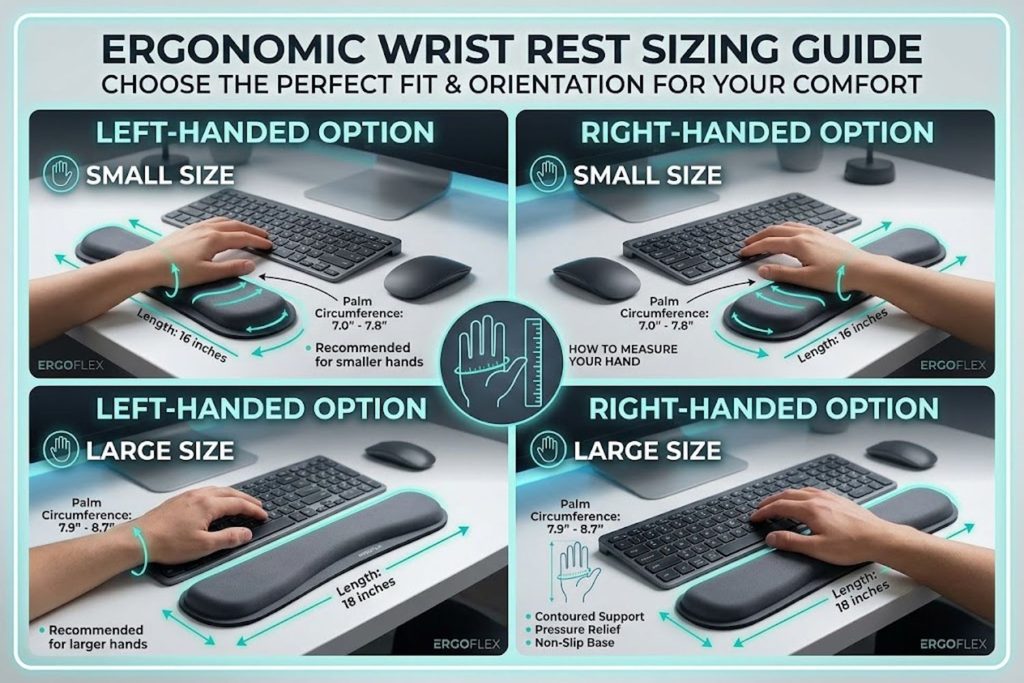
The Carpio comes in four configurations: small left, small right, large left, large right.
Size matters. Small fits hands roughly 7–8 inches, large fits 8+ inches. Sizing incorrectly reduces effectiveness—too small and it feels cramped, too large and your palm overhangs.
Handedness is critical. The Carpio is specifically designed for left or right hands (the pad is asymmetrical). Buying the wrong handedness defeats the ergonomic benefit.
Measure your hand before purchasing. DeltaHub provides sizing guidance on their site.
Gliding Wrist Rests vs. Static Alternatives
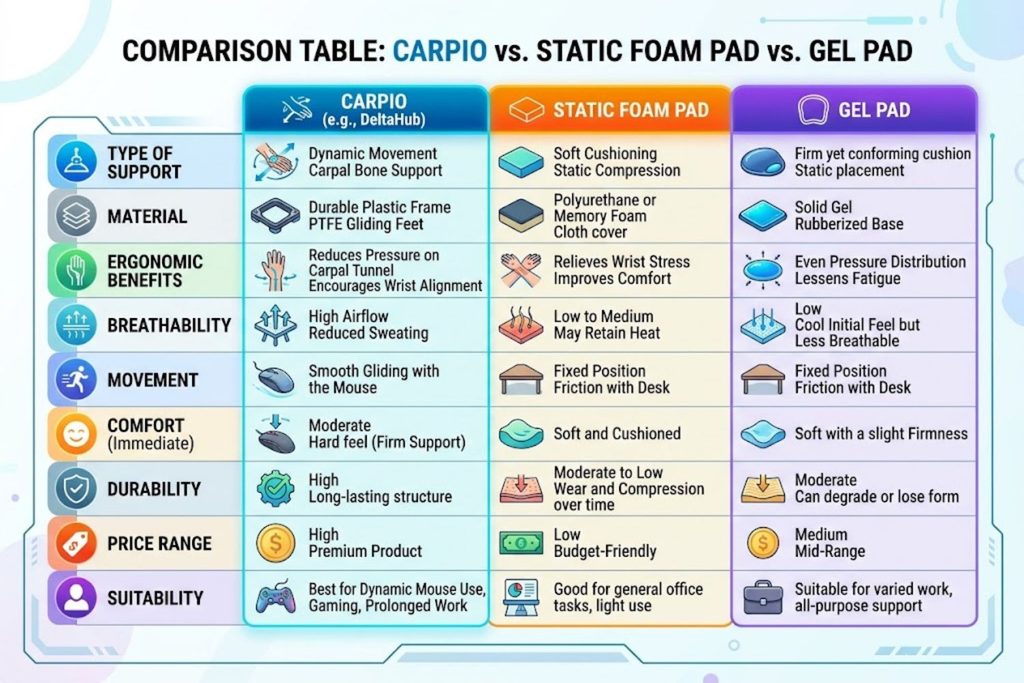
Understanding how the Carpio compares to other solutions helps you make an informed choice.
Static Foam Pads vs. Carpio
| Aspect | Static Foam | Carpio 2.0 |
|---|---|---|
| Cost | $10–20 | $35–40 |
| Comfort (initial) | High—soft and cushioned | Moderate—firm support |
| Comfort (long-term) | Decreases as pad compresses | Consistent over years |
| Wrist positioning | Fixed angle | Moves with hand |
| Durability | 6–12 months | 2+ years |
| Best for | Short sessions, budget-conscious | Long sessions, strain prevention |
Static foam pads are soft and comfortable immediately but degrade quickly. The Carpio has a steeper learning curve but maintains performance long-term.
Gel Pads vs. Gliding Technology
Gel pads offer temporary comfort through cushioning but don’t address the core problem: static positioning. They also tend to get sticky and compress over time, requiring replacement every 12–18 months.
Gliding technology addresses the root cause (static wrist position) rather than the symptom (pressure on the palm). This is why occupational medicine experts generally prefer gliding or ergonomic rests over passive cushioning.
When to Choose Each Option
Choose static foam if:
- Budget is your priority
- You use your mouse fewer than 3 hours daily
- You want immediate soft comfort
Choose gliding if:
- You use your mouse 6+ hours daily
- You want long-term durability
- You have existing wrist concerns
- You prioritize ergonomic science over immediate softness
Choose gel if:
- You want a middle ground between foam and gliding
- You prefer maximum immediate cushioning
- You don’t mind replacing every 12–18 months
Expert Tips for Maximum Comfort
If you’ve committed to the Carpio, optimize your setup for maximum benefit.
Optimal Desk Height and Mouse Placement
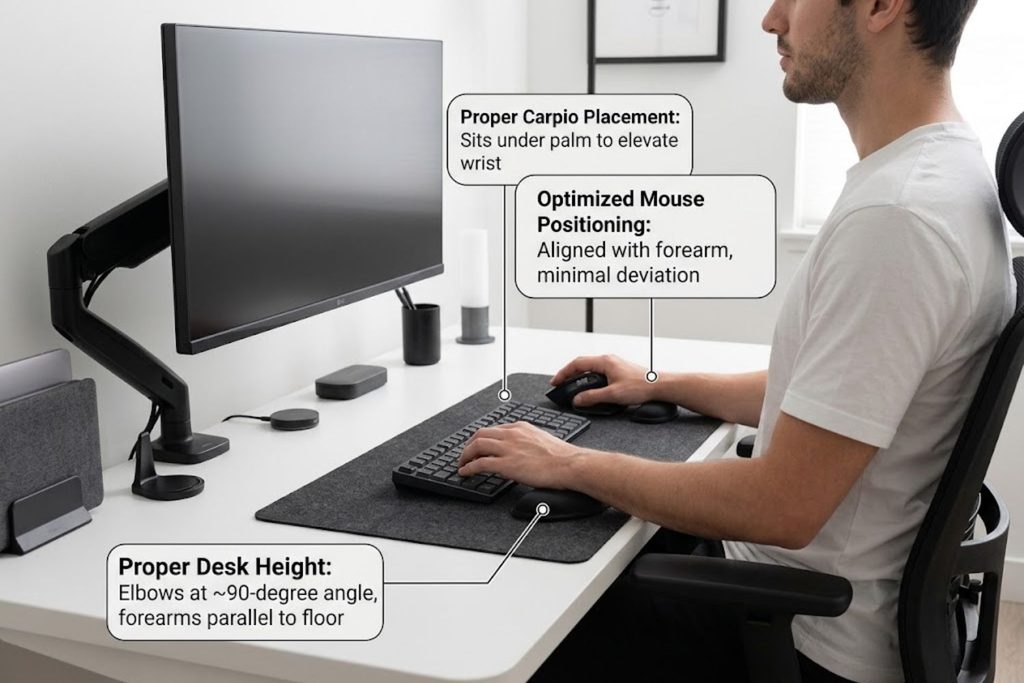
Your desk height matters. Your mouse should be at or slightly below elbow height when seated with your back straight. This minimizes wrist bending.
Place your mouse close to your body, not stretched away on the far edge of the desk. The Carpio glides with your hand, but it can’t fix poor mouse placement.
Combining With a Desk Mat Strategy
Pair your Carpio with a quality felt or neoprene desk mat. The mat provides the low-friction surface the Carpio’s gliders require. A cheap mat with rough texture will slow the gliding.
Consider mat size—a larger mat gives the Carpio more room to glide freely, improving ergonomic benefit. Cramped mats limit movement.
Breaking In Your Carpio Properly
The Carpio needs a brief adjustment period. The silicone pads start slightly sticky and smooth out after a few days of use. Your hand also needs to adjust to the gliding mechanism.
Don’t judge it after one day. Give it a week of normal use before deciding if it works for you.
Adjusting Your Grip and Hand Position
The Carpio works best when your palm sits roughly centered on the silicone top. Gripping toward the edges or sitting your wrist on it changes the ergonomic benefit.
Experiment with hand position during your first week. Find the placement that feels most natural.
Frequently Asked Questions
Q: Is the BadSeed Tech Edition better than standard Carpio 2.0?
A: No, they use identical gliding mechanisms. The BadSeed Edition offers different aesthetics and is a limited release. Choose it for looks or creator affiliation, not improved ergonomics.
Q: Will the Carpio work on a hard desk without a mat?
A: It won’t glide well. You need a felt or soft neoprene desk mat for the PTFE gliders to function smoothly.
Q: How long before I notice a difference?
A: Some people notice reduced wrist fatigue after 1–2 days. Others need a week to adjust. Longer sessions (6+ hours) show benefits faster than short sessions.
Q: Can I use the Carpio on a gaming mouse pad?
A: Yes, but not all gaming mats work equally. Thinner, tightly woven mats work best. Textured, high-friction mats slow the gliding.
Q: Does hand size really matter?
A: Yes. Incorrect sizing reduces comfort and ergonomic benefit. Measure before purchasing.
Q: What if I want to switch from left to right-handed?
A: You’ll need to purchase a new Carpio—they’re specifically engineered for hand dominance.
Q: How often should I replace the pads?
A: Most users report 12–24 months of use before noticeable wear. Replacement pads cost $10–15.
Q: Does it work for trackpad users or laptop work?
A: The Carpio is designed for external mice on desks. It’s not optimized for trackpad use or laptop work.
Q: Will it help if I already have carpal tunnel?
A: It may reduce strain and symptoms, but it’s not a treatment. Consult a physician about carpal tunnel management.
Q: Is there a break-in period?
A: Yes, typically 3–7 days. The silicone pads smooth out and your hand adapts to the gliding mechanism.
Q: Can I return it if it doesn’t work?
A: DeltaHub offers a return policy—check their site for specifics. Most retailers also allow returns within 30 days.
Final Verdict: Is the BadSeed Tech Carpio Right for You?
The BadSeed Tech Carpio isn’t a universal solution, but it excels in specific situations.
Buy it if:
- You spend 6+ hours daily using a mouse
- You experience wrist fatigue after work or gaming sessions
- You have existing wrist concerns or carpal tunnel risk
- You want a durable, long-term solution (2+ years lifespan)
- You prefer the dark aesthetic and brand affiliation
Skip it if:
- You use your mouse fewer than 4 hours daily with no discomfort
- Your budget is under $30
- Your desk doesn’t accommodate a mouse pad
- You prefer immediate softness over long-term ergonomic science
- You’re unsure about hand sizing and can’t measure properly
The Carpio represents a shift from reactive (treating wrist pain after it occurs) to proactive ergonomics (preventing wrist strain before it happens). That philosophy appeals to serious gamers, content creators, and remote workers—exactly the audience BadSeed Tech serves.
If you’re in that category and wrist health matters to you, the investment pays dividends. If you’re on the fence, the 30-day return policy lets you test it risk-free.
Start with one assumption: gliding wrist rests work differently than static pads. Whether that difference improves your experience depends entirely on your hands, desk setup, and usage patterns. The Carpio is well-engineered and durable, but no piece of hardware solves ergonomic issues created by poor desk design or excessive daily use.
Set it up properly, give yourself a week to adjust, and then decide. Most people who commit to the learning curve report they wouldn’t go back to static pads.
9. KEY TAKEAWAYS
- The BadSeed Tech Carpio is a gliding wrist rest, not a static pad—the entire unit moves with your hand to maintain neutral wrist position
- It uses PTFE gliders for low-friction movement and maintains smoothness for 2+ years
- The BadSeed Edition is functionally identical to other Carpio 2.0 colorways; you’re paying for dark aesthetics and brand collaboration
- Best suited for 6+ hour daily mouse use, especially gaming, content creation, or office work
- Requires a desk mat (felt or neoprene) to function optimally
- Price ($35–40) is justified by durability, but only if you use it enough to recoup the investment
- Medical professionals contributed to design, focusing on neutral wrist positioning, though it’s not a carpal tunnel treatment
- Sizing matters critically—measure your hand and choose correct left/right handedness
- Gliding takes 3–7 days to adjust to; don’t judge it after one day
- Real-world benefit increases with session length—marginal difference in 2-hour sessions, significant improvement in 6+ hour sessions
10. FREQUENTLY ASKED QUESTIONS (PAA-Optimized)
Q1: What is a gliding wrist rest, and how is it different from a static wrist rest?
A: A gliding wrist rest (like the Carpio) uses low-friction gliders to slide across your desk mat as your hand moves, maintaining neutral wrist position. Static wrist rests stay fixed in one spot while your wrist bends and twists around them. Gliding reduces accumulated strain over long sessions; static pads are cheaper but less ergonomic.
Q2: Is the BadSeed Tech Carpio worth the money compared to a $15 foam pad?
A: It depends on daily usage. If you use your mouse 6+ hours daily, the Carpio’s 2+ year lifespan and ergonomic benefits justify the cost. For light users or those with no wrist issues, a foam pad suffices. The Carpio is an investment in long-term wrist health, not immediate comfort.
Q3: Can the Carpio help with carpal tunnel syndrome?
A: The Carpio reduces wrist strain that contributes to carpal tunnel symptoms, but it’s not a treatment. It may ease pain during recovery, but consult a physician for actual carpal tunnel management. Think of it as prevention or pain reduction, not cure.
Q4: How do I know if I need small or large Carpio?
A: Measure your hand from wrist to fingertip. Small fits 7–8 inches; large fits 8+ inches. Incorrect sizing reduces comfort and ergonomic benefit. DeltaHub provides sizing charts on their site.
Q5: Does the Carpio work on hard desks without a mat?
A: No, gliding is minimal or inconsistent on hard surfaces. Use it on a felt or neoprene desk mat for optimal low-friction gliding. This is non-negotiable for proper function.
Q6: What’s the difference between the BadSeed Tech Edition and standard Carpio 2.0?
A: The BadSeed Edition features black coloring, BadSeed Tech branding, and exclusive pads. The underlying gliding mechanism is identical. Choose it for aesthetics and creator affiliation, not improved ergonomics.
Q7: How long do the silicone pads last before needing replacement?
A: Most users report 12–24 months before noticeable wear. Replacement pads cost $10–15, so you’re extending the Carpio’s lifespan affordably. Replace proactively when grip decreases.
Q8: Does the Carpio slow down your mouse movement or feel sluggish?
A: No, PTFE gliders are engineered for smoothness. Users report that gliding feels natural after a 3–7 day adjustment period. Any initial sluggishness is your hand adapting, not the pad being faulty.
Q9: Can I use the Carpio with any mouse?
A: Yes, any mouse works with the Carpio. Heavier mice glide more smoothly. Lighter mice might feel slightly less responsive, but this is minor. The mouse pad surface matters more than the mouse itself.
Q10: What happens if I buy the wrong size or left/right version?
A: Incorrect sizing reduces comfort and ergonomic benefit. Wrong handedness defeats the asymmetrical design purpose. DeltaHub accepts returns, but it’s better to measure before purchasing. Sizing mistakes are common; avoid them.
Q11: Is there a learning curve to using the Carpio?
A: Yes, 3–7 days is typical. Your hand needs to adapt to gliding mechanics, and the silicone pads smooth out with use. Don’t judge it after one day. Most users who commit report they wouldn’t return to static pads.
Q12: How often do I need to clean the Carpio?
A: Clean the PTFE gliders every few months by wiping the underside with a soft cloth. Keep it dry to avoid moisture degradation. Maintenance is minimal compared to foam pads, which degrade quickly.