Robotics programming isn’t a trend—it’s a fundamental skill reshaping how we manufacture goods, deliver services, and solve complex problems. But unlike web development or data science, robotics programming requires a unique blend of software engineering, physics, and hardware understanding.
The difference matters. A Python developer might think learning robotics programming is just picking up a new library. They’re usually wrong. Within the first week, they hit the physics wall.
This guide cuts through that gap.
What Is Robotics Programming?
Robotics programming is the process of creating instructions that tell physical machines how to perceive their environment, make decisions, and execute movements to complete specific tasks.
Think of it this way: a robot is simply hardware without software. The programming—the code you write—is what gives that hardware purpose, intelligence, and adaptability.
How It Differs from Software Development
The core difference isn’t the language. It’s the immediate, physical consequences of your mistakes.
When a web application crashes, users refresh the page. When robot code crashes, a $2 million industrial arm might weld in the wrong place, damage product inventory, or injure someone standing nearby.
This creates real constraints software developers don’t usually face:
- Real-time requirements: Code must execute within strict time windows (milliseconds matter)
- Hardware coupling: You can’t simply update production code remotely; physical access may be needed
- State uncertainty: Robots operate in unpredictable physical environments where sensor data is imperfect
- Safety-critical operations: Failures have physical consequences
Most software developers learn this lesson the hard way. The good news: understanding this upfront changes how you approach the entire learning journey.
Why Robotics Programming Matters in 2026
The robotics market is accelerating. The global robotics market reached $29 billion in 2024 and continues expanding at 13% annually. Every major manufacturer, logistics company, and healthcare provider is either implementing robotics or planning to.
But here’s the gap: there aren’t enough skilled robotics programmers. A typical industrial automation company can deploy twice as many robots as they have engineers to program. This creates immediate, well-compensated opportunities for people who understand both software and robotics.
The Three Pillars of Robotics Programming
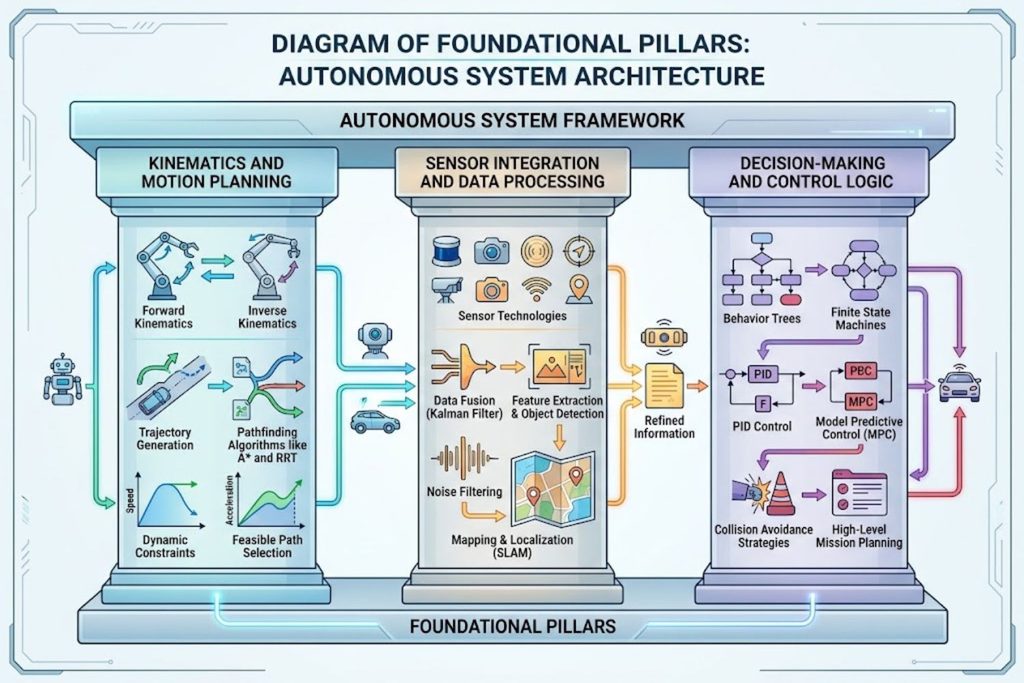
Every robotics programming task, regardless of complexity, relies on three foundational concepts. Understanding these transforms you from someone who can copy code to someone who can solve novel problems.
Pillar 1: Kinematics and Motion Planning
Kinematics is the mathematics of motion. It answers: “If I want the robot’s hand to reach position X, what angles should each joint achieve?”
This sounds academic, but it’s your daily reality as a robotics programmer.
Here’s a practical example: An industrial robot has six joints (like a human shoulder, elbow, wrist, and fingers). Your task is to pick up a component from position A and place it at position B. The robot doesn’t think in terms of “move to position B.” Instead, it thinks in terms of joint angles.
Your code must translate the goal (position B) into joint angles. This is forward kinematics (angles → position) and inverse kinematics (position → angles).
Inverse kinematics is harder. For a six-joint robot, there are often multiple solutions—multiple ways to reach the same point. Your algorithm must find the solution that doesn’t hit obstacles and minimizes energy consumption.
Most robotics frameworks handle this for you (ROS includes solvers), but understanding what’s happening underneath prevents you from making naive mistakes.
Pillar 2: Sensor Integration and Data Processing
Robots are blind without sensors. Cameras, LiDAR, proximity sensors, accelerometers, force sensors—they all feed data to your program.
The challenge: sensor data is noisy, delayed, and often contradictory.
A camera might show an object at position (100, 150). A force sensor says the gripper has already made contact. Which is true? Probably both, but they describe different moments in time (sensor lag).
Your robotics program must:
- Fuse data from multiple sensors into a coherent world model
- Filter noise using techniques like Kalman filtering
- Handle uncertainty gracefully (don’t assume perfect data)
- React to anomalies (what if a sensor suddenly disconnects?)
This is where many beginners struggle. They write code assuming perfect data, then deploy it to a real robot and watch it fail spectacularly when reality doesn’t match assumptions.
Pillar 3: Decision-Making and Control Logic
Once the robot understands its state (position, sensor readings, environmental conditions), it must decide what to do next.
This ranges from simple (if gripper force > threshold, stop closing) to complex (plan a collision-free path through a crowded warehouse while another robot works nearby).
The decision logic you write determines whether the robot:
- Completes its task efficiently
- Avoids collisions
- Responds to unexpected situations
- Optimizes for safety or speed
Most robotics programming frameworks provide building blocks for this (state machines, behavior trees), but understanding the tradeoffs between different approaches matters.
Essential Programming Languages for Robotics
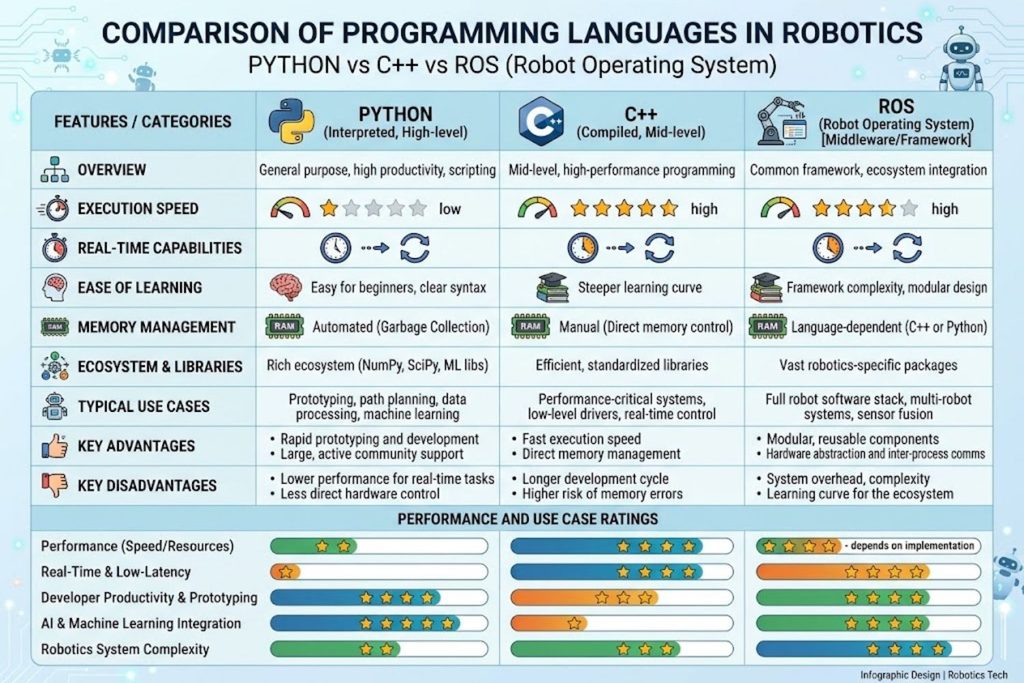
Choosing a language matters less than you’d think—but it matters.
Python – The Beginner’s Choice
Strengths:
- Readable syntax (easier to debug)
- Massive AI/machine learning ecosystem (OpenCV, TensorFlow)
- ROS has native Python support
- Quick prototyping
Weaknesses:
- Slower execution (problematic for real-time systems)
- Not ideal for low-level hardware control
- Memory overhead on embedded systems
Best for: Computer vision tasks, high-level robot logic, machine learning integration, educational projects.
Real-world use: Companies use Python for robot perception (image processing) while using C++ for real-time motion control in the same system.
C++ – The Performance Standard
Strengths:
- Real-time performance (microsecond-level precision)
- Direct hardware access
- Standard in aerospace and automotive robotics
- Excellent for embedded systems
Weaknesses:
- Steep learning curve
- Manual memory management
- Longer development cycles
Best for: Real-time control, industrial robots, safety-critical systems, resource-constrained platforms.
Real-world use: Tesla’s robot control software uses C++. ABB (industrial robotics) uses C++. Drone flight controllers use C++.
ROS and Middleware Solutions
Robot Operating System (ROS) isn’t a programming language—it’s a framework that lets you write robotics software in C++ or Python while managing communication between components.
Think of ROS as a message-passing system. Different pieces of your robot’s software (perception, planning, control) run as separate processes and communicate through ROS messages.
This architecture solves a real problem: robot software is complex. A robot typically needs:
- Camera processing nodes
- Motion planning nodes
- Sensor fusion nodes
- Safety monitoring nodes
ROS lets these run independently, communicate reliably, and be tested individually.
When to use ROS: Research, academic projects, complex robotic systems with multiple components.
When to avoid ROS: Real-time performance is critical, system is embedded/resource-constrained, you need deterministic timing.
Domain-Specific Languages
Some robotics platforms use proprietary languages designed specifically for their robots.
KUKA robots use KRL (KUKA Robot Language). ABB robots use RAPID. These languages abstract away low-level details but lock you into that platform.
They’re useful for:
- Industrial production environments
- Simpler programming tasks
- Platform-specific optimization
But they limit your transferable skills.
The Robotics Programming Stack: Tools and Frameworks
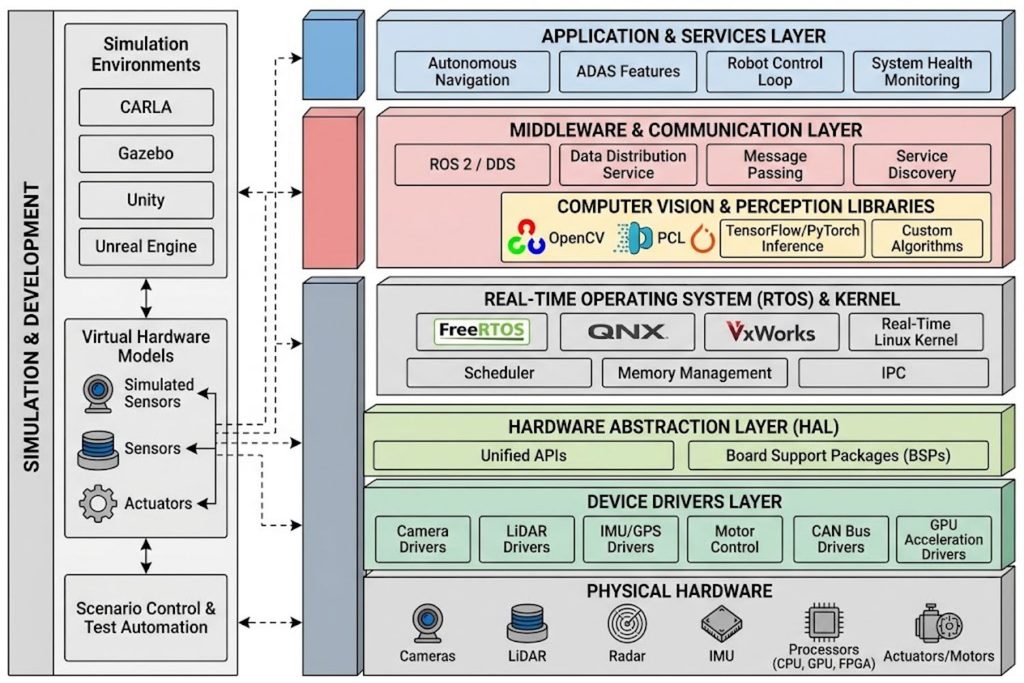
You don’t write robotics code in a vacuum. You’re always working within a stack of tools, each serving a specific purpose.
Simulation Environments
Before deploying code to a physical robot, you simulate.
Gazebo is the standard. It simulates physics, sensors, and robot dynamics. You can test your code against simulated collisions, sensor noise, and actuator delays.
Why this matters: A real robot costs $50,000 to $5 million. Crashing it while learning is expensive. Simulation lets you fail cheaply.
Best practice: Write code that works in simulation, then expect it to behave differently on real hardware (it always does). The simulation taught you the algorithm; real deployment teaches you robustness.
Real-Time Operating Systems
Some robots need real-time guarantees. A surgical robot can’t just “respond when it gets around to it”—it must respond within guaranteed timeframes.
Linux isn’t real-time by default. So real-time systems (like QNX or ROS 2 with Real-Time Linux) ensure your code executes on schedule.
Most developers never touch this layer. But understanding it exists prevents you from wondering why your “perfectly optimized” code still misses deadlines.
Computer Vision and AI Libraries
Robots see the world through cameras. Making sense of that visual data requires computer vision.
OpenCV is the standard library. It handles image processing, object detection, and feature tracking.
For AI: TensorFlow and PyTorch integrate with robot systems for machine learning tasks (object recognition, grasp planning).
Hardware Abstraction Layers
Robotics is fragmented. Each manufacturer uses different hardware interfaces, communication protocols, and conventions.
HALs (Hardware Abstraction Layers) hide this complexity. You write code once; the HAL translates it to each specific robot.
This is where ROS excels—it provides the HAL that lets you write robot-agnostic code.
Common Mistakes Beginners Make (And How to Avoid Them)
Learning robotics programming is humbling. Every experienced robotics engineer has made these mistakes.
Mistake #1: Skipping Physics Fundamentals
Many developers jump straight to coding without understanding the physics underneath.
The problem: You end up writing code that looks correct but fails in practice. A motion planning algorithm that ignores acceleration profiles will command robots to move impossibly fast, overloading motors.
How to fix it: Spend time understanding:
- Newton’s laws (force, mass, acceleration)
- Coordinate systems and transformations
- Euler angles vs. quaternions
- Momentum and inertia
You don’t need to become a physicist. But knowing the basics prevents costly mistakes.
Mistake #2: Assuming Software Skills Transfer Directly
A skilled web developer might assume robotics programming is “just another programming problem.”
It’s not.
Web development values abstraction, modularity, and scalability. Robotics programming values reliability, predictability, and understanding what’s happening at the hardware level.
A web developer’s instinct to abstract away complexity backfires when programming robots. Sometimes you need to know exactly what the hardware is doing.
How to fix it: If you’re coming from software development, spend time with hardware. Build small projects with Arduino or Raspberry Pi. Get comfortable with electronics.
Mistake #3: Ignoring Hardware Constraints Early
Beginners write code for an ideal world. They assume:
- Sensors are perfectly accurate
- Motors respond instantly
- Networks never lag
- Power is unlimited
Real hardware violates all these assumptions.
How to fix it: From day one, ask:
- How much power does this use?
- What’s the sensor accuracy?
- What happens if communication lags?
- How do I detect and recover from failures?
Design with constraints in mind from the start.
Mistake #4: Poor Debugging Practices
Debugging a robot is harder than debugging software. You can’t just add print statements and hope (though sometimes you do).
How to fix it:
- Use simulation extensively before deploying to hardware
- Log everything (sensor data, state transitions, error conditions)
- Use hardware-in-the-loop testing (test your software with real sensors/actuators in a safe environment)
- Build incrementally (test each component before integrating)
Practical Learning Path: From Zero to Productive
This is the roadmap. Follow it, and you’ll go from “I don’t understand robotics programming” to “I can solve real problems.”
Phase 1: Foundation (Weeks 1-4)
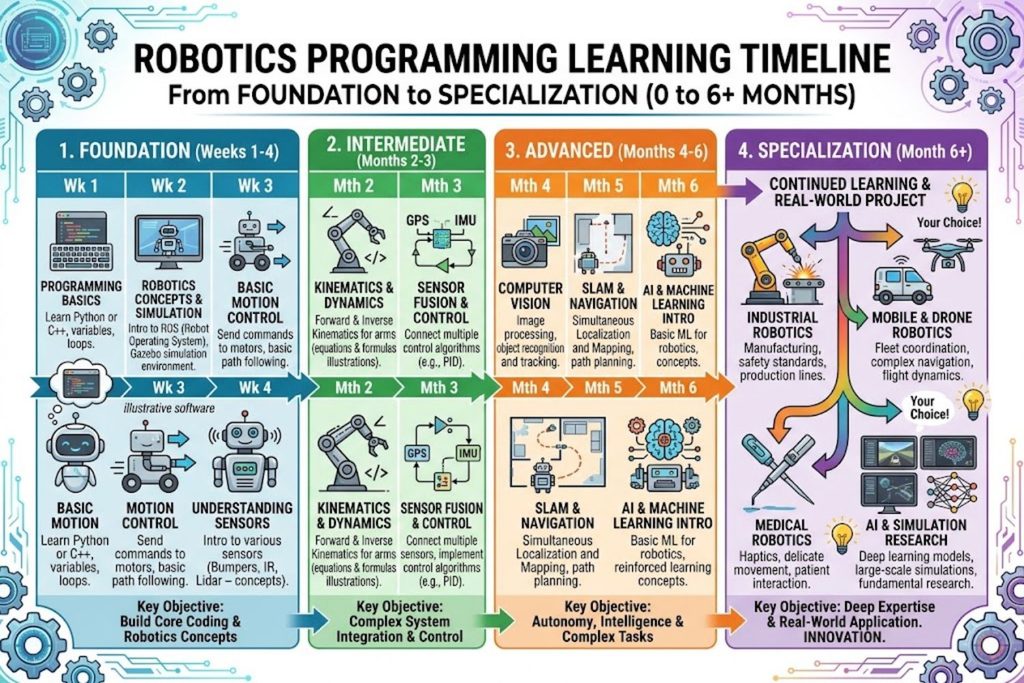
Goal: Understand the fundamentals without touching robots yet.
What to learn:
- Coordinate systems and transformations (3D math)
- Linear algebra basics (vectors, matrices)
- Basic physics (kinematics, dynamics)
- Programming basics in Python or C++
Practical project: Write a 3D rotation function. Take a point in space, rotate it, and verify the math is correct.
Time commitment: 4-6 hours weekly
Phase 2: Core Concepts (Weeks 5-12)
Goal: Understand how robot software actually works.
What to learn:
- ROS fundamentals (nodes, topics, services)
- Sensor fusion and filtering
- Motion planning algorithms
- State machines and behavior control
Practical project: Simulate a robot in Gazebo. Write code to:
- Subscribe to camera data
- Detect a target object
- Plan a path
- Execute movement
Time commitment: 6-10 hours weekly
Tools needed:
- Linux (Ubuntu 22.04)
- ROS 2
- Gazebo
- Python or C++
Phase 3: Hands-On Projects (Weeks 13-20)
Goal: Build something real.
Project ideas:
- Beginner: Program a mobile robot (real or simulated) to navigate a maze
- Intermediate: Build a pick-and-place system (detect object, plan grasp, move)
- Advanced: Implement vision-based object tracking with moving targets
Time commitment: 8-15 hours weekly
This is where the learning accelerates. Real failures teach more than a thousand tutorials.
Phase 4: Specialization (Months 6+)
Goal: Become an expert in your chosen area.
Choose your path based on interests:
- Industrial Automation: Study arm programming and production workflows
- Autonomous Systems: Focus on path planning and obstacle avoidance
- Robotic Vision: Deep dive into computer vision and AI integration
- Embedded Robotics: Learn low-level hardware and real-time systems
Real-World Applications: Where Robotics Programming Is Used
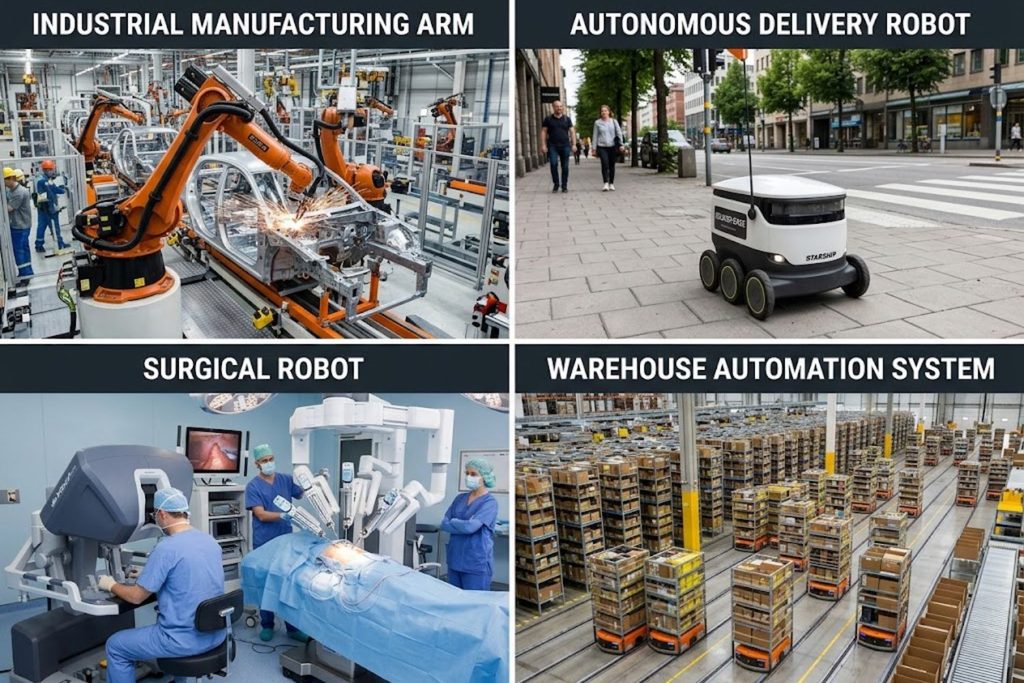
Robotics programming isn’t abstract. It’s solving concrete business problems across every industry.
Industrial Automation
The challenge: Manufacturers need consistent, fast, reliable production.
How robotics programming helps:
- Programs robot arms to assemble components with precision
- Monitors quality in real-time
- Adapts to product variations
- Minimizes downtime
Example: A smartphone manufacturer programs robots to assemble 500 units per hour with zero defects. The code handles part positioning, alignment verification, and error recovery.
Autonomous Vehicles
The challenge: Vehicles must navigate real-world environments safely.
How robotics programming helps:
- Processes sensor data (camera, LiDAR, radar) in real-time
- Plans collision-free paths
- Makes safety-critical decisions
- Handles edge cases and failures
Real complexity: An autonomous vehicle receives data from 10+ sensors, each with different accuracy, latency, and failure modes. Your code must fuse them into coherent understanding while predicting other vehicles’ behavior.
Robotics Surgery and Healthcare
The challenge: Surgical precision requires repeatability humans can’t match.
How robotics programming helps:
- Da Vinci surgical robots are programmed for procedure-specific movements
- Code implements safety constraints (don’t puncture organs)
- Enables remote surgery (programmer ensures safe operation even with network lag)
Drone Programming
The challenge: Drones are unstable by nature and must operate in uncertain environments.
How robotics programming helps:
- Real-time flight control (millisecond-level adjustments)
- Autonomous navigation and obstacle avoidance
- Payload management
- Return-to-home safety features
Warehouse Automation
The challenge: Logistics requires speed and accuracy at scale.
How robotics programming helps:
- Mobile robots navigate warehouses without human guidance
- Coordinate multiple robots to avoid collisions
- Adapt to dynamic environments (new obstacles, people)
- Integrate with inventory management systems
Robotics Programming Career Prospects
If you’re considering this path for employment, here’s what you should know.
Job Market Demand
Demand exceeds supply significantly.
LinkedIn data shows 40% growth in robotics programming roles (2022-2026). The Bureau of Labor Statistics doesn’t yet have a specific category, but “robotics engineers” fall under “mechanical engineers” with 4% projected growth—lower than average, but this understates demand since robotics is creating entirely new role categories.
The real shortage isn’t in roboticists—it’s in people who can bridge software and robotics.
Typical Salary Range
US-based robotics programmers earn:
- Entry-level (0-2 years): $65,000 – $85,000
- Mid-level (3-7 years): $95,000 – $130,000
- Senior (8+ years): $130,000 – $180,000+
Salaries are higher in:
- Aerospace (Tesla, SpaceX average $150,000+)
- Autonomous vehicles (higher CoL areas)
- Healthcare robotics (surgical systems)
Lower in:
- Educational robotics
- Hobby/hobbyist work
- Startups (equity compensation often replaces salary)
Required Qualifications
You don’t need a specific degree. But you need demonstrable skills.
Educational background:
- Computer Science degree (most common)
- Mechanical Engineering + software skills
- Physics + programming experience
- Self-taught (increasingly viable)
What actually matters for employment:
- Portfolio of projects
- GitHub contributions to robotics projects
- Practical experience (even hobby projects count)
- Understanding of specific robotics platforms (ROS, Gazebo)
- Problem-solving ability
Career Progression Path
Typical trajectory:
- Start: Robotics Software Engineer (junior)
- Grow: Senior Robotics Software Engineer / Tech Lead
- Branch:
- Management track (Engineering Manager → Director)
- Specialist track (Principal Roboticist, Research roles)
- Entrepreneurship (start a robotics company)
Getting Started: Hands-On Resources
Beginner-Friendly Platforms
Arduino + ROS:
- Start with Arduino for simple projects
- Transition to ROS when ready for complexity
- Enormous community support
Raspberry Pi:
- Full Linux computer in a small package
- Run Python and ROS
- Low cost ($50-100)
- Perfect for learning without expensive hardware
TurtleBot:
- Educational mobile robot
- Pre-configured for ROS
- Designed for learning
- $500-2000 (used options cheaper)
Webots:
- Free, open-source simulator
- No hardware needed initially
- Physics simulation included
- Available on all platforms
Practice Projects
Start small and build complexity:
- Blink an LED (Arduino, 30 minutes)
- Read a sensor (Arduino, 2 hours)
- Control a motor (Arduino, 4 hours)
- Build a mobile robot (Raspberry Pi, 20 hours)
- Implement obstacle avoidance (Raspberry Pi + ROS, 30 hours)
- Create a vision system (OpenCV + ROS, 40 hours)
Communities and Mentorship
Online:
- r/robotics (Reddit) – active, helpful community
- ROS Discourse – official ROS community forum
- Stack Overflow – tag with
roboticsorros - GitHub – find robotics projects to learn from
In-person:
- Local robotics clubs (check Meetup)
- Makerspaces and hackerspaces
- University robotics labs (often welcome community members)
- Robotics competitions (RoboCup, FIRST Robotics)
Mentorship:
- Many experienced roboticists mentor for free
- Contributing to open-source robotics projects attracts mentors
- Robotics companies sometimes offer internships
Frequently Asked Questions
Q: How long does it take to become a robotics programmer?
A: Basic competency takes 3-6 months (consistent effort). Professional-level skill takes 2-3 years. You’re never truly “done” learning—the field moves quickly.
Q: Do I need a degree?
A: No, but it helps. A relevant degree (CS, ME, Physics) accelerates your learning. Self-taught programmers can succeed with a strong portfolio.
Q: What’s the difference between robotics and automation?
A: Automation is broad (any system that automates tasks). Robotics is a subset—automation using programmable mechanical devices. All robotics are automation; not all automation is robotics.
Q: Can I learn robotics programming without touching hardware?
A: Yes, initially. Simulation (Gazebo, Webots) lets you learn core concepts. But hardware experience is essential for real-world work. Eventually, build something real.
Q: Is robotics programming harder than regular software development?
A: Different, not necessarily harder. You’ll struggle with hardware constraints that web developers never face. Web developers struggle with scale that robotics programmers never encounter. Both are complex in different ways.
Q: What’s more important: knowing math or knowing programming?
A: Both. Programming is your tool; math is your thinking framework. You can learn weaker math through robotics; you can’t avoid it. Similarly, you’ll learn programming by doing robotics, but foundational programming knowledge helps.
Q: Should I learn C++ or Python first?
A: Python first. It’s easier, faster to learn, and you’ll be productive quickly. Move to C++ when you hit performance constraints or need real-time systems.
Q: Is robotics programming competitive as a career?
A: Less competitive than general software development, but more competitive than 5 years ago. Demand still exceeds supply, but the gap is closing. Differentiate yourself with real projects and specific expertise.
Q: What’s the robotics job market like outside the US?
A: Europe (Germany, Switzerland) has strong robotics industries. Japan, South Korea, and Singapore are investing heavily. China has enormous robotics ambitions. Most large robotics companies are multinational.
Key Takeaways
What you should remember:
- Robotics programming is different – It requires understanding hardware constraints, physics, and real-time systems. Software expertise doesn’t automatically transfer.
- Three pillars underpin everything – Motion planning (kinematics), sensor integration, and decision-making logic. Understand these deeply.
- Language choice matters less than framework choice – Python vs. C++ is less important than understanding ROS, simulation tools, and hardware abstraction layers.
- Physics knowledge is essential – You’ll write better code when you understand the underlying physics. Invest time here.
- Simulation is your best friend – Test extensively in simulation before deploying to hardware. Failures in simulation are cheap; failures in hardware are expensive.
- Common mistakes are predictable – Most beginners skip fundamentals, ignore hardware constraints, or assume perfect data. Avoid these patterns.
- The learning path is clear – Foundation → Core concepts → Hands-on projects → Specialization. Follow this progression.
- Career opportunities are real – Demand exceeds supply. Robotics programmers are well-compensated and in short supply.
- Your first project matters – Choose something simple that teaches concepts without overwhelming complexity. Arduino LED project → Raspberry Pi mobile robot → ROS system.
- Community is valuable – This field is collaborative. Find mentors, join communities, contribute to open-source projects.
Start Your Robotics Programming Journey
The barrier to entry is lower than ever. You can start with $200 of hardware and free software. What once required access to university labs or major corporations is now accessible to anyone with curiosity and persistence.
The robotics revolution isn’t coming—it’s here. Manufacturing plants are automation-powered. Warehouses run on mobile robots. Hospitals use surgical robots. Self-driving vehicles are becoming reality.
And they all need programmers who understand robotics.
If this resonates, take the first step: pick a beginner project (Arduino LED blink or Raspberry Pi obstacle avoidance), spend one weekend on it, and see if it clicks.
That weekend project could be the start of a career solving problems most software developers never encounter.
Featured Snippet Box: Quick Reference
What is robotics programming?
Robotics programming is creating instructions that tell physical machines how to perceive their environment, make decisions, and execute movements. It differs from software development because it requires real-time performance, hardware understanding, and physical safety considerations. Unlike web applications, robot code failures have immediate physical consequences.
Comparison Table: Programming Languages for Robotics
| Aspect | Python | C++ | Domain-Specific | Java |
|---|---|---|---|---|
| Learning Curve | Beginner-friendly | Steep | Variable | Medium |
| Performance | Slow | Fast | Optimized | Medium |
| Real-time Capable | Limited | Excellent | Yes | Limited |
| Hardware Control | Indirect | Direct | Direct | Indirect |
| AI/ML Integration | Excellent | Good | Variable | Poor |
| Best For | Prototyping, vision | Production, control | Specific robots | Education |
Robotics Programming Checklist: Your Learning Plan
□ Week 1-2: Learn coordinate systems, 3D math, basic physics
□ Week 3-4: Set up development environment (Ubuntu, ROS, Gazebo)
□ Week 5-8: Complete ROS tutorials and understand publish/subscribe model
□ Week 9-12: Implement motion planning and sensor fusion
□ Week 13+: Build real projects (simulation first, then hardware)