Leonardo AI has grown from a niche image generator into a full creative suite used by designers, game artists, and marketers. The product page explains the features well enough, but it leaves out what matters most to buyers: how the token system works, which settings change your results, and whether the paid plans are worth the cost. This guide covers all three so you can decide quickly.
What Is Leonardo AI?
Leonardo AI is a web-based platform that creates and edits images from text prompts or reference pictures. It offers a library of image models, tools for keeping a visual style consistent, and AI video features. Canva acquired the company in 2024, so it now sits alongside Canva’s design products.
How Leonardo AI Works
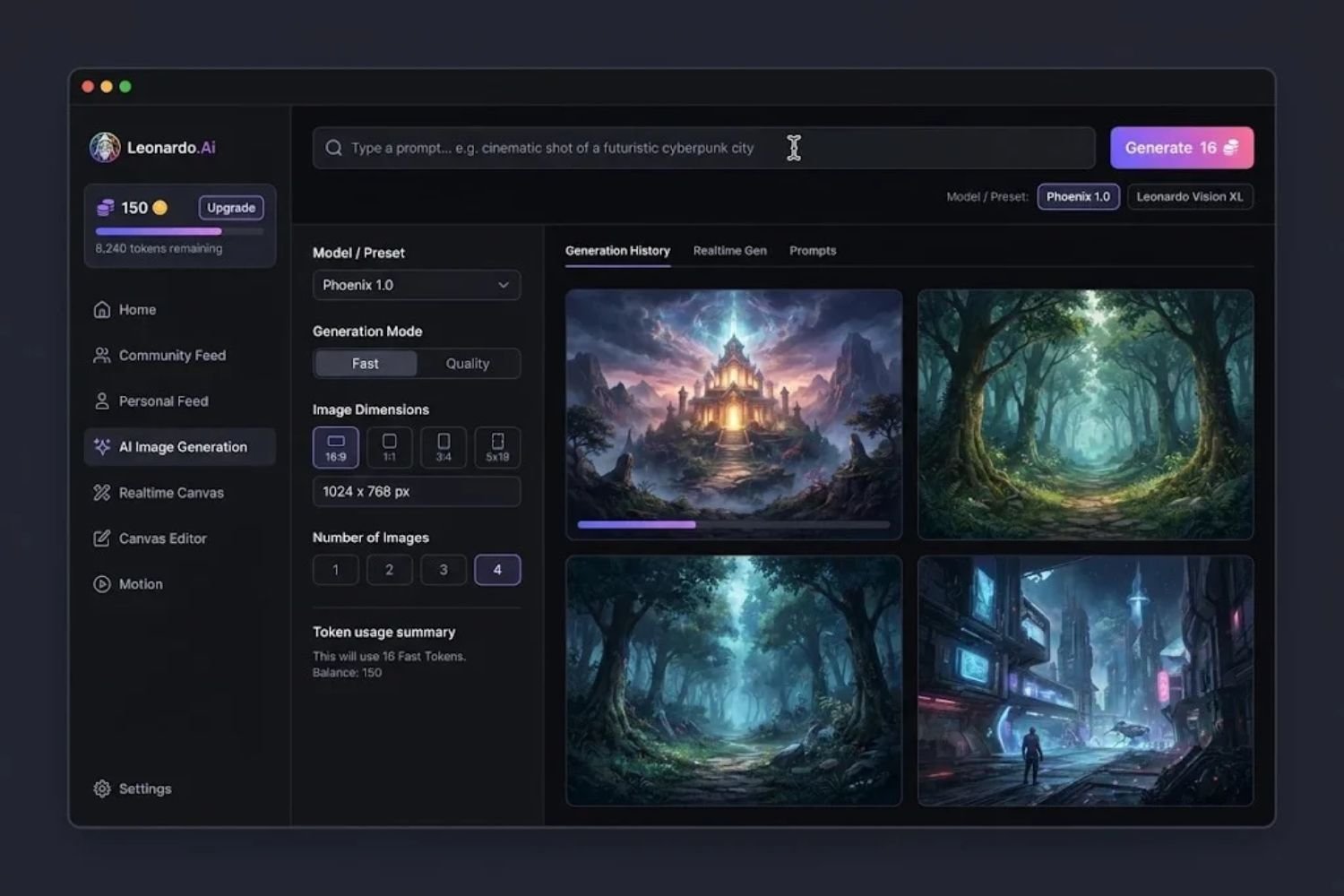
The platform’s main advantage is choice. Leonardo runs its own models alongside third-party engines in one interface. Its art generator combines the Lucid Origin, Lucid Realism, and Phoenix models with a rotating selection of third-party engines in one interface and token balance.
Choose the Model Before You Write the Prompt
Most beginners spend their time rewriting prompts while leaving the model on default. Switch models first. Run the same prompt through two or three options and compare them side by side. A model that excels at photorealistic product shots may produce flat results for stylized concept art, and the reverse is also true. Save the prompt and model combinations that work, so you can reuse them later.
Core Tools: Text-to-Image, Image-to-Image, Canvas, and Video
Text-to-image is the starting point, but the editing tools make Leonardo more useful for production work. The platform includes AI Canvas, Image-to-Image, and Blueprints, which let you refine a single image rather than regenerating from scratch. Image-to-image is especially useful when you have a rough sketch or a product photo that needs a new background. Leonardo also offers AI video tools that turn stills into short motion clips.
For consistency across a project, the custom training feature matters most. Users can upload their own images and train a personalized model around a specific visual style. Teams building a game, a comic series, or a brand look rely on this to keep outputs recognizable across hundreds of images.
Leonardo AI Pricing: How the Token System Really Works
Leonardo doesn’t charge per image. It charges in tokens, and the cost depends on the work involved. One pricing analysis describes the model as selling tokens whose cost tracks the compute a job burns, not the images it returns. That distinction explains most of the confusion new users hit.
What the Free Tier Gives You
The free plan is more capable than many users expect. The free tier provides 150 tokens per day, roughly 30 images. Reviewers have been impressed with the output, noting that even with a free account, you can get some truly amazingly realistic images. The limit is volume, not quality, so the free plan works well for testing your prompts before you commit.
Where Costs Creep Up
Paid plans start at $12, $30 or $60 a month, but the monthly price is only part of the bill. Three details catch people off guard:
- Third-party models burn tokens faster. The “unlimited relaxed” mode applies only to selected image and video models, depending on your plan. If you rely on the popular third-party engines, plan for a larger token spend.
- The API bills separately. All API requests cost API credit, sold separately as pay as you go or a custom plan. A subscription does not cover API calls.
- Plan names keep changing. Sources disagree on tier names in 2026. One vendor timeline notes that plans were renamed Essential, Premium and Ultimate, with prices and token counts unchanged, while other guides still use Apprentice, Artisan, and Maestro. Check the official pricing page before you buy.
A useful planning rule: one reviewer suggests budgeting 10 tokens per final, polished image if you’re using quality enhancement and upscaling. Test a full project on the free tier, count the tokens you actually use per finished image, and then pick a plan.
Common Mistakes New Users Make
- Judging the tool on default settings. Model choice, aspect ratio, and reference images change results more than prompt wording does.
- Ignoring model costs. Running every test on the most expensive model drains a monthly allowance quickly. Prototype on cheaper options and upscale only the finalists.
- Regenerating instead of editing. Canvas and image-to-image let you fix one area. Starting over wastes tokens and breaks consistency.
- Skipping custom training for series work. If you need twenty images that look like one artist made them, a trained model saves hours of prompt adjustment.
- Forgetting the API is separate. Developers who assume the subscription covers their build pipeline get surprised at invoice time.
A Practical Workflow for Consistent Results
- Write a plain-language brief. State the subject, the use case, and the mood in two sentences.
- Test three models with the same prompt and keep the best match.
- Generate in batches of four or fewer to limit wasted tokens while you refine.
- Use image-to-image to lock composition once you have a result you like.
- Use Canvas for local fixes, such as removing an extra finger or replacing a background.
- Upscale only the final selections.
- Log your token use per finished image for the first week, then decide whether your plan fits.
Can You Use Leonardo AI Images Commercially?
Leonardo states that Leonardo images can be used commercially, and the company points users to its terms for the latest details. Commercial use is only part of the question. Copyright protection for purely AI-generated images remains unsettled in many jurisdictions, so a business relying on an image as a trademark or exclusive asset should review the position with a lawyer. This article is not legal advice. leonardo
Leonardo AI vs. Alternatives: A Decision Framework
Choose Leonardo if you need a single platform for generation, editing, and light video work, and you value model variety and custom training. Consider other tools if your needs are simpler or more predictable.
| Your priority | Leonardo AI fit | Consider alternatives if… |
|---|---|---|
| Model variety and experimentation | Strong | You want one house style |
| Style consistency across a project | Strong (custom training) | You only generate one-off images |
| Predictable monthly cost | Moderate (token-based) | You need flat, unlimited pricing |
| Simple, polished interface | Mixed | You prefer a minimal workflow |
| Developer API access | Available, billed separately | You need a budget-friendly API as the primary product |
Reviewers have noted the trade-off. One review found the overall UI is great, but there are areas where it’s a little clunky. Expect a learning curve for the editing tools.
Who Should Use Leonardo AI (and Who Shouldn’t)
Leonardo AI suits: concept artists, game studios prototyping visual styles, marketers producing many image variants, and small teams that want custom models.
Look elsewhere if: you need a single, low-cost tool for occasional images, or you want predictable pricing without tracking tokens.
Frequently Asked Questions
Is Leonardo AI free?
Yes, there is a free tier with a daily token allowance. Paid plans unlock more tokens and features. Check the current limits on the pricing page, since they change.
What is Leonardo AI used for?
It is used for generating images from text, editing existing pictures, training custom visual styles, and creating short AI videos.
How much does Leonardo AI cost per image?
There is no fixed per-image price. Cost depends on the model, the quality settings, and upscaling. Track your token use on a test project to estimate your real cost.
Can I use Leonardo AI images for my business?
Leonardo says its images can be used commercially. Review its current terms and your plan’s conditions before using images in client or product work.
Is Leonardo AI better than Midjourney?
It depends on the job. Leonardo offers more model choice and built-in editing tools, while Midjourney is known for its distinct artistic style and community. Test both with the same brief.
Does Leonardo AI include an API?
Yes, but API usage is billed separately from subscription tokens.
Can Leonardo AI create video?
Yes. Its AI video tools can turn images or prompts into short clips.
Is Leonardo AI good for beginners?
It is accessible, but the token system and model choices have a learning curve. Start on the free tier and build a simple workflow before upgrading.
Final Thoughts
Leonardo AI is a flexible platform for image creation, editing, and light video, with strong tools for keeping a style consistent across a project. Its token-based pricing rewards careful planning. Start on the free tier, track what you spend per finished image, and upgrade only when the numbers justify it.
Ready to try it? Sign up for the free tier, run your next project through the workflow above, and see whether it fits. For more AI tool breakdowns, visit TechWoid’s homepage.
Key Takeaways
- Leonardo AI combines multiple image models, editing tools, and video features in one platform.
- The token system is the main source of confusion. Costs depend on the model and settings, not the number of images.
- Third-party models use tokens faster, and the API is billed separately from subscriptions.
- Plan names and prices have changed in 2026, so verify them before budgeting.
- Test on the free tier, measure tokens per finished image, then choose a plan.