If you’ve ever finished a 12-hour gaming marathon or editing session only to have your wrist screaming in pain, you already know the problem traditional wrist rests can’t solve. They sit there while your wrist does all the work—bending, twisting, staying locked in one painful angle for hours.
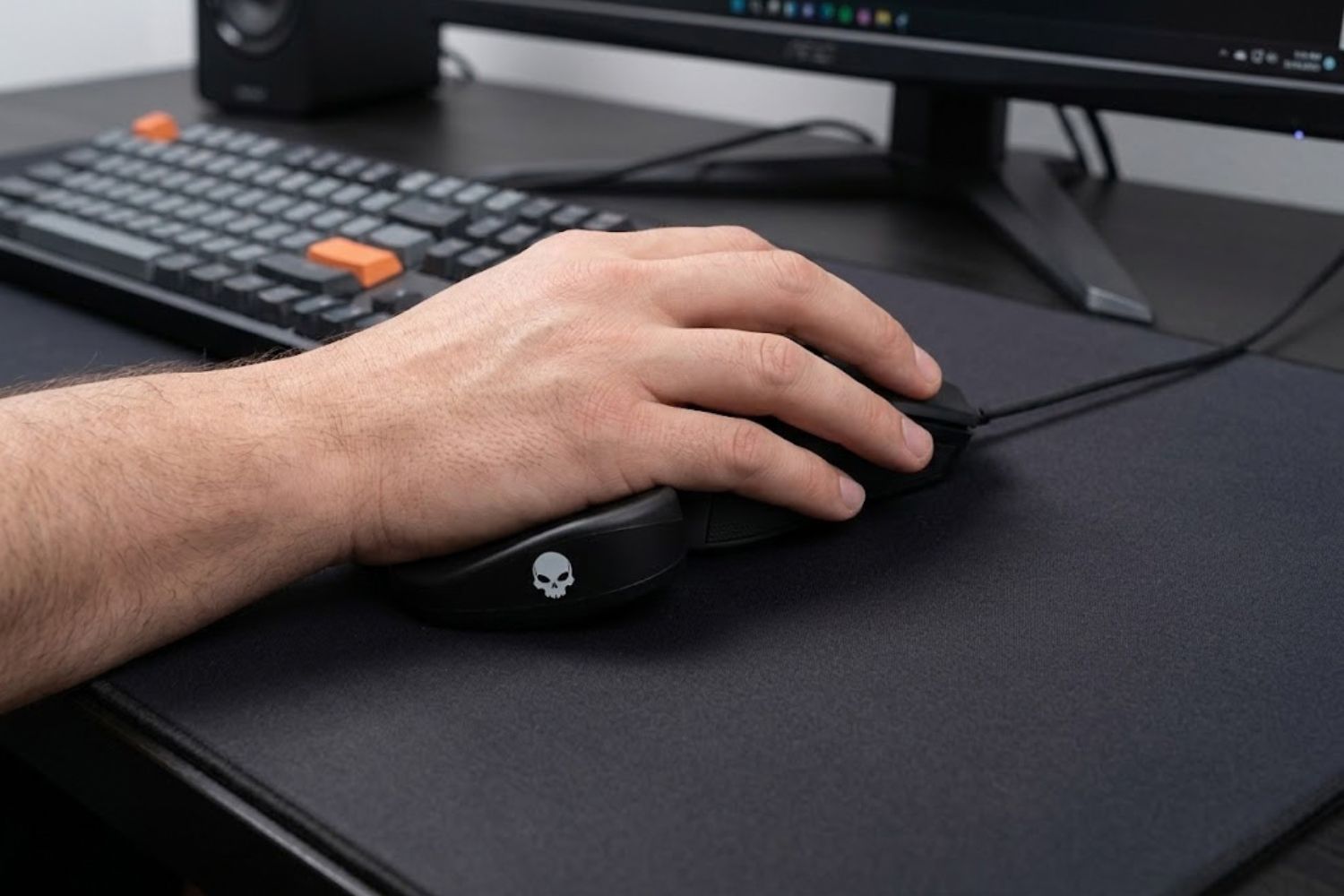
The BadSeed Tech Carpio takes a completely different approach. Instead of anchoring your wrist in place, the entire pad glides across your desk with your hand, keeping your wrist in a natural, neutral position throughout your session. The result? Less strain, better mouse control, and genuine ergonomic relief that actually feels different the moment you use it.
This guide covers everything you need to know—what it really is, how it compares to static wrist rests, whether the BadSeed special edition is worth the money, and the exact setup steps that make the difference between okay and exceptional performance.
What Is the BadSeed Tech Carpio?
The BadSeed Tech Carpio isn’t a completely new product. It’s a limited-edition collaboration version of DeltaHub’s Carpio 2.0, an ergonomic wrist rest that operates on a single revolutionary principle: let the wrist rest move with your hand instead of forcing your hand to stay still.
DeltaHub, an ergonomics company based in Slovenia, created the original Carpio after watching how poorly traditional wrist rests worked in real-world scenarios. The BadSeed Tech edition came from a partnership with Brian from BadSeed Tech, a YouTube channel known for honest PC hardware reviews. The collab gave the product a darker, performance-focused aesthetic aimed at high-end gaming and content creation setups.
Here’s the critical distinction: The BadSeed Tech Edition uses identical ergonomic engineering as every other Carpio 2.0 variant. The difference is cosmetic—exclusive badging, darker colorway, and special edition pads included in the box. If you’re buying it for the technology, you’re getting the same gliding mechanism as the Linus Tech Tips edition or standard Carpio 2.0. You’re choosing it because you prefer the look and the creator connection.
Core Design: Gliding vs. Static Wrist Rests
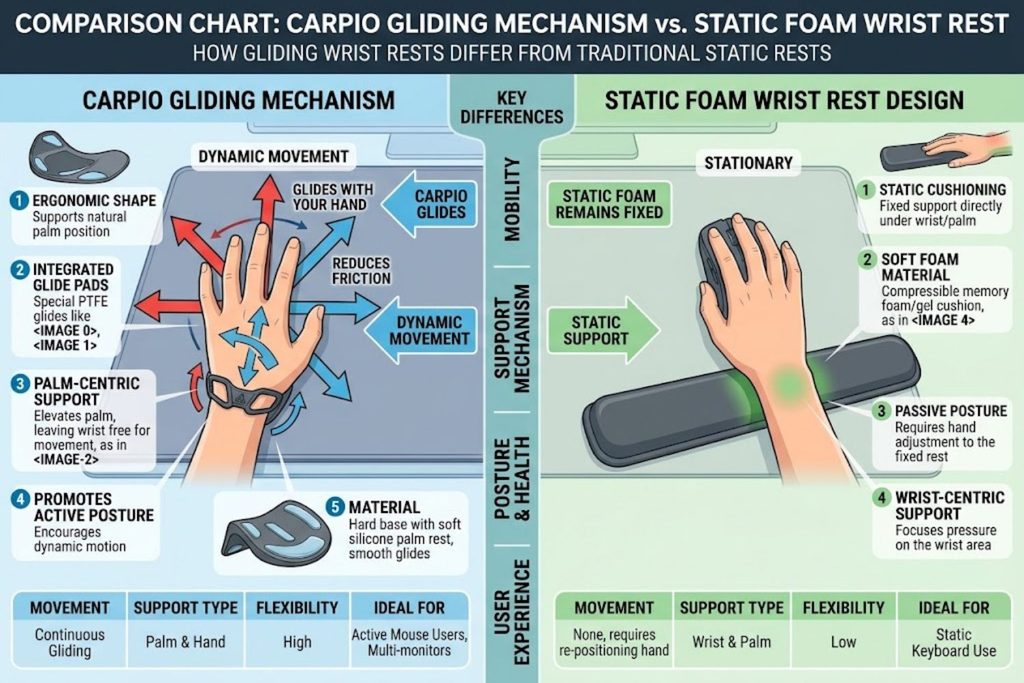
A traditional wrist rest is passive. You place your wrist on it, the pad stays in one spot, and your hand does all the work. Your wrist bends, twists, and rotates around a fixed object all day.
The Carpio flips this on its head. The small platform (about the size of a domino) sits under your palm with PTFE gliders on the underside—the same low-friction material NASA uses in space suits. As your hand moves to reach the mouse, adjust position, or shift weight, the entire wrist rest glides smoothly across your desk mat. Your wrist tracks with your hand instead of staying pinned in place.
This single design choice eliminates the repetitive strain cycle that kills traditional wrist rests. Your wrist maintains a neutral angle throughout movement. Pressure distributes across the tougher parts of your palm instead of concentrating on the sensitive carpal tunnel area. Over 8-12 hours, that difference compounds into noticeable relief.
BadSeed Edition vs. Standard Carpio 2.0
Let’s be clear on what you’re actually paying for with the BadSeed Edition:
Identical:
- Gliding mechanism and PTFE base
- Ergonomic engineering
- Size options (small/large)
- Handedness options (left/right)
- Performance characteristics
Different:
- Exclusive black colorway optimized for dark desk setups
- BadSeed Tech branding
- Special edition replacement pads included
- Creator partnership appeal
- Limited availability (drives perceived exclusivity)
If you already own a standard Carpio 2.0, the BadSeed Edition isn’t a mechanical upgrade. You’re paying for aesthetics and collector value. If you don’t own a Carpio yet and prefer the darker look, the price premium is minimal—usually $5-10 more than standard editions.
The Ergonomic Science Behind Gliding Wrist Rests
Understanding why the Carpio works requires understanding why traditional wrist rests often fail. The science is straightforward, but the implications are significant.
Why Traditional Wrist Rests Fail Most Users
Conventional wrist rests (foam, gel, memory foam) operate on a faulty premise: keep the wrist still, and it won’t hurt. The logic sounds reasonable. In practice, it’s backward.
Your wrist isn’t meant to stay frozen. It’s a joint designed for dynamic movement. When you force it into a static position for hours, you’re doing exactly what occupational medicine specialists warn against—creating a fixed, repetitive posture that eventually causes injury.
Consider a video editor working 8 hours daily. Their wrist rests on a gel pad. They move the mouse 20-30 times per hour. Each movement requires their wrist to either rotate around the pad or lift off and reset. This creates micro-movements that, multiplied across thousands of repetitions, accumulate into inflammation and strain.
By afternoon, the wrist aches. By week three, discomfort becomes consistent. By month two, they’re considering surgery.
Traditional wrist rests address the symptom (hard desk) but ignore the root cause (forced immobility).
How Neutral Wrist Positioning Reduces Strain
The carpal tunnel—a narrow passage in your wrist through which nerves and tendons travel—is the structural weak point. Static wrist rests compress it. Repetitive bent-wrist positions strain it. Extended flexion or extension aggravates it.
Neutral wrist position means your wrist remains relatively straight, neither bent forward (flexion), bent backward (extension), nor twisted to the side (deviation). In this position, the carpal tunnel has maximum space, nerves face minimal pressure, and tendons can move freely.
The Carpio maintains neutral positioning because it moves with your hand. As you adjust position, the wrist rest adjusts with you, rather than forcing your wrist to conform to a fixed object. Your forearm, wrist, and hand align naturally. Pressure distributes across the tougher palmar area instead of pinpointing the sensitive carpal region.
Research supports this approach. Studies on occupational ergonomics consistently show that dynamic positioning—allowing movement within a neutral range—reduces repetitive strain injury risk compared to static positioning.
The Role of PTFE Gliders in Movement
PTFE (polytetrafluoroethylene), commonly known as Teflon, has a coefficient of friction of just 0.05-0.1. That’s nearly frictionless. For reference, steel on ice is around 0.02-0.05. PTFE gliders create the smooth gliding sensation that makes the Carpio feel almost effortless.
This matters because resistance creates effort. If a wrist rest required conscious muscle engagement to glide, you’d eventually stop using it consciously. Instead, you’d rest your wrist on it like a traditional pad. PTFE gliders are smooth enough that gliding becomes unconscious and natural—you move your hand, the pad follows, no extra thought required.
The gliders sit on your desk mat or mousepad. Surface texture affects gliding performance dramatically. A rough surface creates drag. A smooth felt or neoprene pad enables smooth gliding. This is why desk mat selection matters—more on that below.
Medical Development & Expert Consultation
The Carpio went through 2+ years of development with medical input. DeltaHub consulted with Dr. Marko Mikša, a specialist in plastic, reconstructive, and aesthetic surgery with specific expertise in carpal tunnel procedures. They also consulted occupational medicine physicians to ensure the design met medical standards.
This doesn’t mean the Carpio is a medical device or a guaranteed cure for existing carpal tunnel syndrome. Company-led research isn’t independent verification. But the involvement of physicians with relevant expertise (particularly someone who performs carpal tunnel surgeries) suggests the design wasn’t arbitrary—it was informed by people who understand wrist anatomy and injury.
That said, if you already have clinical carpal tunnel syndrome or wrist injury, consult your doctor before assuming any wrist rest will help. The Carpio is preventive and supportive, not therapeutic.
BadSeed Tech Carpio Specs & Materials
Understanding the actual product specifications helps separate marketing from performance.
What’s Inside the Box
BadSeed Tech Carpio includes:
- One Carpio 2.0 base (black anodized aluminum or high-quality plastic, depending on material variant)
- One set of BadSeed Tech Edition silicone pads (usually darker colored, matching the aesthetic)
- Documentation with setup instructions
- Pad replacement kit (sometimes included, sometimes sold separately)
The base remains consistent across all editions. The BadSeed Edition distinction comes from included pad color and packaging.
Build Quality & Durability
The Carpio is built from three main components:
- ABS or aluminum base – durable polymer or metal shell that holds the pad
- Silicone top surface – replaceable pads that make contact with your palm
- PTFE gliders – Teflon feet on the underside
Build quality is solid. The base doesn’t flex or feel cheap. Silicone pads are thick enough to provide structure without being rigid. PTFE gliders are replaceable if they eventually wear down (though DeltaHub claims they last years with normal use).
Expected lifespan: 3-5 years with regular use, potentially longer. The silicone pads can be replaced when they eventually degrade, extending product life.
Sizing Options: Small vs. Large
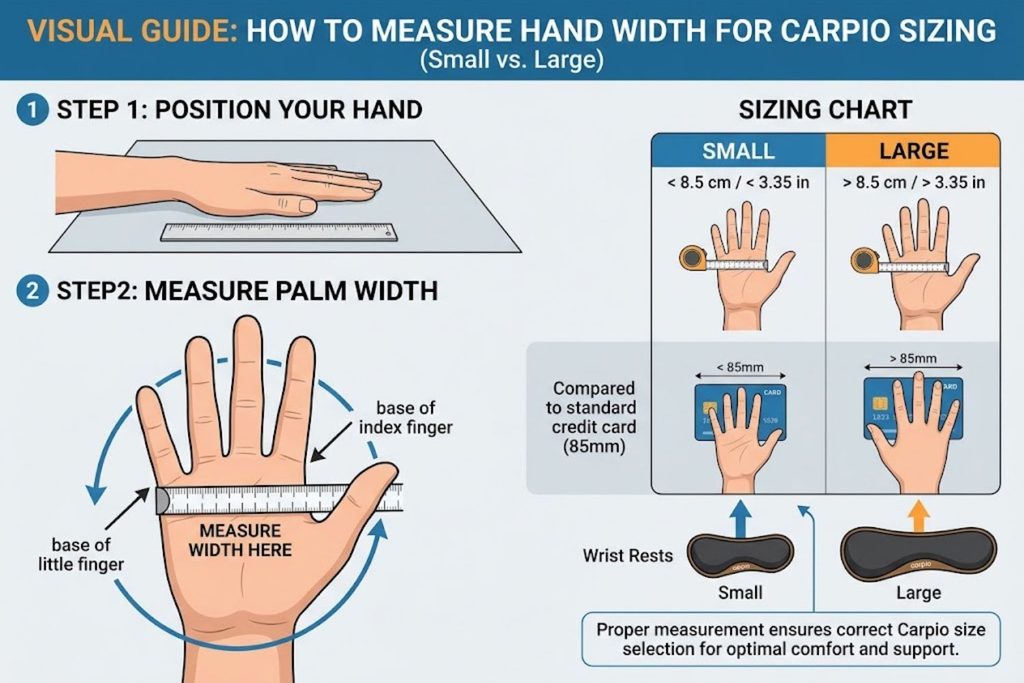
Carpio comes in two sizes:
- Small: 8.4 cm x 3.6 cm (3.3″ x 1.4″)
- Large: 9.6 cm x 4.0 cm (3.8″ x 1.6″)
Size selection depends on hand size and palm width. Too small, and the pad might not support your entire palm, creating pressure concentration. Too large, and it extends beyond your wrist, potentially interfering with mouse movement or feeling awkward.
Most adults with average hand sizes fit the Large comfortably. People with smaller hands or those who prefer a more minimal footprint choose Small. There’s no performance difference between sizes—it’s purely about fit and comfort.
Hand Position Configuration
Both left-handed and right-handed versions are available. This isn’t ambidextrous. You choose your dominant hand before purchasing. Using a right-handed version with your left hand creates an awkward angle and defeats the ergonomic benefit.
The purchase process requires you to select left or right. Don’t guess—measure which hand you use for mousing.
BadSeed Tech Carpio vs. Traditional Wrist Rests
A direct comparison shows why the Carpio occupies a different product category from gel or foam rests.
| Feature | Static Wrist Rest (Gel/Foam) | Carpio Gliding Wrist Rest | Winner for RSI Prevention |
|---|---|---|---|
| Positioning | Fixed in one angle | Moves with hand movements | Carpio |
| Wrist Freedom | Restricted | Natural, unrestricted | Carpio |
| Pressure Distribution | Concentrated on contact area | Distributed via movement | Carpio |
| Learning Curve | None (plug-and-play) | Minimal (~1-2 hours) | Static Rest |
| Desk Space | Larger footprint | Minimal footprint | Carpio |
| Price | $10-30 | $35-50 | Static Rest |
| Maintenance | Occasional cleaning | Glider cleaning + pad replacement | Static Rest |
| Effectiveness for 8+ hour sessions | Diminishes after 4-6 hours | Consistent throughout day | Carpio |
The trade-off is clear: static wrist rests are simpler and cheaper. The Carpio requires slightly more investment and care but delivers superior ergonomic benefits for extended use.
Price Point Breakdown
- Standard gel/foam wrist rest: $10-25
- Standard Carpio 2.0 (any creator edition): $35-45
- BadSeed Tech Carpio Edition: $38-48 (usually ~$5-10 premium over standard Carpio)
- Replaceable pad kits: $15-20
The BadSeed Edition doesn’t charge a steep premium for aesthetics. If you want the product anyway, the special edition costs almost the same.
Real-World Use Cases That Actually Benefit
The Carpio isn’t universal. It’s excellent for specific scenarios and adequate for others.
Competitive Gaming Sessions (4+ Hours)
This is the Carpio’s sweet spot. Competitive gamers play for 4-12 hour sessions, performing hundreds of micro-movements per hour. Their mouse hand experiences constant, intense use.
Static wrist rests fail here because comfort degrades after 4-6 hours. The Carpio maintains consistent support because it moves with the hand, preventing the fatigue-inducing compression that static rests create.
Testimonials from competitive players consistently mention improved mouse control and reduced hand fatigue over multi-hour sessions.
Content Creation & Video Editing
Video editors, graphic designers, and photographers spend 6-10 hours daily at their desks. They’re using a mouse or trackpad constantly, with minimal hand position variation.
The gliding mechanism addresses the exact problem these professionals face: repetitive mouse movements within a limited range, creating concentrated strain on specific wrist angles.
Content creators report noticeable comfort improvements and, importantly, fewer post-work wrist aches.
Programming & Extended Typing
Programmers and technical writers combine keyboard and mouse use. Their hands shift between keyboard and trackpad/mouse repeatedly. This repositioning cycle, when forced around a static wrist rest, creates micro-strain.
The Carpio allows natural hand repositioning without forcing adjustment around a fixed object.
Programmers who spend 6+ hours daily coding report measurable comfort improvements.
Office Work & Daily Computing
This is where benefits become marginal. A typical office worker does light computer work—email, spreadsheets, occasional mouse movement. Their wrist strain risk is lower because usage intensity is lower.
A basic foam wrist rest is often sufficient for light office use. The Carpio isn’t bad for office work; it’s just not addressing a pressing problem. It’s like buying a sports car for commuting to the grocery store—it works, but overkill.
Who Shouldn’t Use It
- Existing carpal tunnel syndrome patients – consult your doctor; the Carpio is preventive, not therapeutic
- People with wrist injuries requiring immobilization – you need medical bracing, not a wrist rest
- Minimal computer users – if your wrist strain risk is low, a simple pad is adequate
- Those with very small hands – the Small size is the lower limit; if it doesn’t fit, the positioning benefit diminishes
Step-by-Step Setup & Optimization Guide
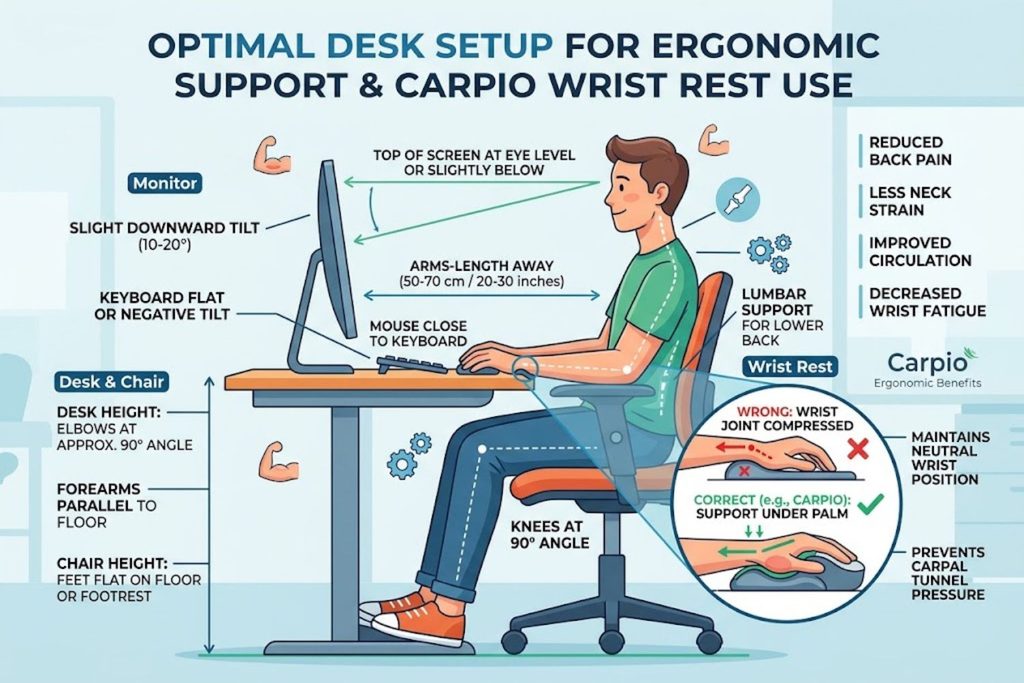
Buying the Carpio is one thing. Setting it up correctly is what separates “that was a waste” from “this changed everything.”
Pre-Setup Checklist
Before unboxing:
- Confirm desk height allows neutral wrist positioning (elbows at 90 degrees)
- Have a quality desk mat available (felt or neoprene, smooth surface preferred)
- Clean your desk—the Carpio needs a smooth, clean surface to glide effectively
- Note your dominant hand (you’ll need the right-handed or left-handed version)
- Measure your hand to confirm sizing (small vs. large)
Finding Your Ideal Gliding Distance
The Carpio only glides well if your desk mat surface allows it. Place your pad on the mat and test:
- Does it slide with minimal pressure? Good—your surface is appropriate.
- Does it stick or require force to move? Your desk mat surface is too rough. Upgrade to a smoother mat.
Gliding distance should feel effortless. You shouldn’t consciously think about moving the pad. If you do, your surface isn’t optimized.
Desk Mat Selection (Critical for Performance)
This is the most underrated setup variable.
Best for Carpio gliding:
- Smooth felt desk mats (minimize friction)
- Smooth neoprene pads (optimized gliding surface)
- Hard mousepads with smooth finish (works, but less ideal)
Poor for Carpio gliding:
- Rough fabric desk mats
- Textured or woven surfaces
- Wooden desks without protection
- Glass (too frictionless; pad slides uncontrollably)
If your current desk mat is rough or textured, the Carpio won’t glide smoothly. You’ll use more muscle to move it, defeating the purpose. Upgrading to a smooth felt or neoprene mat is essential, not optional.
DeltaHub’s own felt desk mats are optimized for Carpio gliding. Third-party smooth mats work equally well if they have similar smooth, low-friction surfaces.
Mouse Sensitivity Calibration
After setup, your mouse sensitivity might feel off. This is because you’re now moving your wrist differently. Your arm is now creating the full movement rather than your wrist doing micro-adjustments around a fixed rest.
Spend 30 minutes getting accustomed to new arm positioning. Your sensitivity settings likely don’t need changing, but your muscle memory does. Adjust sensitivity only if, after 30 minutes of use, it still feels wrong.
Hand Position Adjustments
Your hand should sit naturally on the pad. Not gripping it. Not resting too far forward or backward. The pad should support your palm while your fingers remain free to move the mouse.
If you feel you’re constantly adjusting your hand position, you may have chosen the wrong size. Small users who chose Large might find it extends too far back.
Sizing & Handedness: How to Choose Right
Getting this wrong is the most common buyer mistake.
Measuring Your Hand
Measure from your wrist crease to the base of your fingers (the widest part of your palm).
- Less than 8 cm: Small size
- 8-9 cm: Small or Large (try Small first)
- 9 cm and above: Large size
Don’t overthink this. Measure, compare to the specification, and order accordingly.
Small vs. Large Decision Tree
Choose Small if:
- Your hand width is under 8.5 cm
- You prefer minimal desk footprint
- You like lightweight, compact gear
Choose Large if:
- Your hand width is over 8.5 cm
- You want maximum palm support
- You have larger hands or prefer more substantial products
When in doubt, order Large. It’s forgiving. Small can feel cramped if your hands are larger than average.
Left-Handed & Right-Handed Versions
This is binary. Choose the hand you use for mousing. Right-handed users order right-handed. Left-handed users order left-handed. Ordering the wrong version creates an ergonomically awkward product.
Common Sizing Mistakes
- Ordering Large when you have small hands, then complaining the pad is too long
- Ordering the wrong handedness because you didn’t measure
- Assuming ambidextrous capability (it’s not)
- Choosing based on aesthetics rather than fit
BadSeed Tech Carpio Pros & Cons
Here’s an honest assessment.
Key Advantages
✔ Maintains neutral wrist position – The core benefit. Your wrist stays straighter throughout extended use.
✔ Reduces fatigue after 6+ hours – Where static rests begin failing, the Carpio maintains consistent support.
✔ Minimal desk footprint – Smaller than traditional wrist rests, giving you more usable desk space.
✔ Durable construction – Replaceable pads mean years of use without complete replacement.
✔ Works across use cases – Gaming, coding, editing, office work—it’s effective for any mouse-intensive activity.
✔ Smooth learning curve – You get the benefit immediately; no weeks of adjustment needed.
Legitimate Drawbacks
✗ Requires smooth desk mat – A rough surface breaks the entire value proposition. Budget for mat upgrade.
✗ Higher initial cost – $38-48 vs. $10-25 for basic wrist rests. Significant price premium.
✗ Not a medical device – Won’t cure existing carpal tunnel syndrome or wrist injuries.
✗ Requires proper sizing – Ordering wrong size/handedness creates an awkward product.
✗ Pad replacement cost – Over 3-5 years, you’ll invest $15-20 in replacement pads.
✗ Overkill for light users – If you work 2-3 hours daily at a computer, you won’t notice the benefit enough to justify the cost.
✗ Learning curve for muscle memory – First 1-2 hours feel different as your arm positioning adjusts.
Is the BadSeed Tech Edition Worth It?
This is the question driving most searches.
Why the Special Edition Matters
The BadSeed Tech Edition taps into creator culture. Brian from BadSeed Tech is known for honest, unapologetic hardware reviews. His audience trusts his recommendations. When he releases a limited collab, people pay attention.
If you follow BadSeed Tech and appreciate their content style, the special edition carries social currency. You’re not just buying a wrist rest; you’re supporting a creator you respect and using a product endorsed by someone in the community.
Cost vs. Standard Carpio 2.0
The price difference is minimal—$5-10 more than standard editions. If you’re already willing to spend $35-40 on a Carpio, the premium for BadSeed aesthetic is negligible.
The decision becomes: do you prefer the dark BadSeed look or the standard/other creator colorways? If yes, order BadSeed. If indifferent, order whichever is in stock.
The Creator Collaboration Value
Creator collabs hold appeal for invested fans but offer no functional advantage. The Linus Tech Tips edition, Liv edition, and BadSeed edition are ergonomically identical. You choose based on:
- Which creator you support
- Which aesthetic matches your desk setup
- Which is currently available
The BadSeed edition doesn’t perform better than other versions. It’s a styling preference, not a performance upgrade.
Verdict: If the BadSeed Tech aesthetic appeals to you and you were already considering a Carpio, the special edition is worth the minimal premium. If you’re indifferent to creator editions, save $5-10 and order standard Carpio 2.0.
Maintenance & Long-Term Care
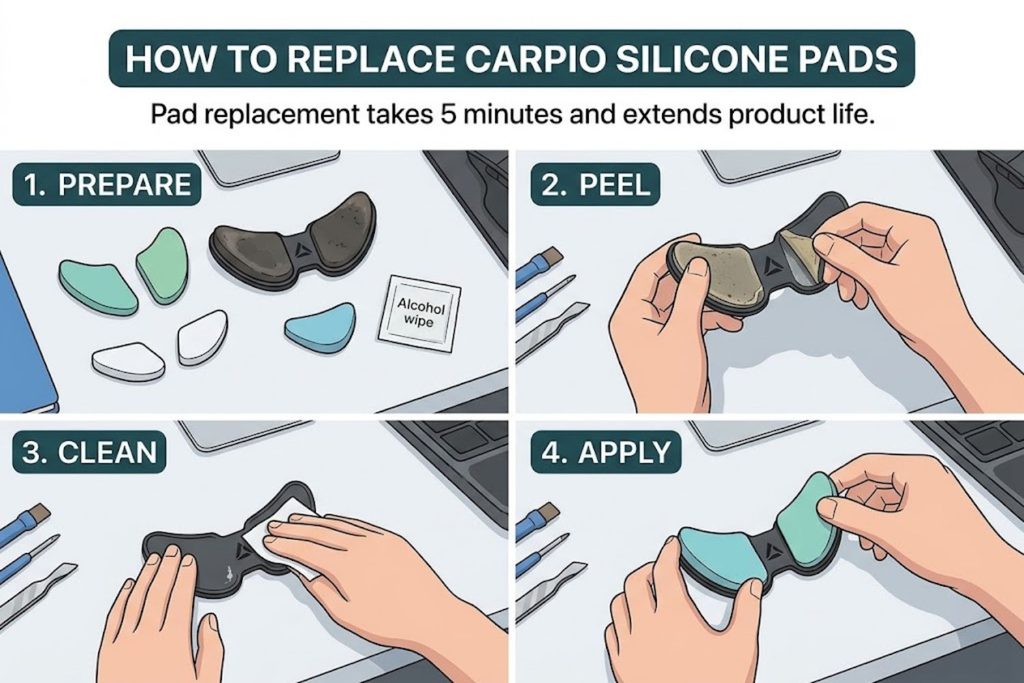
The Carpio outlasts most wrist rests if maintained properly.
Cleaning PTFE Gliders
The Teflon gliders occasionally collect dust or debris. This creates drag and reduces gliding smoothness.
Clean every 3-6 months:
- Turn the Carpio upside down
- Use a soft brush or lint-free cloth to wipe the gliders
- Wipe your desk mat clean to remove dust
- Test gliding again—should be smooth
This takes 2 minutes and dramatically improves performance.
Pad Replacement Process
Silicone pads degrade over 2-3 years of heavy use. Signs of degradation:
- Surface feels sticky or grippy rather than smooth
- Visible cracks in the silicone
- Loss of cushioning feel
Replacement is simple: order a pad kit, peel off old pads (they pull away cleanly), and press new pads onto the base. No adhesive needed; the pads grip the base via friction.
Cost: $15-20 per pad kit. Process: 5 minutes.
Expected Lifespan
With proper care, the Carpio base lasts 5+ years. Pads typically need replacement every 2-3 years, depending on usage intensity.
Total cost of ownership over 5 years:
- Initial Carpio: $40
- Two pad replacements (years 2 and 4): $30
- Total: $70 over 5 years, or $14/year
Compared to replacing multiple cheap wrist rests over that same period, the Carpio becomes cost-effective.
Frequently Asked Questions
Q: Will the Carpio fix my existing carpal tunnel syndrome?
A: No. The Carpio is preventive, not therapeutic. Existing clinical carpal tunnel requires medical consultation and potentially physical therapy or other interventions. Talk to your doctor before assuming any wrist rest will help.
Q: How long does it take to adjust to using it?
A: Most users feel comfortable within 1-2 hours of use. Your arm positioning changes slightly because the wrist rest moves with you instead of staying fixed. This adjustment happens quickly for most people.
Q: Can I use it on a wooden desk without a mat?
A: Technically, yes, but gliding performance degrades significantly. Wood creates friction that resists the PTFE gliders. A smooth desk mat is essential for the product to function optimally.
Q: Is the BadSeed Edition limited availability?
A: Typically, yes. Creator collabs are released in limited quantities and may not restock. If you want the BadSeed edition specifically, don’t assume you can buy it later.
Q: What’s the return policy if it doesn’t work for me?
A: Return policy depends on the retailer (DeltaHub, LTT Store, Amazon, etc.). DeltaHub typically offers 30-day returns if the product doesn’t meet expectations. Check the specific retailer’s policy before purchasing.
Q: Can I use it with a large mousepad instead of a separate desk mat?
A: Yes, if the mousepad surface is smooth. Large mousepads work fine as long as they enable gliding. Check gliding smoothness before settling on a setup.
Q: Does it work with different mouse weights or shapes?
A: Yes. The Carpio isn’t a mouse accessory; it’s a wrist support. It works with any mouse or trackpad, regardless of weight or shape.
Q: How does it compare to mechanical keyboard wrist rests?
A: Different products for different purposes. Mechanical keyboard wrist rests support your wrists while typing. The Carpio supports your wrist while using a mouse. Many users have both—one for keyboard, one for mouse.
Q: Is the Carpio 2.0 or Carpio G2.0 version better?
A: The Carpio 2.0 is the main product line. The Carpio G2.0 exists but isn’t widely available. Stick with 2.0 unless you have specific reasons to prefer G2.0.
Q: Can I buy multiple versions for different workstations?
A: Yes. Some professionals keep Carpio units at multiple desks. At $35-40 each, it’s reasonable to invest in multiple units if you work from different locations.
Q: What if I’m left-handed? Does it actually make a difference?
A: Absolutely. The handedness designation affects ergonomic angle and positioning. A left-handed user with a right-handed Carpio experiences an awkward, suboptimal angle. Always order the correct handedness.