
Nearly half of all consumers now use AI tools like ChatGPT, Gemini, and Perplexity to find brands, compare products, and inform purchase decisions. But here’s what most businesses still don’t understand: appearing in an AI-generated answer is fundamentally different from ranking in traditional search results.
In traditional search, your brand visibility depends on keyword rankings and backlinks. In AI-generated answers, visibility depends on something far more technical—and far less forgiving: data consistency.
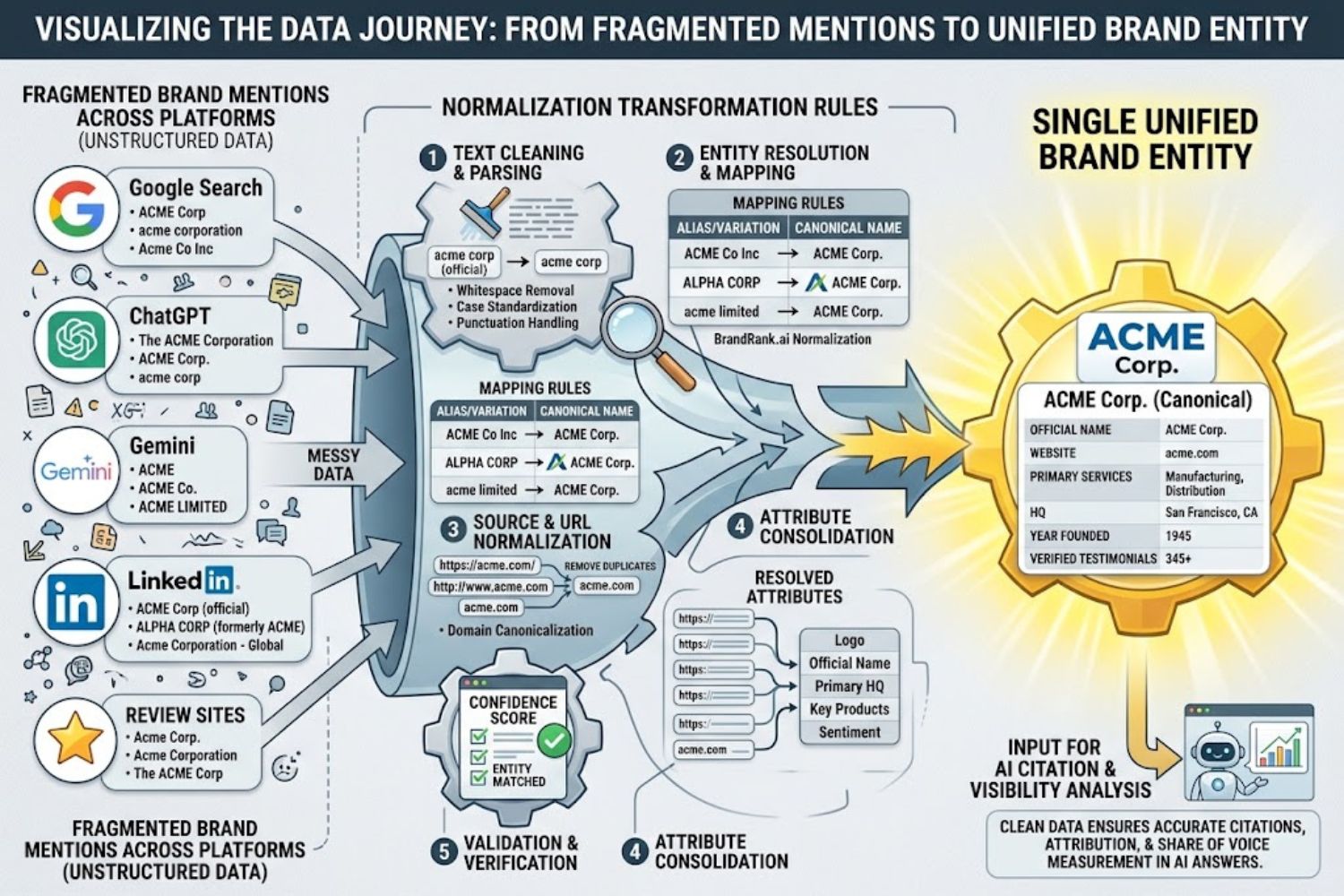
This is where BrandRank.ai normalization transformation rules become critical. These rules are the systematic approach to cleaning, standardizing, and organizing brand data so that AI models can identify your company as a single, trustworthy entity instead of multiple confusing fragments scattered across the web.
Get these rules right, and AI systems cite your brand with confidence. Get them wrong, and you’re invisible—or worse, misrepresented—in every AI response.
What BrandRank.ai Normalization Transformation Rules Actually Are (And Aren’t)
The Definition (and what competitors get wrong)
BrandRank.ai normalization transformation rules are a set of data-processing principles designed to convert inconsistent or unstructured information into a standardized format.
But that definition misses the real value. These rules aren’t just about data hygiene. They’re about entity recognition.
When you search for your brand name on Google, the search engine uses a relatively simple algorithm: it looks for pages that match your keywords, scores them by relevance, and ranks them. Imperfection is tolerated.
When ChatGPT or Gemini reads across hundreds of web pages to generate an answer, it’s doing something different. It’s building a probabilistic model of what entities exist, what they mean, and whether they’re trustworthy enough to cite. If your company appears online as “TechCorp,” “Tech Corp,” “tech-corp,” and “TECH CORP”—each with different associated descriptions, addresses, and product lists—the AI model sees fragments of different entities, not one unified brand.
Normalization means taking every version of a brand’s data and mapping it back to one canonical form, or official version. Transformation rules are the specific instructions that execute this process—replacing outdated names, standardizing URLs through redirects, fixing address fields, aligning schema markup, and validating consistency across sources.
The key insight: AI systems can’t do what humans do automatically—they can’t just “know” that “TechCorp Inc” and “Tech-Corp, Inc.” refer to the same company unless your data tells them explicitly.
Normalization vs. Transformation: The Critical Distinction
These terms are often used interchangeably, but they describe different operations:
Normalization = Making existing data consistent. If your brand appears as three different name variations across 47 listings, normalization consolidates those into one canonical form.
Transformation = Reshaping data into a new structure or format for a new purpose. A transformation might extract sentiment from a review, restructure an address field, or convert unstructured text into structured data that AI models can process more reliably.
Most data pipelines require both. You normalize first to eliminate inconsistencies, then transform to make the data AI-ready. Skipping either step leaves gaps that AI models fill with guesses.
Why Traditional SEO Strategies Miss AI Visibility Entirely
The Answer Economy Has Replaced the Search Results Page
Something fundamental shifted in 2025–2026. Nearly half of consumers as of early 2026 are now asking AI systems their questions and acting on the answer they receive, not the links.
This sounds like a small distinction. It’s not.
In the traditional search economy, a brand could rank on Page 1 for your target keywords without ever being cited in an article. You could appear in the results even if your content was mediocre, as long as you had enough backlinks and technical optimization.
In the answer economy, ranking is irrelevant. What matters is whether the AI model chooses to cite your brand in its response.
When someone asks ChatGPT, “What’s the best project management software for remote teams?”—your software either appears in the response or it doesn’t. There’s no middle ground. Your ranking doesn’t matter. Your meta descriptions don’t matter. What matters is this: Did the AI model identify your brand as a trustworthy source on this topic, and do it have consistent, reliable data about your company across multiple sources?
That’s where data consistency enters the equation.
How AI Models Build Entity Signals from Brand Data
AI models don’t browse the web like humans do. They’re trained on massive datasets of text, which includes mentions of your brand across websites, news articles, reviews, forums, and social media.
The model’s job is to answer questions in a way that feels natural and trustworthy. When a user asks about your industry, the model has two options:
- Cite your brand directly – but only if it has high-confidence entity resolution (it knows who you are) and sufficient corroboration across sources
- Mention your competitors – whose data is cleaner and more consistent
Most models choose the safer path. They cite brands with consistent, well-corroborated data. If your data is fragmented, the model simply skips you.
Entity signals are built from:
- Frequency (how often your brand is mentioned)
- Consistency (whether those mentions align)
- Corroboration (whether multiple sources agree about basic facts)
- Authority (whether citing you would make the answer more credible)
- Recency (whether your data is current)
Data normalization directly impacts the first four signals. If your address changes but you never update it across all listings, the consistency signal weakens. If you rebrand but leave old brand names live, the model sees conflicting entity signals. If your product descriptions vary wildly across platforms, corroboration suffers.
The Citation Confidence Problem
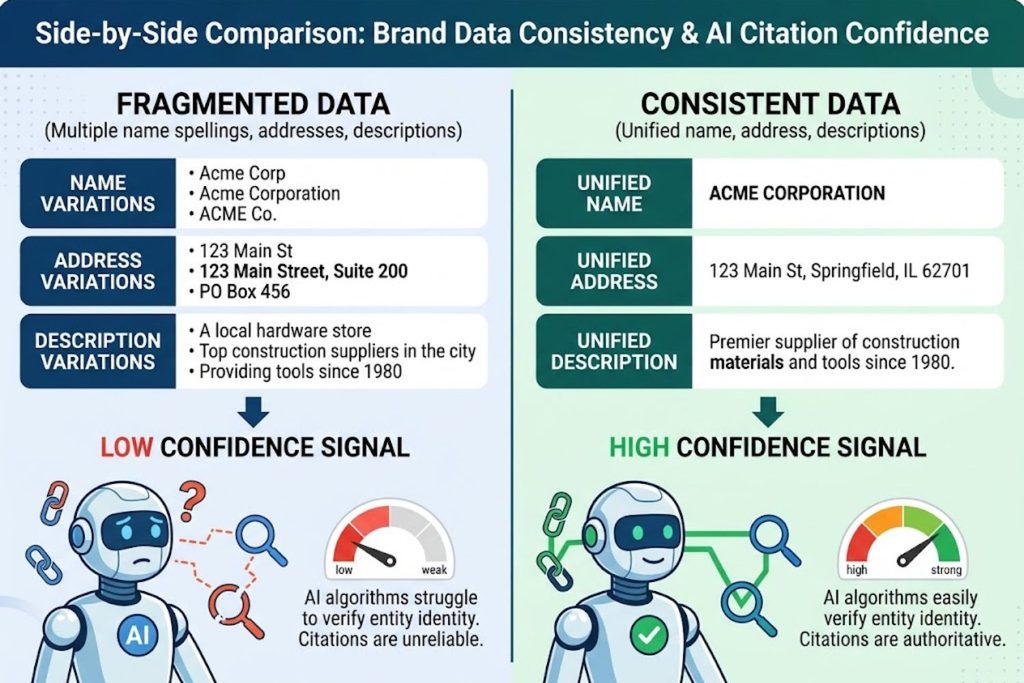
Left side: Fragmented data (multiple name spellings, addresses, descriptions) = Low confidence signal
Right side: Consistent data (unified name, address, descriptions) = High confidence signal
There’s a real difference between being findable and being cited. A brand can show up in a regular search result without ever being trusted enough for an AI model to reference directly in a generated answer.
This is the citation confidence problem.
Imagine you’re an AI model generating an answer to a user’s question. You’ve read thousands of sources mentioning Brand X. But here’s the problem: 30% of mentions spell it “Brand X,” 40% spell it “BrandX,” 20% call it by an old name, and 10% spell it differently. Half the sources list an address in New York; the other half list an address in Los Angeles.
Do you cite Brand X? Or do you cite a competitor whose entity data is crystal clear?
Most models choose the competitor. They’re optimizing for answer quality and user trust. Citing a confusing brand makes the answer look less reliable.
This is what normalization and transformation rules solve. By standardizing your data across the web, you increase the model’s citation confidence. You move from “maybe this brand” to “this brand clearly.”
The 8 Core Transformation Rule Categories Every Brand Needs
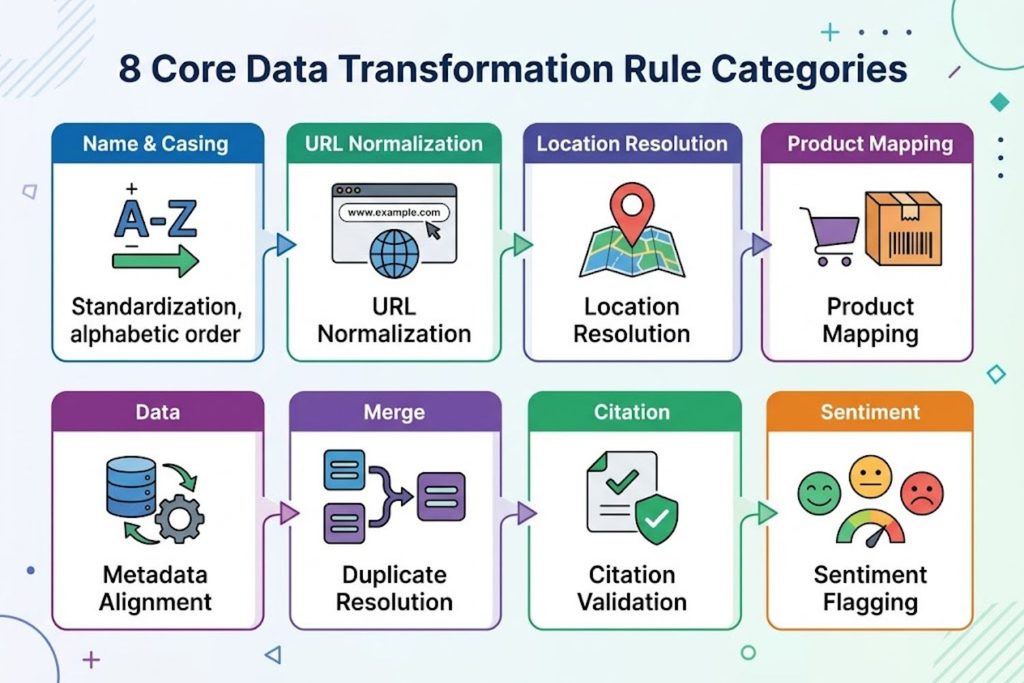
Name & Casing (A-Z icon)
URL Normalization (domain icon)
Location Resolution (map icon)
Product Mapping (product icon)
Metadata Alignment (data icon)
Duplicate Resolution (merge icon)
Citation Validation (checkmark icon)
Sentiment Flagging (sentiment icon)
Based on the BrandRank.AI platform’s framework, here are eight categories of transformation rules that most brands need to address.
Rule Type #1 – Name & Casing Standardization
Your brand name should appear consistently across all channels. But this is harder than it sounds.
“iPhone” uses lowercase for part of the name. “eBay” capitalizes the B. Your company might have evolved from “OldName Inc.” to “NewName Inc.” but old listings still use the outdated version.
Transformation rule: Define your canonical brand name. Document approved variations. Then systematically identify and convert non-standard versions across your digital footprint.
Example workflow:
- Canonical: TechCorp Solutions Inc.
- Approved variations: TechCorp, TechCorp Solutions, TechCorp Inc.
- Non-approved: Tech Corp (with space), TECHCORP (all caps), TechCorp Ltd. (wrong legal entity)
- Action: Flag and update all non-approved versions to match canonical
The mistake: Using a rigid rule that overwrites intentional variations. If your brand intentionally uses lowercase styling, an automated rule that forces title case will break your brand identity. Build in exception handling.
Rule Type #2 – Domain & URL Normalization
When your company moves domains or changes your URL structure, old links persist. Pages get redirected, migrated, or forgotten.
From an AI model’s perspective, domain normalization answers the question: “Do these URLs belong to the same entity?”
Transformation rule: Map all owned domains to your primary domain. Implement 301 redirects from legacy domains. Maintain a canonical domain list.
Example workflow:
- Primary domain: techwoid.com
- Legacy domains: old-techwoid.com, techwoid-old.com, legacy.techwoid.com
- Mapping: Redirect all legacy domains to techwoid.com with 301 redirects
- Result: AI models see one consistent domain signal, not four fragmented ones
Rule Type #3 – Location & Address Resolution
Many businesses operate across multiple locations. Your company might have headquarters in New York, offices in San Francisco, and service areas nationwide.
But if each listing platform records your address differently, the model gets confused. It might think you have eight separate locations when you actually have three.
Transformation rule: Define canonical locations. Standardize address formatting. Keep location data current.
Example workflow:
- Canonical HQ: 123 Tech Street, New York, NY 10001
- Variations found: “123 Tech St., NYC, NY 10001” | “123 Tech Str, New York, New York 10001” | “Tech Street 123, NY, NY 10001”
- Transformation: Normalize all variations to standardized format
- Schema markup: Specify OrganizationAddress with consistent latitude/longitude
Rule Type #4 – Product & Category Mapping
If you sell the same product under different names on different platforms, or categorize it differently in different marketplaces, the model sees separate products instead of one unified offering.
Transformation rule: Create a canonical product database. Map product variations to canonical IDs. Synchronize descriptions and specifications.
Example workflow:
- Your product: Project Management Platform
- Amazon lists it as: “Collaboration Software”
- Your website calls it: “Team Communication Suite”
- G2 category: “Work Management”
- Transformation: Map all variations to canonical entity “Project Management Platform” with standardized description
- Result: AI understands these all refer to the same product offering
Rule Type #5 – Metadata & Schema Alignment
Schema markup tells AI models what type of entity you are and what information you want to highlight. But if your schema doesn’t match what’s actually written on your page, the model gets confused signals.
Transformation rule: Implement schema markup that matches visible page content. Update schema when you change information on the page.
Example workflow:
- Your page says: “Founded 2018”
- Your schema says: “founded 2015”
- Transformation: Update schema to match visible content (2018)
- Result: AI sees consistent corroboration signals
Rule Type #6 – Duplicate & Alias Resolution
Your brand might be listed on Google Business Profile, Apple Maps, Yelp, LinkedIn, Crunchbase, and dozens of other platforms. Each listing is technically a different entity from a technical perspective, but they’re all you.
Transformation rule: Create a single source of truth. Use entity linking to connect duplicates. Mark copies as canonical or non-canonical.
Example workflow:
- Master record: Your official LinkedIn profile
- Duplicates identified: LinkedIn mirror site | old directory listing | outdated profile on defunct platform
- Transformation: Link duplicates to master record, mark as non-canonical
- Result: AI models consolidate signals to your primary listing
Rule Type #7 – Citation Source Validation
Not all mentions of your brand are created equal. A mention on a high-authority news site carries more weight than a mention in a spam forum.
Transformation rule: Validate that your brand is cited in high-authority contexts. Remove or deprioritize low-quality mentions.
Example workflow:
- Identify where your brand is mentioned across the web
- Score source authority (news site = high, random blog = low)
- Flag low-authority mentions for manual review
- Suppress citations from spam or low-trust sources in your normalization pipeline
Rule Type #8 – Sentiment & Accuracy Flagging
If your brand is mentioned but with negative sentiment or inaccurate claims, that matters for AI citations.
Transformation rule: Develop rules to flag inaccurate claims about your brand. Provide correction mechanisms.
Example workflow:
- Rule: Flag claims about your founding date if they don’t match your official founding year
- Rule: Identify negative sentiment in product reviews; flag for possible response or context
- Action: Provide accurate information to search engines and AI platforms for inclusion
The 5-Step Implementation Framework (With Real Examples)
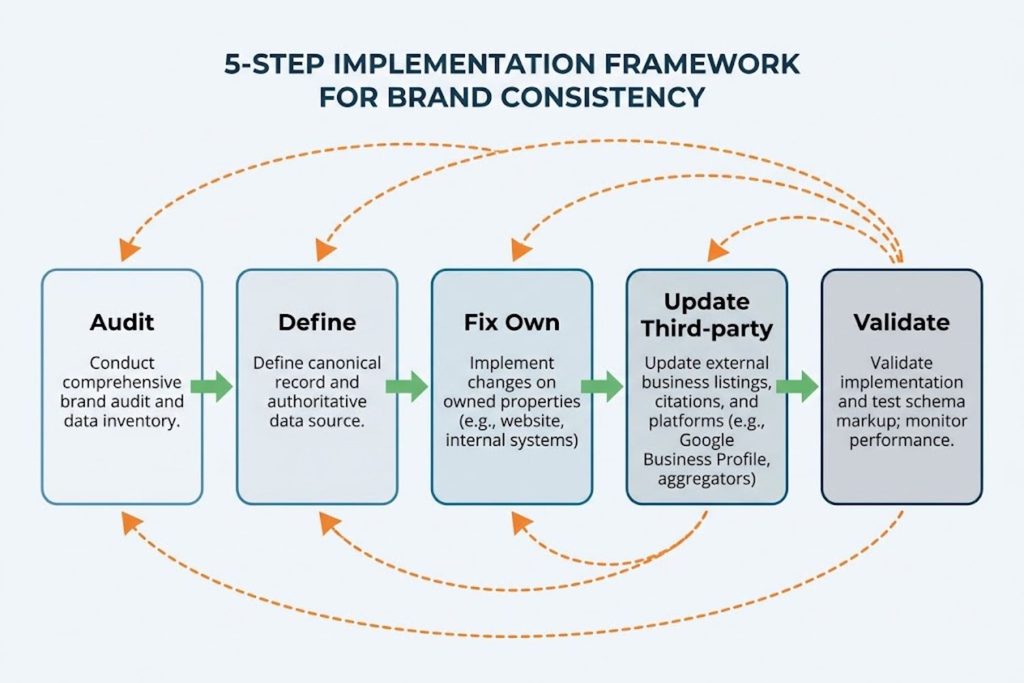
Audit → Define → Fix Own → Update Third-party → Validate
With arrows showing progression and feedback loops
Normalization transformation rules aren’t abstract—they require systematic action. Here’s how to implement them.
Step 1 – Conduct Your Brand Entity Audit
Before you fix anything, you need to know what’s broken.
Audit every place your brand appears online:
- Your official properties (website, social media, app stores)
- Major directory listings (Google Business Profile, Apple Maps, Yelp, LinkedIn)
- Press and media mentions
- Third-party review sites
- Citation databases (Crunchbase, Bloomberg, etc.)
- Social media (verified and unverified accounts)
- Industry-specific databases
For each listing, document:
- Brand name (exact spelling)
- Business description
- Address
- Phone number
- Website URL
- Operating hours
- Categories
- Products/services listed
Look for inconsistencies:
- Does your brand name match across all listings?
- Do addresses align?
- Are business descriptions similar or contradictory?
- Do website URLs all point to the primary domain?
- Are there duplicate or outdated listings?
Most brands find 50+ inconsistencies in their first audit.
Step 2 – Define Your Canonical Brand Record
Your canonical record is the single source of truth. Every other instance should reference this.
Document:
- Official legal business name
- DBA (if applicable)
- Primary domain
- Headquarters address
- All service locations
- Official product/service descriptions
- Founding year
- Key team members (if relevant)
- Social media profiles (official only)
- Contact information
- Brand guidelines (approved variations)
Example canonical record for a fictional company:
CANONICAL BRAND RECORD

Legal Name: TechWoid Inc.
DBA: TechWoid (preferred public name)
Founded: 2018
Primary Domain: techwoid.com

Official Description:
"TechWoid provides AI-powered project management software for distributed teams.
We focus on real-time collaboration, deadline tracking, and automation."

Headquarters: 123 Tech Street, New York, NY 10001
Service Areas: United States, Canada, UK, Australia

Primary Products:
- TechWoid Platform (main software)
- TechWoid API (developer integration)
- TechWoid Analytics (reporting tool)

Official Social Media:
- LinkedIn: linkedin.com/company/techwoid-inc
- Twitter: @techwoidapp
- Product Hunt: techwoid

Approved Variations:
- TechWoid
- TechWoid Platform
- TechWoid Inc.

Non-Approved Variations:
- Tech Woid (space)
- TechWoid Ltd. (wrong entity type)
- Old names from before 2023 rebranding

Schema Markup Type: Organization
Step 3 – Audit and Fix Your Own Properties First
You control your website. Fix it first.
Actions:
- Ensure your website domain is your primary domain
- Update your homepage with canonical brand name in H1
- Implement Organization schema markup
- Ensure all internal links use primary domain
- Update social media bios and links
- Update email signatures
- Remove or update outdated content about your company
Don’t change things on the fly. Create a change log documenting what you’re fixing and why. Test everything.
Step 4 – Target High-Authority Third-Party Listings
Once your own properties are clean, systematically update high-authority directories in this order:
- Google Business Profile (highest priority)
- Update name, description, hours, address
- Add complete business information
- Respond to all reviews
- Apple Maps & Bing Places (important for Apple and Microsoft users)
- Ensure consistency with Google
- Update all available fields
- LinkedIn Company Page (critical for B2B brands)
- Ensure accuracy
- Add detailed company information
- Link social profiles
- Industry-Specific Databases
- Crunchbase (for tech companies)
- G2 (for software)
- Industry directories relevant to your space
- Local Directories
- Yelp, BBB, Yellow Pages (if applicable)
- Local chamber of commerce listings
Don’t try to update every listing at once. Prioritize by authority. Google Business Profile updates have the highest impact on AI visibility.
Step 5 – Implement Schema Markup & Validate
Schema markup tells AI systems (and search engines) what type of entity you are and what information matters.
Minimum schema for most brands:
json
{
  "@context": "https://schema.org",
  "@type": "Organization",
  "name": "TechWoid Inc.",
  "alternateName": ["TechWoid", "TechWoid Platform"],
  "url": "https://techwoid.com",
  "logo": "https://techwoid.com/logo.png",
  "sameAs": [
    "https://www.linkedin.com/company/techwoid-inc",
    "https://twitter.com/techwoidapp"
  ],
  "address": {
    "@type": "PostalAddress",
    "streetAddress": "123 Tech Street",
    "addressLocality": "New York",
    "addressRegion": "NY",
    "postalCode": "10001",
    "addressCountry": "US"
  },
  "founded": "2018",
  "foundingDate": "2018-01-01",
  "description": "AI-powered project management software for distributed teams",
  "contactPoint": {
    "@type": "ContactPoint",
    "contactType": "Customer Service",
    "telephone": "+1-555-123-4567",
    "email": "support@techwoid.com"
  }
}
Validation steps:
- Use Google’s Rich Results Test to verify schema markup
- Check that visible page content matches your schema
- Test your schema with structured data testing tools
- Monitor Search Console for schema-related errors
Common Mistakes That Tank AI Visibility (And How to Avoid Them)
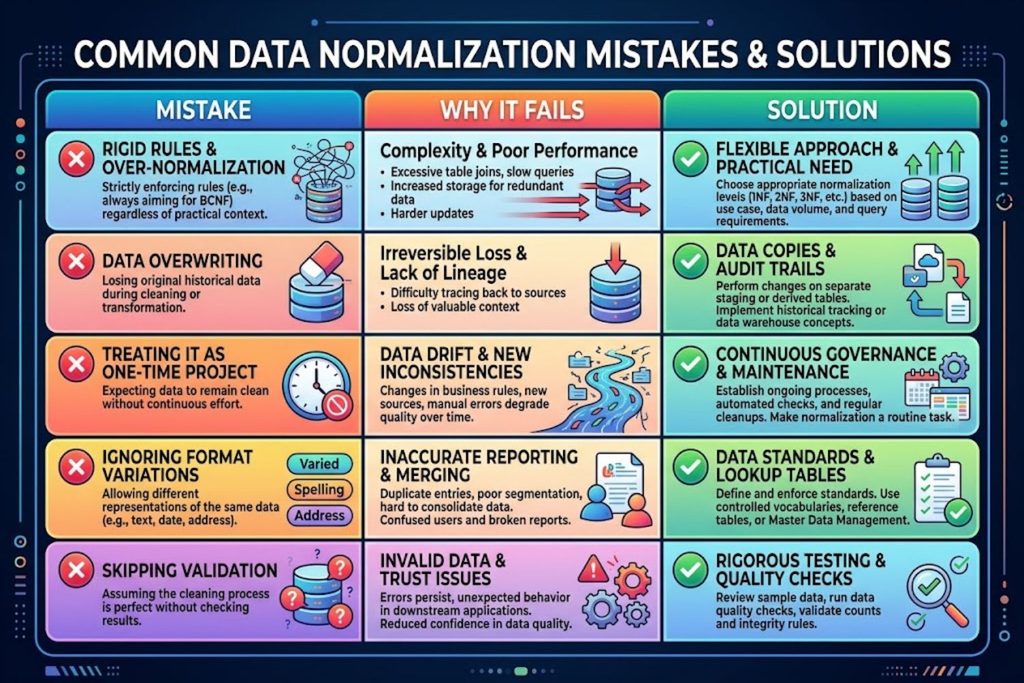
Mistake | Why it fails | Solution
Visual layout with error icon for mistakes, checkmark for solutions
Mistake #1 – Rigid Rule Sets Without Exception Handling
The worst approach: Build a normalization rule that automatically “fixes” every instance of non-canonical data.
Why it fails: Some brands intentionally break conventions. “iPhone” isn’t a typo. “eBay” capitalizes the B intentionally. A rigid rule that forces everything to Title Case will destroy brand identity.
Solution: Build exception handling into your rules. Document intentional variations. Make your automation intelligent enough to know when NOT to change something.
Rule: Standardize brand name to "TechWoid Inc."
Exceptions:
- "techwoid" (lowercase on social media by design)
- "TECHWOID PLATFORM" (all caps in specific branded assets)
Transform everything else, but preserve exceptions.
Mistake #2 – Overwriting Raw Data Without Backups
Once you transform data, you can’t undo it if the transformation was wrong.
Why it fails: You might discover your normalization rule was incorrect after it’s affected 1,000 listings. Now you have no original data to reference.
Solution: Always preserve raw data alongside normalized data. Don’t overwrite. Create an audit trail.
Original data: "TechCorp Solutions Inc."
Normalized data: "TechWoid Inc." (with link back to original)
Timestamp: 2026-01-15
Source: Directory audit
Status: ACTIVE transformation
Mistake #3 – Treating Normalization as a One-Time Project
The worst mistake: Running one big audit, fixing everything, then assuming you’re done.
Why it fails: New listings and mentions keep appearing, creating data drift. Normalize on an ongoing basis instead. New platforms emerge. Your team creates new accounts. Competitors might create fake listings using your name.
Solution: Build normalization into your quarterly review cycle. Make it ongoing.
Quarterly audit checklist:
- Search for your brand across major directories
- Check for new listings created since your last audit
- Validate that previous corrections are still in place
- Update outdated information
- Check for impersonation or brand spoofing
Mistake #4 – Ignoring Intentional Brand Variations
Your brand might legitimately appear in different formats:
- Lowercase for social media (@techwoid)
- Title case for official communications (TechWoid)
- All caps for branded assets (TECHWOID)
- Abbreviated (TW)
Forcing all of these into one format destroys brand consistency.
Solution: No exception handling. Some brands intentionally break casing conventions. A rigid rule set without exceptions will “fix” things that were never broken.
Document approved variations and preserve them. Transform everything else.
Mistake #5 – Skipping Schema Markup Validation
Validate every change before it goes live. Give models concrete, checkable statements to cite, not vague marketing language.
Why it fails: You might update your company information across directories, but if your schema markup is outdated or contradictory, AI models still see conflicting signals.
Solution: After every major change, validate your schema markup. Test it in Google’s Rich Results Test and Schema.org validation tools. Ensure it matches what’s visible on your page.
Measuring Impact: From Rules to Real AI Citations
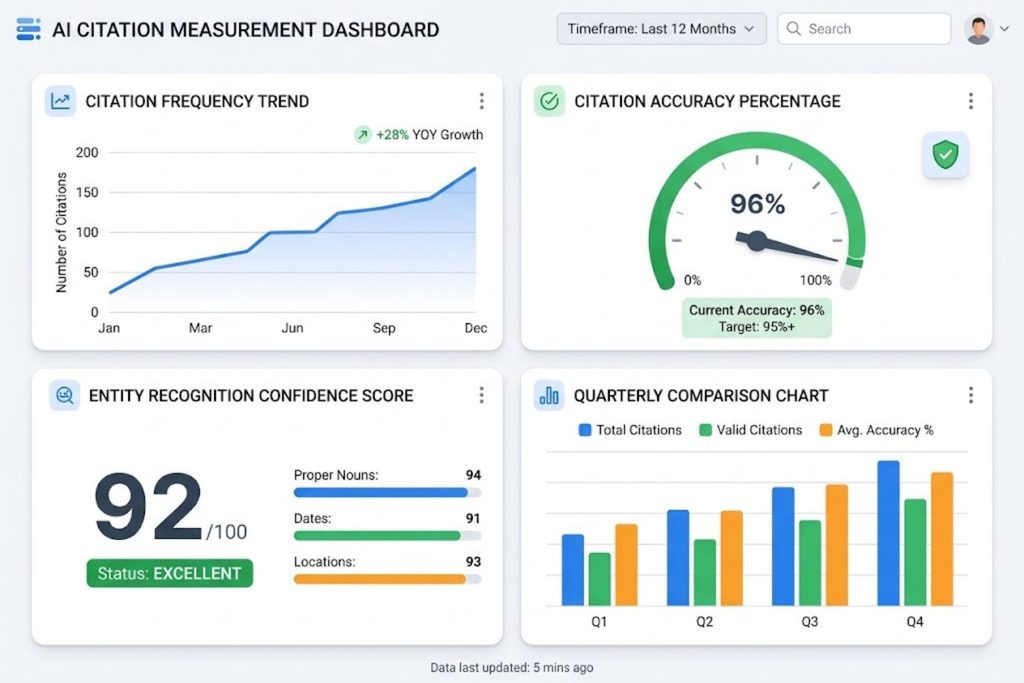
Citation frequency trend line (improving over time)
Citation accuracy percentage gauge
Entity recognition confidence score
Quarterly comparison chart
You’ve implemented normalization transformation rules. But did they actually work?
The Three Metrics That Actually Matter
Metric #1: Citation Frequency
How often does your brand appear in AI-generated answers across ChatGPT, Gemini, Perplexity, and other platforms?
Measure: Use tools like BrandRank.ai or manual testing to track how often your brand is cited when relevant queries are asked.
Baseline: Test your brand against 50-100 relevant questions before implementing rules.
Target: 30-40% increase in citations within 3 months.
Metric #2: Citation Accuracy
When AI models cite your brand, do they get the facts right?
Measure: Track whether citations accurately describe your company, products, and positioning.
Baseline: Run 50 sample queries and manually evaluate citation accuracy.
Target: 95%+ of citations should be accurate (not outdated, not contradictory to your official data).
Metric #3: Entity Recognition Confidence
Do AI models confidently identify you as a single entity, or do they show confusion or hesitation?
Measure: Track whether models cite you with confidence or hedge their language.
Baseline: “TechWoid may be” vs “TechWoid is” — confident citations matter.
Target: All citations should be confident and unhesitating.
How to Test Whether Your Rules Are Working
- Create a test list of 50 relevant queries related to your industry and offerings
- Examples: “Best project management software for remote teams”
- “Top collaboration tools for startups”
- “Most affordable team communication platform”
- Test each query across ChatGPT, Google Gemini, Perplexity, Claude, and Meta AI
- Copy the full AI-generated response
- Note whether your brand is mentioned
- Note whether you’re cited positively, negatively, or neutrally
- Track results in a simple spreadsheet
- Query | Platform | Mentioned? | Accuracy | Citation Confidence | Notes
- Repeat quarterly to see if citation rates improve
Example test results:
| Query | Platform | Mentioned | Accuracy | Confidence |
|---|---|---|---|---|
| Best PM tool for remote teams | ChatGPT | Yes | Accurate | High |
| Top collaboration software | Gemini | No | N/A | N/A |
| Affordable team communication | Perplexity | Yes | Accurate | Medium |
If your “Mentioned” percentage improves from 30% to 45% over three months, your normalization rules are working.
Quarterly Audit Checklist
Every three months, run through this checklist:
- Search for your brand across 10+ major directories
- Compare data across directories—do names match?
- Check for duplicate listings created since last audit
- Verify all previous fixes are still in place
- Update founding date if relevant
- Correct any product description drift
- Validate schema markup against current page content
- Test 50 relevant queries across AI platforms
- Document changes and results
- Update transformation rules based on new issues found
How This Differs from Traditional Structured Data & SEO
Schema Markup Alone Isn’t Enough
Many brands implement schema markup and assume that’s sufficient. It’s necessary, but not sufficient.
Schema markup tells AI systems what you are. Normalization tells them how to find and consolidate all the different versions of you across the web.
Traditional structured data approach:
- Add Organization schema to homepage ✓
- Implement breadcrumb markup ✓
- Add Product schema ✓
- Assume Google and AI systems now understand you
Gap: This only works if your data is already clean and consistent. If you have conflicting entity information across the web, schema markup on your own site doesn’t resolve that conflict.
Normalization transformation rules approach:
- Schema markup on your site (one piece of the puzzle)
- Consistent data across directories (critical piece)
- Entity linking and canonical consolidation (tie it together)
- Ongoing monitoring and updates (keep it working)
Why Answer Engine Optimization Requires Different Thinking
Traditional SEO optimizes for search engine algorithms. Answer Engine Optimization (AEO) optimizes for AI model confidence in citing you.
Traditional SEO assumes:
- More authority (backlinks) = higher ranking
- Keyword optimization drives relevance
- Technical SEO removes crawlability issues
- Rankings correlate with visibility
AEO assumes:
- Entity consistency = citation confidence
- Data corroboration = AI trust
- Structured information = better representation
- Brand visibility correlates with answer inclusion
These aren’t contradictory—you need both. But the emphasis is different. In AEO, data quality and consistency matter more than keyword volume or technical speed optimizations.
Tools & Platforms That Support Transformation Rules
BrandRank.ai Platform Overview
BrandRank.ai is the primary platform built specifically to measure and support brand normalization transformation rules.
Key features:
- AI Search Visibility Score: Tracks how often and how accurately your brand appears in ChatGPT, Gemini, Perplexity, and other platforms
- Content Readiness Score: Evaluates whether your content and structured data are optimized for AI citation
- Brand Vulnerability Score: Identifies risks (gaps, inconsistencies, false information) that could harm AI visibility
- BRAND ANSWER Diagnostic: Specific recommendations for improving entity consistency and data quality
How it works:
- Scans how your brand appears across the web
- Identifies inconsistencies and normalization opportunities
- Recommends specific transformation rules
- Measures the impact of changes on AI citations
Best for: Brands with significant online presence, multiple listings, or complex entity relationships.
Open-Source & DIY Approaches
If you’re building your own system:
Entity Resolution Tools:
- Apache Spark (large-scale data processing)
- Dedupe.io (open-source record linkage)
- OpenRefine (data cleaning and transformation)
Data Validation:
- Great Expectations (data quality frameworks)
- Pandas (data manipulation in Python)
Schema Validation:
- Google Rich Results Test (basic validation)
- Schema.org validator
- Structured Data Testing Tool
Manual Audit Tools:
- Google Business Profile (free, critical)
- Google Search Console (free, essential)
- Bing Webmaster Tools (free)
- SEMrush or Ahrefs (paid, comprehensive)
DIY workflow:
- Export data from directories using API or manual export
- Use Dedupe.io or OpenRefine to identify duplicates
- Create canonical records in a spreadsheet
- Implement transformation rules using Python or Zapier
- Validate results using Google’s Rich Results Test
- Monitor ongoing consistency using Search Console
Industry Examples: Normalization Rules in Action
Healthcare: Patient Records Across Systems
Healthcare systems have used data normalization for decades. Hospitals, clinics, and insurance companies need to link the same patient across different medical records systems.
The problem: A patient might be listed as “John Smith,” “J. Smith,” “John Michael Smith,” and “JMS” across different hospitals. Without normalization, the system treats these as four separate patients.
The solution: Healthcare systems implement matching algorithms that identify probable duplicates, then manually verify and merge records.
Lesson for brands: Your data fragmentation is similar. Different platforms use different formats. Normalization consolidates them.
E-Commerce: Product Standardization at Scale
Amazon, eBay, and Walmart deal with millions of products. A single physical item (a specific iPhone model) might be listed on Amazon, eBay, Walmart, and specialty retailers—each with different titles, descriptions, and specifications.
The problem: Consumers see “iPhone 16 Pro” on one site and “Apple iPhone 16 Pro 256GB Silver” on another. Systems don’t recognize these as the same product.
The solution: E-commerce platforms implement product data standards (like GS1 barcodes) and normalization rules. Amazon standardized product data around ASIN (Amazon Standard Identification Number). This allows comparison across sellers.
Lesson for brands: Your products need consistent identity. Use your own internal product IDs as canonical references, then map variations to these IDs.
SaaS: Multi-Region Brand Consistency
SaaS companies often operate globally with multiple sub-brands, regional variations, and acquired companies.
The problem: Salesforce operates globally with regional brands. In Europe, people might search for “Salesforce EMEA” or “Salesforce Europe” while in North America, they search “Salesforce CRM.” Data fragmentation by region.
The solution: Establish canonical entity records for each brand and region, link them with schema markup, and maintain consistent data across all properties and directory listings.
Lesson for brands: If you operate globally or have acquired companies, implement regional normalization rules while maintaining a primary entity link.
FAQ
Q1: Is BrandRank.ai normalization transformation rules an official framework, or industry shorthand?
A: It’s industry shorthand. BrandRank.AI’s publicly named framework is the Brand Health and Trust framework, introduced through its May 2026 partnership with Burke, Inc. However, the normalization transformation rules concept is widely discussed and practical regardless of official naming.
Q2: How long does it take to see results from normalization transformation rules?
A: Most brands see initial improvements in citation frequency within 30-60 days, with full impact visible within 3-6 months. Results depend on how fragmented your existing data is. Brands with 50+ data inconsistencies typically see faster improvements than brands with already-clean data.
Q3: Can I apply normalization transformation rules without using BrandRank.ai?
A: Yes. The principles apply universally. You can implement these using free tools (Google Business Profile, Search Console) combined with manual audits and DIY transformation rules. BrandRank.ai provides automation and comprehensive measurement, but you can execute the fundamentals yourself.
Q4: Will normalization transformation rules guarantee AI citations?
A: No. Clean, consistent data is necessary but not sufficient. You also need high-quality content, topical authority, and trustworthiness signals. Think of normalization as removing friction—it doesn’t guarantee the sale, but it removes obstacles.
Q5: How often should I update my normalization transformation rules?
A: Normalize on an ongoing basis instead of once a year, to keep data drift low. Run quarterly audits. Update immediately if you rebrand, launch new products, change locations, or acquire companies.
Q6: What’s the difference between normalization transformation rules and entity SEO?
A: Entity SEO is the broader practice of establishing brand authority and entity signals. Normalization transformation rules are a specific tactic within entity SEO focused on data consistency. Entity SEO includes topical authority, content quality, and relationship mapping. Normalization rules focus specifically on data cleanliness.
Q7: Can I use 301 redirects instead of updating directory listings?
A: For your own website URLs, yes. For directory listings (Google Business Profile, Yelp, etc.), no. Redirects only work on your own domain. You must update third-party listings directly.
Q8: What if my brand name is intentionally stylized (like “iPhone” or “eBay”)?
A: Document this as an approved variation and build exception handling into your rules. Don’t force your stylization to change in your transformation rules. However, for internal normalization purposes (database records, schema markup), you may need to specify one canonical format while preserving the stylization for display purposes.
Q9: How do I handle outdated information that competitors have posted about my brand?
A: Use BrandRank.ai or manual monitoring to identify incorrect information. Contact the source directly to request correction. For major errors (wrong founding date, false claims), contact the platform’s support team. Google also has a process for reporting factually inaccurate information in search results.
Q10: Should I consolidate all my social media accounts into one, or maintain multiple?
A: You can legitimately maintain multiple accounts (for different products, regions, or teams) as long as you document the relationships. In your schema markup, specify which accounts are official using the “sameAs” field, and which are secondary. This helps AI models understand your multi-account structure.
Q11: How do normalization transformation rules affect traditional SEO rankings?
A: They don’t directly impact rankings, but they support SEO by improving topical authority signals and entity consistency. Search engines prefer brands with clean, corroborated data. Normalization supports this indirectly.
Q12: What if my brand has legitimate variations (e.g., DBA vs. legal name)?
A: Document both. Use your legal name as canonical for formal contexts (schema markup, directory listings). Use your DBA as the preferred public name. Link them in schema markup using “alternateName” and “sameAs” fields so AI models understand the relationship.
Q13: Can I use automation to update all my directory listings at once?
A: For some platforms (like Google Business Profile through APIs), yes. But most directories don’t allow bulk updates. Start with high-priority platforms (Google, Apple Maps, LinkedIn), then systematically update others. Don’t automate updates without testing small batches first.
Q14: How does this relate to Answer Engine Optimization (AEO)?
A: Answer Engine Optimization (AEO) focuses on increasing the chances that AI systems like ChatGPT, Gemini, Claude, and Perplexity accurately cite your brand in generated answers. Normalization transformation rules are a fundamental tactic within AEO. AEO also includes content quality, topical authority, and structured data—but normalization rules are the foundation. Ai Insights News
Q15: How do I measure whether my normalization efforts are actually improving AI citations?
A: Use the three metrics outlined earlier: citation frequency, citation accuracy, and entity recognition confidence. Test 50 relevant queries quarterly across AI platforms. Track results over time. Compare your citation rate before and after implementing rules. Most brands see 25-40% improvement within 3 months if starting from fragmented data.