
If you’ve built web applications, you’ve heard the term “controller.” But most developers only have a surface-level understanding of what controllers actually do and how to design them properly.
This guide goes deeper.
You’ll learn what controllers are, why they matter, how to architect them for scalability, the mistakes that trap most developers, and how to build controllers that perform well in production.
What Are Controllers in Web Development?
The Core Definition
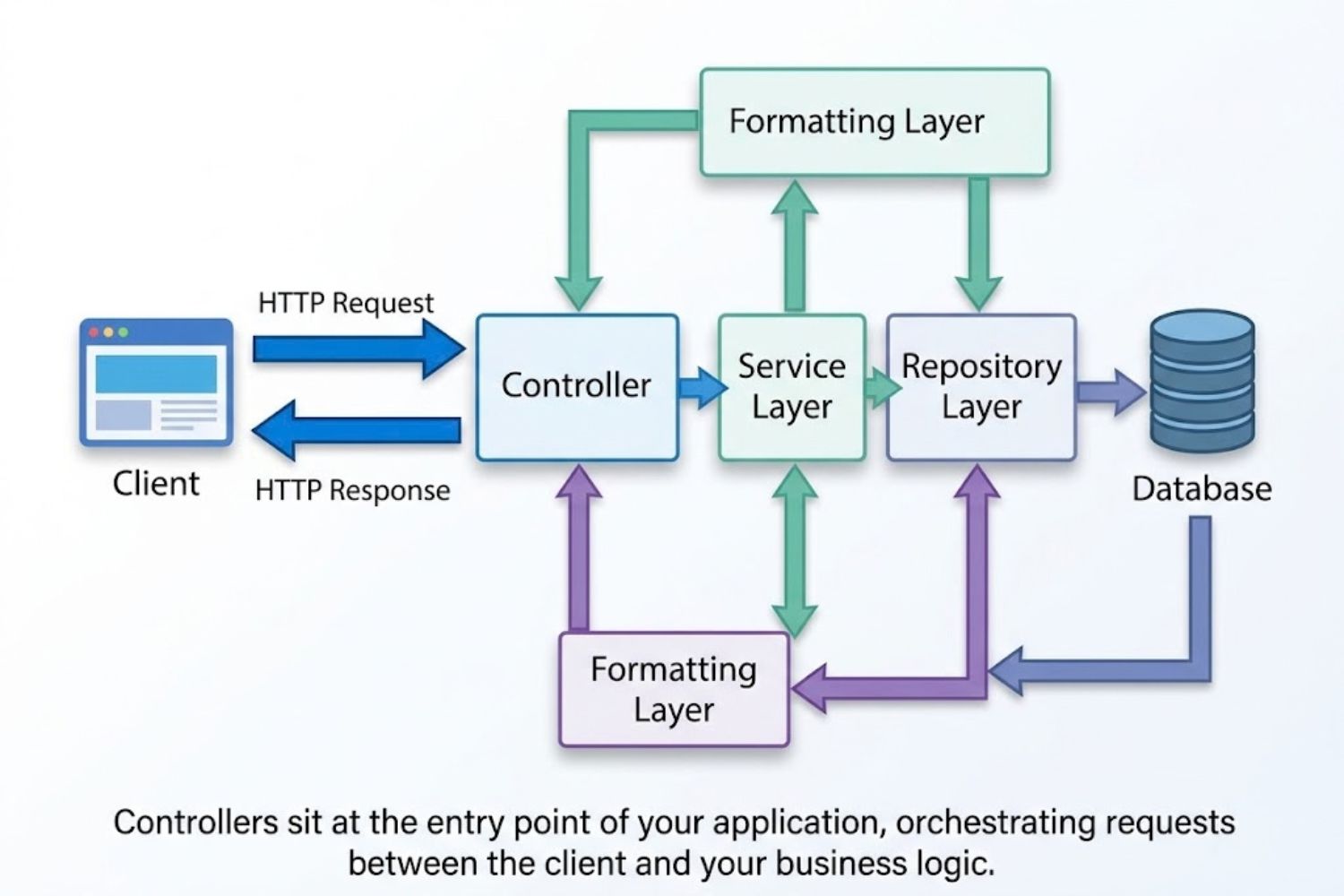
A controller is the component that handles incoming HTTP requests and returns responses. It sits between your routes and your business logic, acting as the traffic director for your application.
Here’s the simplest way to think about it: A controller receives a request, processes it (or delegates processing), and sends back a response.
Request → Controller → Service Layer → Database
                ↓
            Response ← Formatting ← Data
Controllers are the bridge between what the client needs and what your application can deliver.
Controllers vs. Other Application Layers
Many developers confuse controllers with other layers. Let’s clarify:
Controller: Handles HTTP request/response cycle. Maps routes to functions. Validates input parameters.
Service Layer: Contains business logic. Performs calculations. Coordinates between data sources. Usually framework-agnostic.
Repository/DAO: Directly queries the database. Abstracts data access patterns. Handles persistence.
Model: Represents your data structure. Defines schema. Enforces data integrity rules.
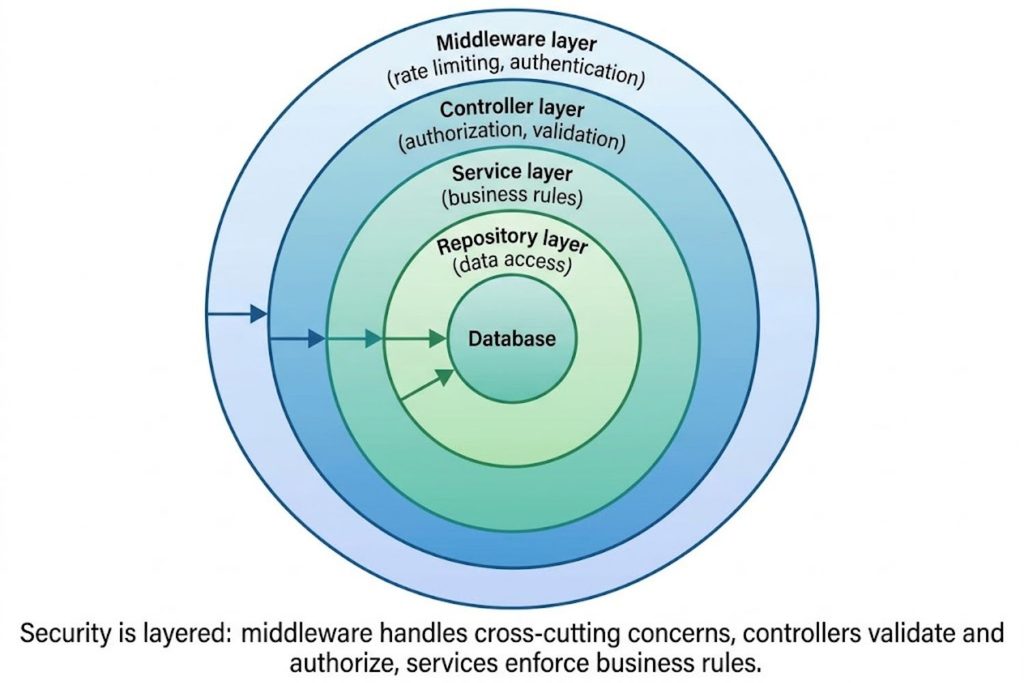
Middleware: Runs before or after controllers. Handles cross-cutting concerns (logging, authentication, rate limiting).
The controller’s job is not to calculate profit margins, authenticate users deeply, or query databases directly. Its job is to orchestrate—to call the right service with the right parameters and format the response.
Why Controllers Matter in Modern Architectures
Controllers serve three critical functions:
1. Request Routing: They determine which code executes based on HTTP method (GET, POST, PUT, DELETE) and URL path.
2. Input Validation: They validate parameters before data reaches your business logic. Bad input dies at the controller level.
3. Response Formatting: They transform internal data structures into API responses that clients understand (JSON, XML, HTML).
Without well-designed controllers, your entire application becomes fragile.
Controller Responsibilities & Design Principles
The Single Responsibility Principle
A controller should do one thing: coordinate a single business operation.
If your controller is:
- Querying multiple databases
- Performing complex calculations
- Sending emails
- Logging to multiple systems
…you’ve violated the Single Responsibility Principle.
Before (Bad):
POST /users/register → validateInput → hashPassword → saveToDatabase → sendConfirmationEmail → logToAnalytics → returnResponseThis one controller does everything. When something breaks, everything breaks.
After (Good):
POST /users/register → validateInput → callUserService.register() → returnResponse
                                    ↓
                      UserService handles: hashing, saving, email, logging
The controller delegates. The service orchestrates.
Separation of Concerns
Each layer should be independently testable and replaceable.
If your controller imports database libraries directly, you’ve created tight coupling. If you need to change databases, you change your controller. Bad.
Instead:
- Controller → depends on → Interface/Contract
- Service Layer → implements → Interface/Contract
- Database Layer → implements → different Interface/Contract
Swap implementations without touching the controller.
Request-Response Handling
A controller’s core responsibility:
- Receive the HTTP request with parameters, headers, and body
- Validate that the input makes sense
- Delegate to the service layer
- Transform the response into the expected format
- Return the HTTP response with appropriate status code
That’s it. Don’t do more.
Controller Patterns Across Popular Frameworks
RESTful Controllers (Express, FastAPI, Django)
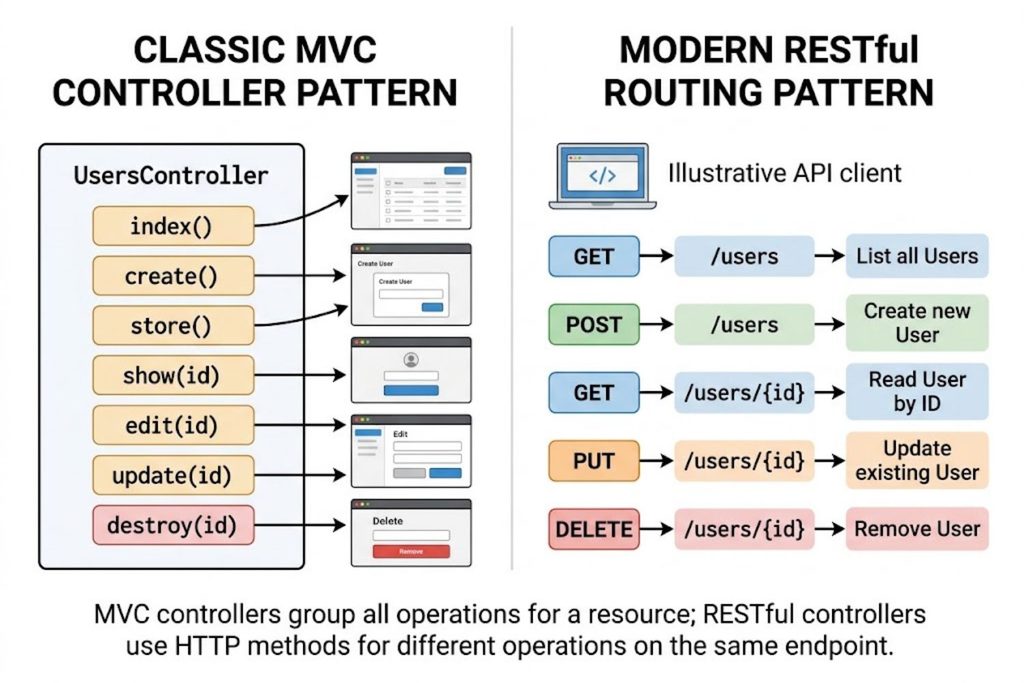
RESTful controllers map HTTP methods to resource operations:
javascript
// Express.js example
router.get('/users/:id', getUser);           // Read
router.post('/users', createUser);           // Create
router.put('/users/:id', updateUser);        // Update
router.delete('/users/:id', deleteUser);     // Delete
This is the modern standard. Each route calls a controller function designed for that specific operation.
Advantage: Predictable. Easy to understand. Follows conventions.
Disadvantage: Can lead to controller bloat if not organized carefully.
MVC Controllers (Laravel, Ruby on Rails)
Traditional MVC controllers handle multiple operations per resource:
php
class UserController {
  public function show($id) { }           // GET /users/1
  public function create() { }            // GET /users/create
  public function store(Request $req) { } // POST /users
  public function edit($id) { }           // GET /users/1/edit
  public function update($id) { }         // PUT /users/1
  public function destroy($id) { }        // DELETE /users/1
}
All user-related operations live in one class.
Advantage: Related logic grouped together. Convention over configuration.
Disadvantage: Controllers can grow large quickly.
Spring Boot Controllers (Annotation-Driven)
Spring uses annotations to declare controllers and routes:
java
@RestController
@RequestMapping("/api/users")
public class UserController {

  @GetMapping("/{id}")
  public ResponseEntity<User> getUser(@PathVariable Long id) {
    return ResponseEntity.ok(userService.findById(id));
  }

  @PostMapping
  public ResponseEntity<User> createUser(@RequestBody UserDTO dto) {
    return ResponseEntity.status(201).body(userService.create(dto));
  }
}
Annotations handle routing and response formatting.
Advantage: Clear metadata. Type-safe. Framework handles serialization.
Disadvantage: Requires understanding Spring’s extensive annotation system.
GraphQL Controllers & Resolvers
GraphQL doesn’t use traditional controllers. Instead, you define resolvers:
javascript
const resolvers = {
  Query: {
    user(parent, args) {
      return userService.findById(args.id);
    }
  },
  User: {
    posts(parent) {
      return postService.findByUserId(parent.id);
    }
  }
};
Each field on the schema has a resolver function.
Advantage: Precise data fetching. Flexible queries.
Disadvantage: Different mental model. Complex nested resolvers require careful design.
Building Scalable Controllers
Dependency Injection & Loose Coupling
Your controller should not create its own dependencies.
Bad (Hard-Coded Dependencies):
javascript
class UserController {
  getUser(id) {
    const db = new Database();
    const user = db.query("SELECT * FROM users WHERE id = ?", [id]);
    return user;
  }
}
If you change database libraries, you rewrite the controller.
Good (Injected Dependencies):
javascript
class UserController {
  constructor(userService) {
    this.userService = userService;
  }

  getUser(id) {
    return this.userService.findById(id);
  }
}
Inject the service. The controller doesn’t care how the service works internally.
Middleware Integration
Middleware runs before your controller and can augment the request or short-circuit it.
javascript
// Authentication middleware
app.use((req, res, next) => {
  if (!req.headers.authorization) {
    return res.status(401).json({ error: 'Unauthorized' });
  }
  req.user = verifyToken(req.headers.authorization);
  next();
});

// Now in your controller, req.user already exists
This keeps authentication logic out of controllers. Controllers assume the request is valid when they receive it.
Async/Await Patterns in Modern Controllers
Modern controllers frequently handle asynchronous operations. Use async/await, not callback chains.
javascript
// Bad: Callback Hell
router.get('/user/:id', (req, res) => {
  userService.getUser(req.params.id, (err, user) => {
    if (err) {
      return res.status(500).json({ error: err });
    }
    postService.getPosts(user.id, (err, posts) => {
      if (err) {
        return res.status(500).json({ error: err });
      }
      res.json({ user, posts });
    });
  });
});

// Good: Async/Await
router.get('/user/:id', async (req, res) => {
  try {
    const user = await userService.getUser(req.params.id);
    const posts = await postService.getPosts(user.id);
    res.json({ user, posts });
  } catch (err) {
    res.status(500).json({ error: err.message });
  }
});
Async/await is more readable, easier to debug, and reduces nesting.
Rate Limiting & Throttling
Controllers often need rate limiting to prevent abuse.
javascript
const rateLimit = require('express-rate-limit');

const limiter = rateLimit({
  windowMs: 15 * 60 * 1000, // 15 minutes
  max: 100 // limit each IP to 100 requests per windowMs
});

app.post('/login', limiter, (req, res) => {
  // Login logic
});
Rate limiting should happen at the middleware level, before your controller code runs. Controllers don’t enforce throttling—middleware does.
Security in Controllers
Input Validation & Sanitization
Never trust input. Validate and sanitize everything.
javascript
router.post('/users', (req, res) => {
  // Validate email format
  if (!req.body.email || !isValidEmail(req.body.email)) {
    return res.status(400).json({ error: 'Invalid email' });
  }

  // Validate age is a number
  if (typeof req.body.age !== 'number' || req.body.age < 18) {
    return res.status(400).json({ error: 'Must be 18 or older' });
  }

  // Sanitize name (remove HTML tags)
  const sanitizedName = sanitizeHtml(req.body.name);

  const user = { email: req.body.email, age: req.body.age, name: sanitizedName };
  return res.json(user);
});
Validation catches bad input early. Sanitization prevents injection attacks.
Authentication & Authorization
Authentication verifies who you are. Authorization checks what you’re allowed to do.
javascript
// Middleware: Verify authentication
async function authenticate(req, res, next) {
  const token = req.headers.authorization?.split(' ')[1];
  if (!token) return res.status(401).json({ error: 'No token' });

  try {
    req.user = await verifyToken(token);
    next();
  } catch {
    res.status(401).json({ error: 'Invalid token' });
  }
}

// Middleware: Check authorization
function requireAdmin(req, res, next) {
  if (req.user.role !== 'admin') {
    return res.status(403).json({ error: 'Forbidden' });
  }
  next();
}

// Controller with both middlewares
router.delete('/users/:id', authenticate, requireAdmin, (req, res) => {
  // By the time we're here, we know:
  // 1. User is authenticated (req.user exists)
  // 2. User has admin role
  userService.delete(req.params.id);
  res.json({ success: true });
});
Separate authentication from authorization. Stack middleware to enforce both.
CSRF Protection
CSRF (Cross-Site Request Forgery) exploits the trust a browser has in authenticated sessions.
javascript
const csrfProtection = csrf({ cookie: true });

// Form submission (GET returns the token)
router.get('/transfer-money', csrfProtection, (req, res) => {
  res.json({ csrfToken: req.csrfToken() });
});

// Form action (POST requires the token)
router.post('/transfer-money', csrfProtection, (req, res) => {
  if (!req.csrfToken()) {
    return res.status(403).json({ error: 'CSRF token invalid' });
  }
  // Process transfer
});
CSRF tokens ensure the request came from your application, not a malicious site.
Output Encoding
When returning data, ensure it’s properly encoded for the context.
javascript
// User data might contain < or > characters
const user = { name: '<script>alert("xss")</script>' };

// JSON encoding escapes special characters
res.json(user); // Safe: {"name":"<script>alert(\"xss\")</script>"}

// But if you return HTML, encode it explicitly
res.send(`<h1>${escapeHtml(user.name)}</h1>`);
Modern frameworks handle JSON encoding automatically. If you’re generating HTML, use proper escaping libraries.
Error Handling Strategies
Exception Handling in Controllers
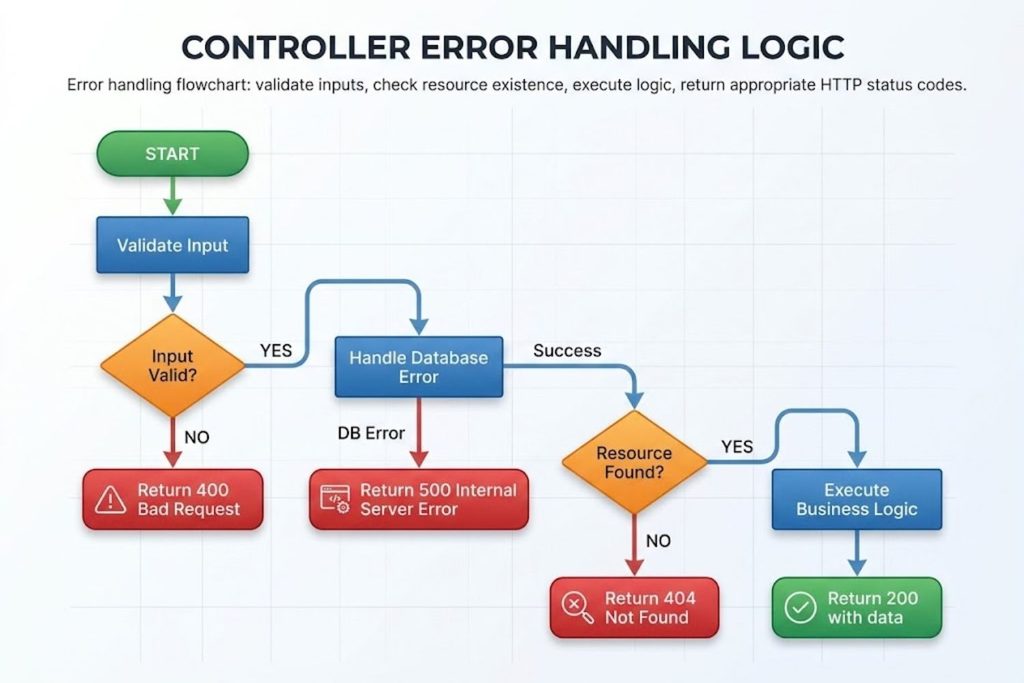
Controllers should catch errors and return appropriate HTTP status codes.
javascript
router.get('/users/:id', async (req, res) => {
  try {
    const user = await userService.findById(req.params.id);

    if (!user) {
      return res.status(404).json({ error: 'User not found' });
    }

    res.json(user);

  } catch (err) {
    if (err instanceof ValidationError) {
      return res.status(400).json({ error: err.message });
    }

    if (err instanceof DatabaseError) {
      return res.status(500).json({ error: 'Database error' });
    }

    // Unexpected error
    console.error('Unexpected error:', err);
    res.status(500).json({ error: 'Internal server error' });
  }
});
Different exceptions warrant different status codes. Catch them specifically and respond appropriately.
Status Code Management
Use HTTP status codes correctly:
- 200: Success
- 201: Created
- 400: Bad request (client error)
- 401: Unauthorized
- 403: Forbidden
- 404: Not found
- 409: Conflict (e.g., duplicate email)
- 422: Unprocessable entity (validation failed)
- 500: Server error
javascript
// Clear status code usage
if (validationFailed) return res.status(400).json(errors);
if (userNotFound) return res.status(404).json({ error: 'Not found' });
if (emailExists) return res.status(409).json({ error: 'Email already in use' });
if (success) return res.status(201).json(newResource);
Error Response Formatting
Keep error responses consistent.
javascript
// Inconsistent (bad)
res.json({ error: 'Something went wrong' });
res.json({ message: 'Invalid email' });
res.json({ errors: ['Age must be a number'] });

// Consistent (good)
res.json({
  success: false,
  error: 'Invalid email',
  code: 'VALIDATION_ERROR'
});
Define an error format. Use it everywhere. Clients can parse errors predictably.
Logging for Debugging
Log errors with context.
javascript
try {
  const user = await userService.findById(req.params.id);
} catch (err) {
  console.error('Failed to fetch user', {
    userId: req.params.id,
    error: err.message,
    stack: err.stack,
    timestamp: new Date().toISOString(),
    userId: req.user?.id
  });

  res.status(500).json({ error: 'Internal server error' });
}
Structured logging (with context) is more useful than generic logs.
Testing Controllers Effectively
Unit Testing Patterns
Unit tests verify controller logic in isolation.
javascript
describe('UserController', () => {
  let controller, userService;

  beforeEach(() => {
    userService = { findById: jest.fn() };
    controller = new UserController(userService);
  });

  it('returns user when found', async () => {
    const mockUser = { id: 1, name: 'John' };
    userService.findById.mockResolvedValue(mockUser);

    const result = await controller.getUser(1);

    expect(result).toEqual(mockUser);
    expect(userService.findById).toHaveBeenCalledWith(1);
  });

  it('returns null when user not found', async () => {
    userService.findById.mockResolvedValue(null);

    const result = await controller.getUser(999);

    expect(result).toBeNull();
  });
});
Mock dependencies. Test the controller’s behavior. Verify it calls dependencies correctly.
Integration Testing Approaches
Integration tests verify controllers work with real (or realistic) dependencies.
javascript
describe('User API Integration', () => {
  it('GET /users/:id returns user', async () => {
    const response = await request(app)
      .get('/users/1')
      .expect(200);

    expect(response.body).toHaveProperty('id', 1);
    expect(response.body).toHaveProperty('name');
  });

  it('POST /users creates user', async () => {
    const response = await request(app)
      .post('/users')
      .send({ email: 'test@example.com', name: 'Test' })
      .expect(201);

    expect(response.body).toHaveProperty('id');
    expect(response.body.email).toBe('test@example.com');
  });
});
Use a test database. Make real HTTP requests. Verify the full flow works.
Mocking Dependencies
Mocking prevents tests from depending on external systems.
javascript
// Without mocking: depends on real email service
const result = await controller.sendPasswordReset(email);
// Test waits for real email to send (slow, flaky)

// With mocking: simulates email service
const emailService = { send: jest.fn() };
controller = new UserController(userService, emailService);

const result = await controller.sendPasswordReset(email);
// Test verifies emailService.send was called (fast, reliable)
expect(emailService.send).toHaveBeenCalled();
Mock external services, databases, and APIs. Test controller logic quickly and reliably.
Common Controller Mistakes & How to Avoid Them
Business Logic in Controllers (Anti-Pattern)
Controllers shouldn’t calculate profit, apply discounts, or apply business rules.
Bad:
javascript
router.post('/orders', (req, res) => {
  // Business logic in controller
  let total = req.body.items.reduce((sum, item) => {
    let price = item.price;
    if (req.user.isVIP) price *= 0.9; // 10% VIP discount
    if (req.body.promoCode) price *= 0.8; // 20% promo
    return sum + price;
  }, 0);

  // Save to database
  db.query('INSERT INTO orders ...', [total]);
  res.json({ total });
});
When business rules change, you rewrite the controller. When business rules are in the controller, they’re harder to test.
Good:
javascript
router.post('/orders', async (req, res) => {
  const order = await orderService.create(req.body, req.user);
  res.status(201).json(order);
});

// Business logic lives in service
class OrderService {
  create(orderData, user) {
    let total = this.calculateTotal(orderData.items);
    if (user.isVIP) total = this.applyVIPDiscount(total);
    if (orderData.promoCode) total = this.applyPromoCode(total);
    return db.insert('orders', { total, items: orderData.items });
  }
}
Business logic belongs in the service layer. Controllers orchestrate.
Over-Fetching & N+1 Query Problems
Controllers that fetch too much data or query inefficiently kill performance.
Bad (N+1 Problem):
javascript
router.get('/users', async (req, res) => {
  const users = await db.query('SELECT * FROM users');

  // For each user, fetch posts (N additional queries)
  const usersWithPosts = await Promise.all(
    users.map(user =>
      db.query('SELECT * FROM posts WHERE user_id = ?', [user.id])
    )
  );

  res.json(usersWithPosts);
});
If you have 100 users, you execute 101 queries. Slow.
Good (Join or Batch):
javascript
router.get('/users', async (req, res) => {
  // Single query with join
  const usersWithPosts = await db.query(`
    SELECT u.*, p.* FROM users u
    LEFT JOIN posts p ON p.user_id = u.id
  `);

  // Or batch load
  const users = await userService.findAll();
  const postsByUserId = await postService.findByUserIds(users.map(u => u.id));

  res.json(users.map(user => ({
    ...user,
    posts: postsByUserId[user.id] || []
  })));
});
Load data efficiently. Batch queries. Use joins when appropriate.
Tight Coupling to Frameworks
Controllers shouldn’t leak framework details.
Bad (Framework-Dependent):
javascript
class UserController {
  getUser(req, res) {
    const user = db.query('...'); // Framework assumption
    res.json(user); // Express-specific
  }
}
If you switch frameworks, the controller breaks.
Good (Framework-Agnostic Logic):
javascript
class UserController {
  constructor(userService) {
    this.userService = userService;
  }

  async getUser(userId) {
    return this.userService.findById(userId);
  }
}

// Framework-specific adapter
router.get('/users/:id', async (req, res) => {
  const controller = new UserController(userService);
  const user = await controller.getUser(req.params.id);
  res.json(user);
});
Write controller logic that doesn’t depend on Express, Django, or Laravel. Adapt it for your framework.
Inadequate Error Handling
Controllers without proper error handling crash unpredictably.
Bad (No Error Handling):
javascript
router.get('/users/:id', (req, res) => {
  const user = userService.findById(req.params.id); // What if this throws?
  res.json(user); // What if user is undefined?
});
If userService throws or returns undefined, the response is unpredictable.
Good (Comprehensive Error Handling):
javascript
router.get('/users/:id', async (req, res) => {
  try {
    // Validate input
    if (!req.params.id || isNaN(req.params.id)) {
      return res.status(400).json({ error: 'Invalid user ID' });
    }

    const user = await userService.findById(parseInt(req.params.id));

    // Handle not found
    if (!user) {
      return res.status(404).json({ error: 'User not found' });
    }

    res.json(user);

  } catch (err) {
    console.error('Error fetching user:', err);
    res.status(500).json({ error: 'Internal server error' });
  }
});
Validate inputs. Handle edge cases. Catch errors. Log for debugging.
Monitoring & Debugging Controllers
Performance Metrics
Track how long controllers take to respond.
javascript
app.use((req, res, next) => {
  const start = Date.now();

  res.on('finish', () => {
    const duration = Date.now() - start;
    console.log(`${req.method} ${req.path} - ${res.statusCode} - ${duration}ms`);

    // Send to monitoring service
    monitoring.recordDuration(req.path, duration, res.statusCode);
  });

  next();
});
Identify slow endpoints. Optimize the slowest ones.
Distributed Tracing
In microservice architectures, trace requests across multiple services.
javascript
app.use((req, res, next) => {
  // Generate or extract trace ID
  const traceId = req.headers['x-trace-id'] || generateId();
  req.traceId = traceId;

  // Pass to downstream services
  res.setHeader('x-trace-id', traceId);

  // Log with trace ID
  console.log(`[${traceId}] ${req.method} ${req.path}`);

  next();
});
Trace IDs help you follow a single request through multiple services.
Common Bottlenecks
Controllers slow down for predictable reasons:
Database Queries: Use query analysis. Look for missing indexes, N+1 problems, or inefficient joins.
External APIs: Implement timeouts and caching. Batch requests when possible.
JSON Serialization: Large response payloads serialize slowly. Paginate responses. Return only needed fields.
Authentication/Authorization: Verify tokens efficiently. Cache authorization decisions when safe.
Use monitoring to identify which bottleneck affects your specific application.
Evolution: From Traditional to Modern Controller Architecture
Serverless Functions as Controllers
Serverless platforms (AWS Lambda, Google Cloud Functions) blur the line between function and controller.
javascript
// AWS Lambda
exports.getUser = async (event) => {
  const userId = event.pathParameters.id;

  try {
    const user = await userService.findById(userId);
    return {
      statusCode: 200,
      body: JSON.stringify(user)
    };
  } catch (err) {
    return {
      statusCode: 500,
      body: JSON.stringify({ error: 'Server error' })
    };
  }
};
Each Lambda function is a controller. No framework. No server to manage.
Advantages: Autoscaling, pay-per-use, simple deployment.
Disadvantages: Cold starts, vendor lock-in, harder local testing.
Event-Driven Architecture
Modern applications often respond to events instead of HTTP requests.
javascript
// Traditional controller
router.post('/orders', (req, res) => {
  const order = createOrder(req.body);
  res.json(order);
});

// Event-driven
eventBus.on('order:created', async (order) => {
  await sendConfirmationEmail(order);
  await updateInventory(order);
  await createShippingLabel(order);
});

// HTTP trigger just publishes event
router.post('/orders', (req, res) => {
  const order = createOrder(req.body);
  eventBus.publish('order:created', order);
  res.status(201).json(order);
});
Controllers become event publishers. Other services react asynchronously.
Advantages: Loose coupling, scalability, easier to extend.
Disadvantages: Complex to debug, eventual consistency challenges.
API Gateway Patterns
API Gateways act as smart routers before your controllers.
Request → API Gateway → Rate Limit
                     → Authentication
                     → Logging
                     → Route to Controller
The gateway handles cross-cutting concerns. Your controllers focus on business logic.
Common API Gateway tasks:
- Request/response transformation
- Rate limiting and throttling
- API versioning
- Request routing
- Authentication
By centralizing these concerns in a gateway, controllers stay focused.
Summary
Controllers are fundamental to web application architecture. Well-designed controllers:
- Receive requests and validate input
- Delegate to services for business logic
- Transform responses into the expected format
- Handle errors gracefully
- Return HTTP responses with appropriate status codes
The best controllers are thin, focused, and easy to test.
They don’t contain business logic. They don’t reach directly into databases. They don’t leak framework details.
Instead, they orchestrate. They call the right service with validated input. They format the response. They handle errors. That’s it.
As your application grows, consider evolutionary patterns: serverless functions for individual operations, event-driven architecture for asynchronous workflows, API gateways for cross-cutting concerns.
Start with fundamentals. Build controllers that are simple, testable, and maintainable. Everything else will follow.
Key Takeaways
✓ Controllers orchestrate requests and responses—they don’t execute business logic
✓ Separate concerns: validation in middleware, business logic in services, data access in repositories
✓ Dependency injection prevents tight coupling and makes testing straightforward
✓ Proper error handling and HTTP status codes make APIs predictable and debuggable
✓ Input validation, sanitization, and authentication/authorization prevent common security vulnerabilities
✓ Mock dependencies in tests; use integration tests to verify full workflows
✓ Business logic in controllers is the primary anti-pattern; move it to the service layer
✓ Over-fetching and N+1 query problems kill performance; batch and join data efficiently
✓ Monitor controller performance; trace requests across microservices for debugging
✓ Modern architectures use API gateways, serverless functions, and event-driven patterns alongside traditional controllers
Frequently Asked Questions
Q: What’s the difference between a controller and a route?
A: A route is a URL path (e.g., /users/:id). A controller is the function that executes when that route is accessed. Routes map to controllers.
Q: Should controllers access the database directly?
A: No. Controllers should call service methods, which call repository methods that access the database. This separation makes testing and changing databases easier.
Q: How do I test a controller that depends on an external API?
A: Mock the API dependency. In unit tests, verify the controller calls the API with correct parameters. In integration tests, use a stub or test server.
Q: Can a controller use multiple services?
A: Yes. A controller can call multiple services to fulfill a single request. However, if a controller coordinates between many services, consider creating an orchestrator or facade service.
Q: What HTTP status code should I return if a user tries to update another user’s profile?
A: 403 Forbidden. The user is authenticated (401 would be for unauthenticated), but lacks permission for this resource.
Q: Should I validate input in the controller or service?
A: Validate in the controller first (fail fast). Services can validate again for defense-in-depth, but controllers prevent invalid requests from reaching services.
Q: How do I handle optional query parameters?
A: Extract them from the request and pass defaults. Example: const limit = req.query.limit || 10; Then pass to the service.
Q: What’s the best practice for pagination?
A: Accept limit and offset (or page and pageSize) as query parameters. Validate they’re positive integers. Pass to the service. Return results with total count so clients can calculate total pages.
Q: Can I return different response formats (JSON, XML, CSV) from the same controller?
A: Yes, using content negotiation. Check the Accept header and format responses accordingly. Better: create formatter classes so the controller stays simple.
Q: How do I version my API controllers?
A: Use URL paths (/api/v1/users vs. /api/v2/users) or custom headers. Keep old versions working while supporting new ones. Migrate clients gradually.
Q: Should error responses include stack traces?
A: Never in production. Stack traces expose internals and aid attackers. Log them server-side; return generic error messages to clients.
Q: What’s the maximum response size I should return from a controller?
A: Depends on your constraints. General guideline: paginate responses larger than 1 MB. Return partial data and let clients request more.