

You’re sitting at your desk with a 3,000-word blog post. You’ve optimized it for your main keyword. You’ve checked for readability. But something feels off about the balance—you’re not sure if you’ve covered certain topics enough, or if certain words dominate the text too much.
This is where text analysis tools step in. And one of the most popular (and free) options is UploadWords.com.
But what actually happens when you paste text into this tool? How does it work behind the scenes? And more importantly—should you be using it as part of your content workflow?
This guide answers all those questions. We’ll break down exactly what UploadWords.com does, why it matters for tech professionals and content creators, and when it makes sense to use it (and when it doesn’t).
What Is UploadWords.com? (The Tech Behind Text Analysis)
UploadWords.com is a free, browser-based text analysis tool. You paste text into it. The tool scans that text and returns data about word frequency, character counts, keyword density, and generates a visual word cloud.
No signup. No account. No software to download. You go to the site, paste your text, and get results instantly.
But the real value isn’t just the counting—it’s the insights the counts reveal.
How the Tool Actually Works
Here’s the technical flow:
- Text Input — You paste text directly into the web interface or upload a file
- Tokenization — The tool breaks text into individual words and characters
- Frequency Analysis — It counts how many times each word appears
- Filtering — Common words (the, a, and, is) are usually filtered out
- Visualization — Words are sized based on frequency, creating a word cloud
- Data Output — You get a list ranked by word frequency, plus statistics
This process happens in milliseconds. The tool doesn’t store your text on its servers—it processes it client-side, which is why it’s fast and private.
What Makes It Different From Other Tools
Most word counting tools just give you a number: “Your document has 2,847 words.”
UploadWords goes further. It shows you which words matter most in your content. It reveals patterns you’d miss reading the text once.
For example, you might notice:
- You used “algorithm” 47 times (maybe too many)
- Your competitor used “machine learning” 12 times (while you used it 3)
- 8% of your content is a single word (poor keyword balance)
- Your introduction doesn’t use your main keyword at all
These insights are actionable. They shape how you rewrite and rebalance content.
Core Features That Matter for Tech Users
Word Frequency Analysis Explained
This is the primary feature. The tool ranks every word by how often it appears.
Why does this matter?
For SEO: You can verify keyword density. Google doesn’t penalize “keyword stuffing” the way it did in 2005, but natural keyword placement still matters. If your main keyword appears only once in a 2,000-word article, that’s a signal to Google that it’s not central to the topic.
For Branding: If you want a phrase associated with your brand (like “ethical AI” or “human-centered design”), frequency analysis shows whether you’re reinforcing that message consistently.
For Tone: Overuse of certain words creates a repetitive tone. Seeing a word appear 30 times lets you know it’s time to use synonyms.
Character Count & Readability Metrics
Beyond words, you get:
- Total characters (important for meta descriptions—155 character limit)
- Total characters without spaces
- Paragraph count
- Average word length
- Estimated reading time
These data points matter if you’re writing for specific platforms. Twitter has character limits. LinkedIn prefers certain post lengths. Email subject lines have click-through sweet spots around 6-10 words.
Visual Word Clouds (What They Show You)
Word clouds are more than pretty graphics. They’re a rapid visual summary of content emphasis.
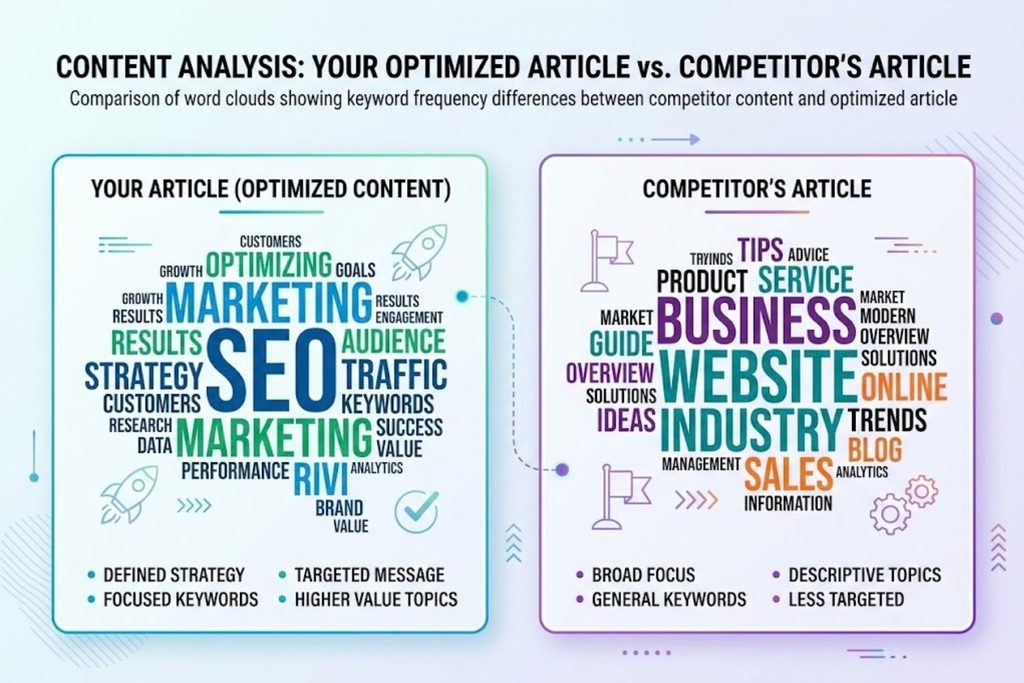
Look at a word cloud of your article and your competitor’s side-by-side. Immediately you can see:
- Which concepts they emphasize more
- Where your content differs in focus
- What terms you’re underusing
A word cloud makes patterns instant and intuitive.
Keyword Density Detection
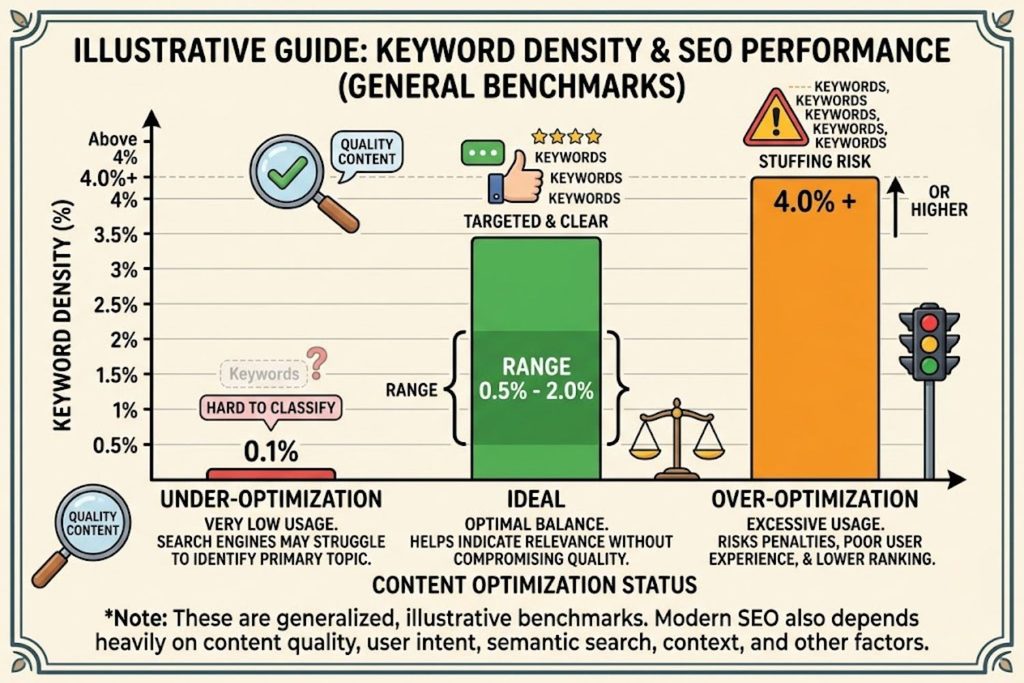
UploadWords shows the percentage of your total words that a specific term represents.
Example: In a 1,500-word article, if your main keyword appears 15 times, that’s a 1% keyword density.
Is 1% good? Generally yes. Most effective SEO content lands between 0.5% and 2% for the primary keyword. Above 2% can feel forced. Below 0.5% might signal the keyword isn’t actually central to your topic.
Real-World Use Cases in Tech & Content
SEO Professionals: Finding Keyword Opportunities
Here’s a practical workflow:
- Analyze your article → identify which words rank high
- Analyze top-ranking competitors → see their word emphasis
- Spot the gap → find keywords competitors emphasize that you don’t
Example: You’re writing about “machine learning applications.” You analyze the top 5 ranking articles. Three of them repeatedly mention “supervised learning” and “labeled data.” Your draft barely touches these. You revise to naturally integrate these terms.
You’re not forcing keywords. You’re realigning your content to match what the search intent actually requires.
Content Creators: Checking Content Balance
Writers often discover they’ve unconsciously over-emphasized certain angles.
A freelance journalist wrote about AI bias. She pasted her article into UploadWords and saw that she’d used “bias” 28 times but only mentioned “fairness” twice. The word cloud showed her article was bias-heavy but fairness-light—missing half the story.
She rebalanced. Now both concepts got proper attention.
Academic Researchers: Text Pattern Analysis
Doctoral students use text analysis to audit their dissertations for:
- Overused jargon (a sign they should simplify)
- Keyword consistency across chapters
- Whether they’re defining unfamiliar terms (every term’s first mention should define it)
UX Writers: Tone & Word Choice Auditing
A UX writer at a tech company needs microcopy to feel friendly but professional. She paste her error messages into UploadWords and checked word patterns.
She noticed:
- “Error” appeared 12 times
- “Problem” appeared 3 times
- “Sorry” appeared 0 times
The tone felt clinical and cold. She rewrote using “try” instead of “error” and added warmth. The word cloud shift reflected the tonal improvement.
UploadWords.com vs. Competitors: Which Tool Wins?
You have options. Let’s compare honestly.
vs. Google Docs Word Count Feature
Google Docs: Built into a tool you already use. Shows basic word/character count. Free.
UploadWords: Frequency analysis, word clouds, keyword density. Requires copying text. Free.
Winner depends on: If you just need the count, Google Docs. If you need insights about what words matter, UploadWords.
vs. SEMrush Content Assistant
SEMrush: Keyword optimization, tone analysis, AI-powered suggestions. Costs $120/month minimum.
UploadWords: Text analysis and word frequency. Free forever.
Winner depends on: If you need SEO recommendations and tone checking, SEMrush. If you need pure text analysis, UploadWords is free and does it better.
vs. Copyscape Plagiarism Checker
These serve different purposes (plagiarism detection vs. word analysis), but they’re sometimes compared.
Copyscape: Checks if your content is original. Costs $5-10 per scan.
UploadWords: Shows internal word patterns, not originality.
They’re complementary, not competitive. Use both.
vs. Hemingway Editor
Hemingway: Checks readability, sentence complexity, and tone. Free version available ($19.99 desktop).
UploadWords: Frequency analysis and word clouds. Free.
Winner depends on: If you need readability coaching, Hemingway. If you need frequency insights, UploadWords.
Comparison Table & Decision Matrix
| Tool | Best For | Cost | Speed | Unique Strength |
|---|---|---|---|---|
| UploadWords | Word frequency & patterns | Free | Instant | Visual word clouds |
| Google Docs | Basic word count | Free | Instant | Already in your workflow |
| SEMrush Content Assistant | SEO optimization | $120/mo | Quick | AI recommendations |
| Hemingway Editor | Readability scores | Free/Paid | Quick | Sentence-level guidance |
| Copyscape | Plagiarism detection | $5-10 | Seconds | Originality check |
Decision Framework:
- Need basic count? → Google Docs
- Need to see word patterns? → UploadWords
- Need SEO recommendations? → SEMrush
- Need readability help? → Hemingway
- Need plagiarism check? → Copyscape
Most professionals use multiple tools, not just one.
Advanced Techniques: Getting More From UploadWords
Using Frequency Data for Content Strategy
Here’s a strategy many SEO pros don’t think about:
Step 1: Analyze content in your niche (top 10 ranking articles)
Step 2: Note which keywords appear most frequently across all 10
Step 3: Create a content cluster around that keyword
Step 4: Link articles together using this keyword as the theme
Example: You analyze 10 articles about “user experience design.” Every single one mentions “usability testing,” “information architecture,” and “wireframing.” But none deeply explore “cognitive load.”
This is your opportunity. Write an in-depth guide on cognitive load. Link it to your main UX article. You’ve found a gap that all competitors missed.
Optimizing for AI Overviews With Text Analysis
Google’s AI Overviews pull answers directly from search results. To rank in those summaries, you need to provide:
- Direct answers immediately after headings
- Concise explanations before deep dives
- Key data front-loaded
Use UploadWords to verify:
- Your introduction uses your main keyword in the first 100 words ✓
- Key statistics appear early, not buried at the end ✓
- You repeat important concepts (not obsessively, but reinforced)
- The most critical terms rank high in frequency
Workflow Integration Tips for Productivity
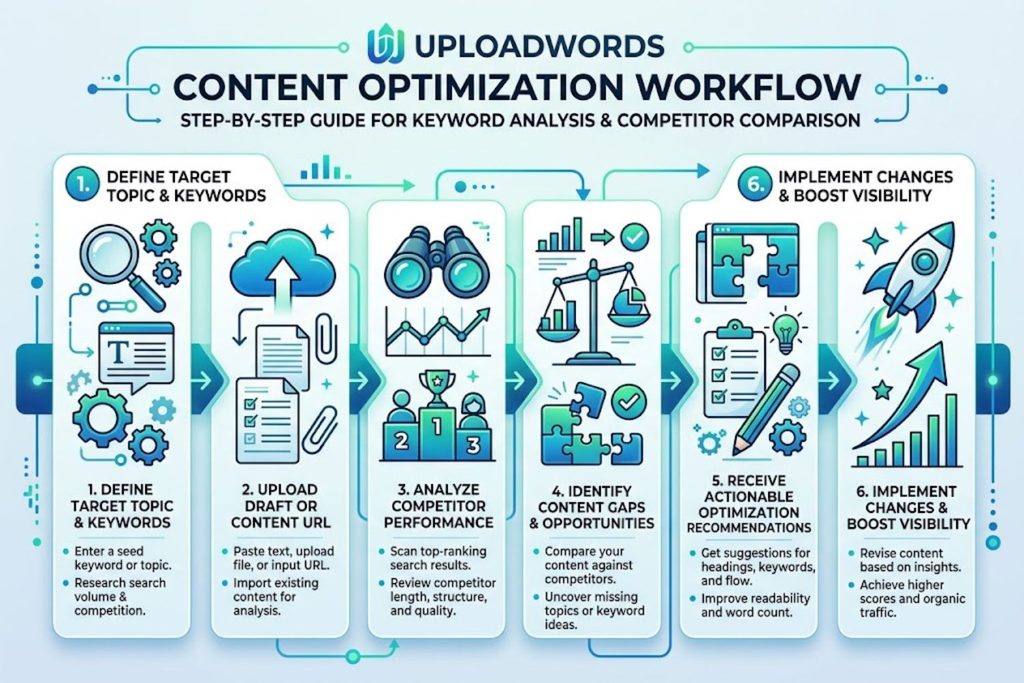
Integrate into your writing process:
- Write your first draft normally
- Before publishing, analyze it in UploadWords
- Check frequency against your target keyword—adjust if under 0.5%
- Look at the word cloud—does it visually match your topic?
- Paste competitor content—compare clouds side-by-side
- Rewrite sections that need more balance
This takes 3 minutes but prevents publish-regrets.
Common Mistakes People Make (And How to Avoid Them)
Mistake #1: Treating word frequency as the goal
Some writers see their main keyword at 0.8% and try to force it to 2%. This creates unnatural text that readers and Google both notice.
Fix: Frequency data is feedback, not a mandate. Natural frequency is almost always better than forced frequency.
Mistake #2: Ignoring stop words entirely
Common words (the, a, and, is) are usually filtered out by default. But sometimes they matter.
If you’re writing “the future of AI,” the word “future” matters more than “the.” But the tool might show only “future” and “AI.” Don’t forget the full context.
Fix: Use frequency data as one signal, not the only signal.
Mistake #3: Comparing word clouds between vastly different length articles
A 500-word article and 5,000-word article can’t be directly compared. Word density changes with length.
Fix: Compare articles of similar length, or calculate percentages (0.8% density) instead of raw counts.
Mistake #4: Using only the highest-frequency words in internal links
Just because a word is frequent doesn’t mean it’s the best anchor text for internal links. You still want descriptive, natural language.
Fix: Use UploadWords for insights, but apply common sense to linking strategy.
Privacy & Security Considerations
How Data Handling Works
UploadWords processes text in your browser, not on its servers. This is important.
What this means:
- Your text isn’t stored
- No cookies tracking your analysis
- No accounts to hack
- No privacy concerns
Technically, the tool is more private than Google Docs or SEMrush (both of which keep your data on their servers).
Is It Safe for Sensitive Content?
Yes, with caveats.
You can safely analyze:
- Client blog posts (before publishing)
- SEO strategy documents
- Competitor analyses
- Product reviews
You should NOT analyze:
- Confidential financial reports
- Personal health information
- Trade secrets
- Anything legally sensitive
The rule: If you wouldn’t be comfortable pasting it in a public forum, don’t paste it into UploadWords (even though it’s technically private).
GDPR Compliance & Legal Questions
Since processing happens client-side and data isn’t stored, GDPR and similar regulations aren’t violated.
But: Always review the site’s privacy policy before analyzing any content containing customer data. While rare, server-side changes could happen.
Pricing, Speed & Scalability
Cost Analysis vs. Paid Alternatives
UploadWords: Free, forever
This is the biggest advantage. SEMrush costs $120/month. Copyscape charges per use. Hemingway’s desktop version is $20.
UploadWords is genuinely no-cost. No catch. No premium tier pushing you to upgrade.
Processing Speed for Large Documents
The tool is fast for documents up to 50,000 words. Instant analysis, no waiting.
For massive documents (100,000+ words), processing might take a few seconds. But you’d rarely analyze something that large in one go.
Limitations You Should Know
Real limitations:
- No login/history — You can’t save analyses. Every time you visit, you start fresh.
- No API access — You can’t integrate it with other tools programmatically.
- No advanced NLP — It doesn’t detect sentiment, entity relationships, or semantic meaning (unlike enterprise tools).
- Browser dependent — If your browser crashes, your analysis is gone.
- Limited customization — You can’t create custom stop word lists or adjust the algorithm.
These aren’t bugs. They’re design choices that keep the tool simple.
How to Maximize UploadWords for SEO
Analyzing Competitor Content
Workflow:
- Find top 3 ranking articles for your target keyword
- Copy their full text
- Paste into UploadWords separately
- Generate word clouds for each
- Compare visually—what do they emphasize?
- Download or screenshot the word clouds
- Use this data to inform your outline
Keyword Gap Analysis Strategy
The analysis:
- Analyze your article in UploadWords
- Analyze competitor #1 in UploadWords
- Analyze competitor #2 in UploadWords
- Note keywords that rank high in competitors but low/absent in yours
- Assess whether those keywords should be in your article
- Revise strategically
Creating Topic Clusters
Text analysis helps you see how topics naturally connect.
You’re creating a topic cluster around “AI ethics.” Analyze existing articles and notice:
- “Bias” and “fairness” always co-occur
- “Accountability” appears frequently
- “Transparency” is underused
This guides your cluster structure. Main pillar article emphasizes bias and accountability. Supporting articles explore transparency, fairness, and individual subtopics.
Optimizing Meta Descriptions & Titles
Use UploadWords to check character count:
- Title: 50-60 characters
- Meta description: 150-160 characters
Paste your draft title and description. UploadWords shows the exact character count. Adjust until it fits.
You can also use it to verify your meta description includes your primary keyword.
FAQ: 15 Questions People Actually Ask
Q1: Is UploadWords.com safe to use with proprietary content?
A: Yes. Text is processed client-side and isn’t stored on servers. However, always review the privacy policy before analyzing extremely sensitive information.
Q2: Can UploadWords detect plagiarism?
A: No. It doesn’t compare your text against the internet. For plagiarism checking, use Copyscape or Turnitin.
Q3: What file formats does UploadWords accept?
A: Most versions accept .txt, .doc, .docx, and direct text paste. Some versions support .pdf, but functionality varies by version.
Q4: Is keyword stuffing still a Google penalty?
A: Not in the traditional sense, but unnaturally high keyword density still hurts readability and can trigger spam signals. Use UploadWords to verify keyword density stays natural (0.5-2%).
Q5: How does UploadWords compare to ChatGPT for content analysis?
A: Different purposes. ChatGPT can offer editorial suggestions. UploadWords gives precise frequency data. Use both—they’re complementary.
Q6: Can I use UploadWords to analyze entire websites?
A: No, it analyzes one text input at a time. To analyze multiple pages, copy-paste them individually.
Q7: Does UploadWords work offline?
A: No. It’s web-based and requires an internet connection.
Q8: What’s the longest document UploadWords can analyze?
A: Most versions handle 50,000+ words without issue. Very large documents might take a few seconds.
Q9: Can UploadWords check for readability scores like Flesch Kincaid?
A: No. For readability scores, use Hemingway Editor or SEMrush.
Q10: How do I know if my keyword density is “good”?
A: 0.5-2% for the primary keyword is ideal for most content. Use UploadWords to calculate: (keyword count / total words) × 100.
Q11: Should I optimize content specifically for word clouds?
A: No. Optimize for readers first. Word clouds are an analysis tool, not a writing guide.
Q12: Can UploadWords detect synonym variations (like “AI,” “artificial intelligence,” “machine learning”)?
A: No. It counts exact word matches only. You need to manually assess synonym usage.
Q13: Is UploadWords better than built-in tools in Microsoft Word?
A: Different purposes. Microsoft Word gives basic counts. UploadWords gives frequency analysis and word clouds. Both are useful.
Q14: How do I save my analysis?
A: Screenshot the word cloud or copy the word frequency list. There’s no save/history feature (by design, for privacy).
Q15: Can UploadWords help with SEO optimization?
A: Indirectly. It shows keyword frequency and balance. But it doesn’t provide SEO recommendations. Use it alongside SEMrush or similar tools.