Every day, your team manually copies data between spreadsheets, waits for emails, and handles repetitive approvals. The cost? Hours. The impact? Missed opportunities, frustrated employees, and slower growth. By 2026, automation isn’t optional anymore. It’s how competitive businesses operate.
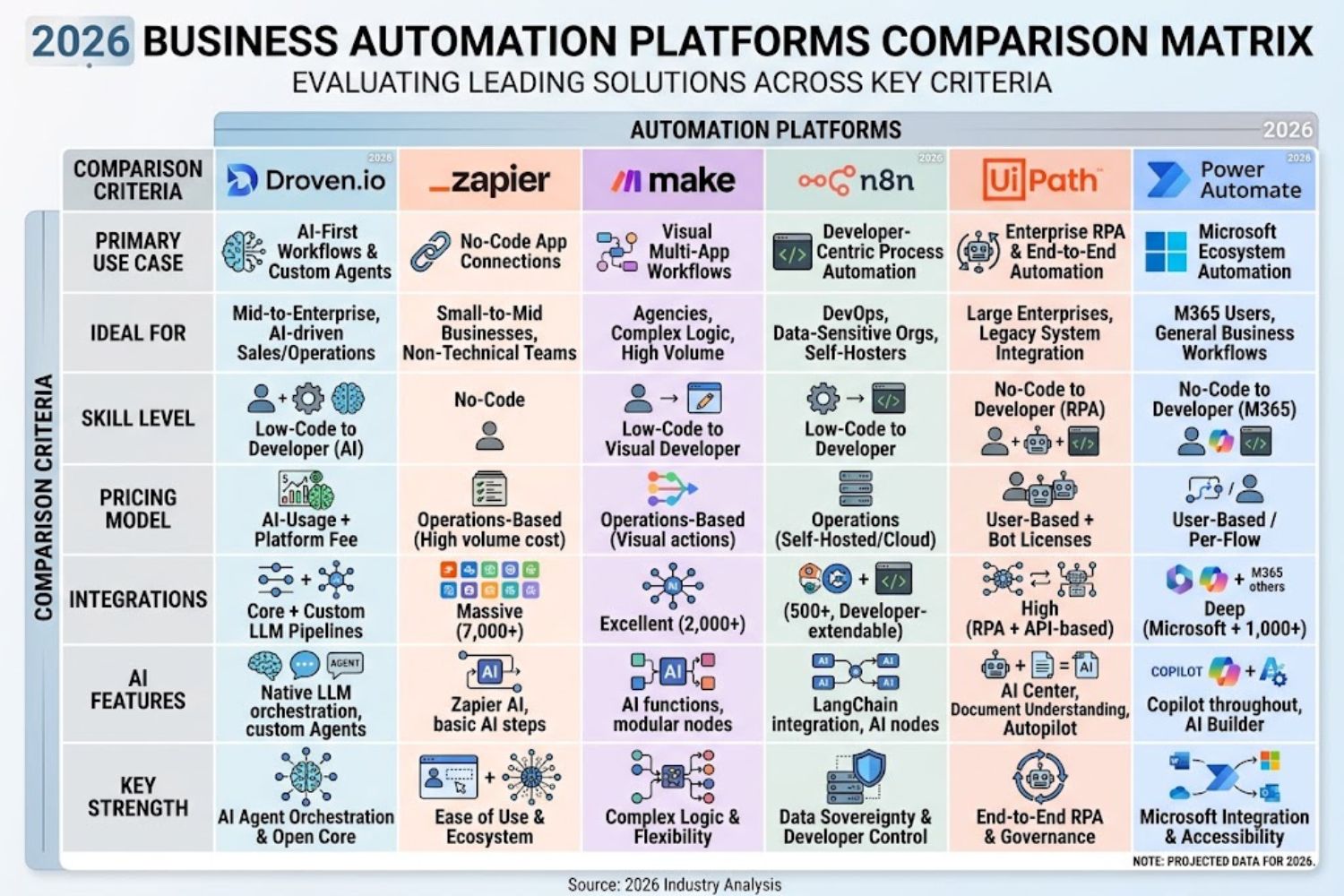
But here’s the real challenge: there’s no single “best” automation tool. Zapier works great for marketers. Make excels at complex workflows. n8n dominates when you need data privacy. UiPath leads enterprise-scale deployments. And emerging AI agents are rewriting what automation can do.
That’s exactly why Droven.io exists—as the unbiased knowledge platform that helps you navigate this complex landscape and choose the right automation stack for your business.
This guide walks you through everything you need to understand about AI automation in 2026, introduces the platforms Droven.io covers, and gives you a proven framework for selecting the tools that actually drive ROI.
What Is Droven.io? The Knowledge Foundation
Droven.io is not a software tool you buy. It’s an educational platform that publishes research-backed guides on artificial intelligence, automation, and digital transformation.
Think of it like this: if you wanted to buy a car, Consumer Reports doesn’t sell cars—it evaluates them. Droven.io doesn’t sell automation platforms. Instead, it helps business leaders, developers, and technology buyers understand the automation landscape before making costly decisions.
Droven.io publishes structured, research-backed educational content on artificial intelligence, automation, machine learning, cloud computing, and cybersecurity—without selling software, offering certifications, or maintaining affiliate relationships with the vendors it covers.
This matters because most automation guides have hidden incentives. Some platforms pay commission for referrals. Others write about tools they own stock in. Droven.io cuts through the noise with vendor-neutral analysis that actually serves your interests.
Why Droven.io Resources Matter in 2026:
The automation industry has matured dramatically. Simple workflow automation has been replaced by intelligent systems that combine AI agents, REST APIs, webhooks, machine learning models, and workflow orchestration. Your decision framework needs to match that complexity.
People searching for “what is Droven.io” often expect to find a product similar to Zapier, UiPath, or Microsoft Power Automate. Based on the official website, Droven.io is better described as an AI and emerging-technology publication. Tonic Of Tech
Understanding this distinction matters because it shapes how you use Droven.io resources. You’re not signing up to build automations inside their platform. You’re leveraging their research to make better decisions about which platforms to actually deploy.
The AI Automation Landscape in 2026
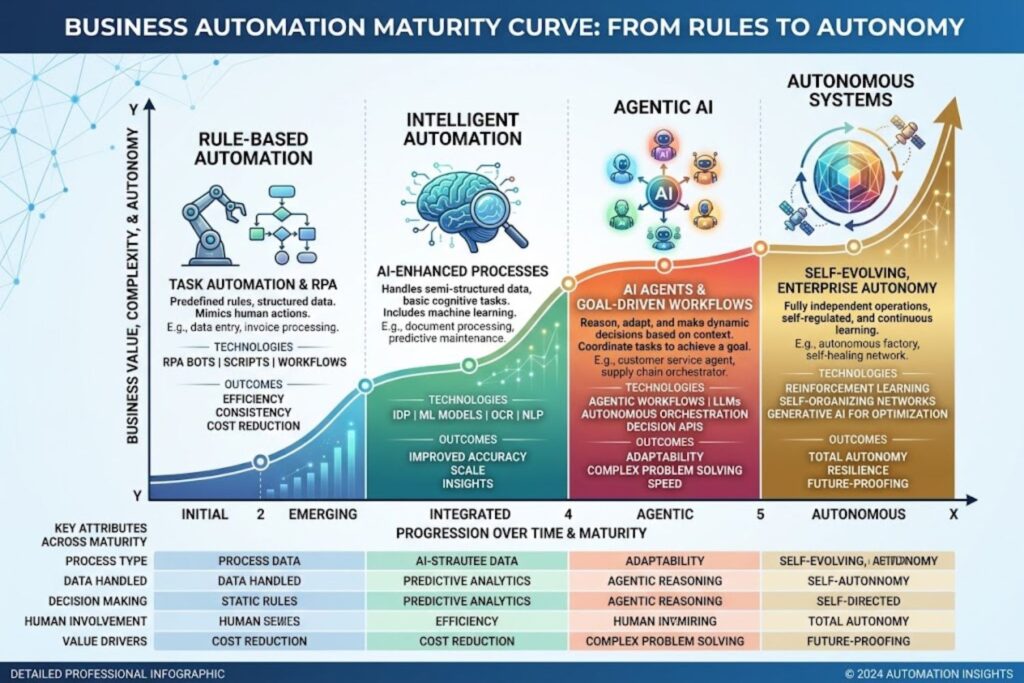
Before comparing tools, you need to understand the automation taxonomy. The landscape breaks down into distinct categories, and each serves different problems.
From RPA to Agentic AI
A decade ago, automation meant Robotic Process Automation (RPA)—software robots clicking buttons and entering data exactly like humans would. It was rules-based, rigid, and broke when anything changed.
Today’s AI automation is fundamentally different. Modern AI automation tools handle everything else when workflows become less predictable. Traditional workflow automation handled the predictable path. AI automation tools handle everything else, with the difference starting to matter once LLMs, agents, and retrieval-augmented generation (RAG) enter the picture.
This shift matters because it expands what you can automate. Instead of handling only fixed processes, modern tools interpret unstructured input, make routing decisions, generate content, and adapt when exceptions appear.
Traditional vs. AI-Powered Automation
A traditional workflow automation looks like this: If email arrives > Extract order number > Update CRM > Send confirmation.
An AI-powered automation might work like this: Receive unstructured customer inquiry > AI agent analyzes intent and context > Decides between resolution paths > Executes workflow > Learns from outcome > Adjusts future decisions.
The difference in capability—and cost—is significant.
The Automation Tool Categories
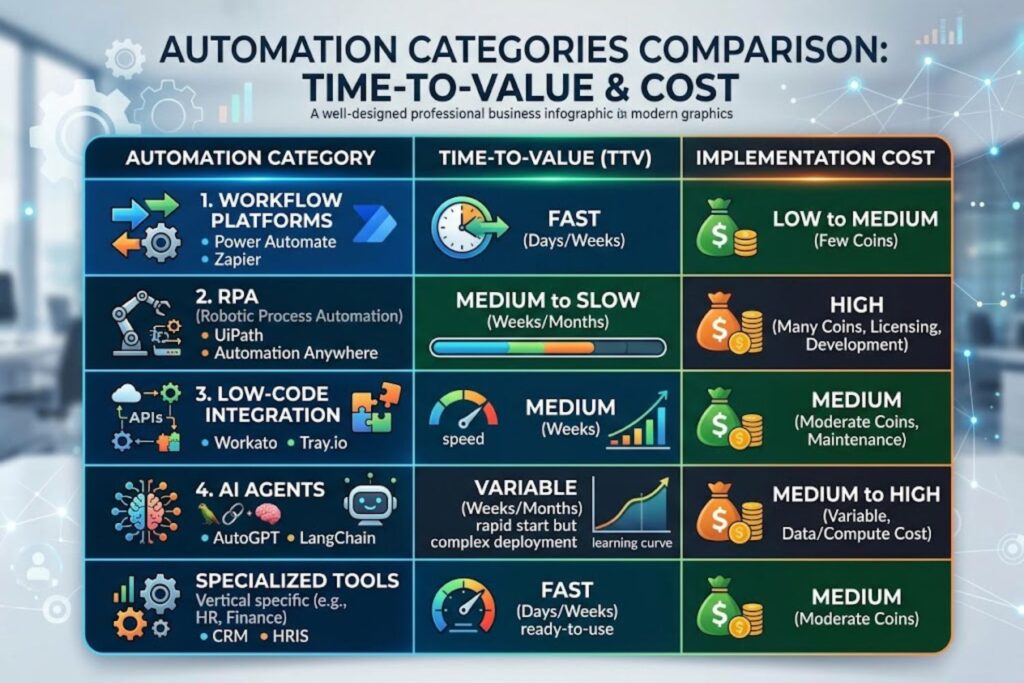
Droven.io breaks the automation market into five core categories. Understanding which category fits your needs eliminates unnecessary complexity.
1. Workflow Automation Platforms (Zapier, Make, n8n)
These platforms connect applications and create automated workflows using visual, no-code interfaces. You define triggers (when X happens) and actions (then do Y). They’re cloud-based, fast to implement, and require minimal technical expertise.
Best for: Marketing automation, lead capture, CRM updates, simple integrations.
Time to value: 1-4 weeks.
Cost range: $29-$200/month for most SMBs.
2. Enterprise RPA Solutions (UiPath, Blue Prism)
RPA platforms automate desktop applications and legacy systems that don’t have APIs. They excel at high-volume, repetitive tasks like accounts payable, invoice processing, and data entry.
Best for: Financial processing, HR onboarding, document management.
Time to value: 3-6 months.
Cost range: $40,000-$300,000+ annually.
3. Low-Code Integration Platforms (Microsoft Power Automate, Boomi)
These tools bridge traditional enterprise systems and modern cloud applications. They’re especially powerful in companies with complex Microsoft 365, SAP, or Salesforce ecosystems.
Best for: Enterprise workflow orchestration, system integration.
Time to value: 2-8 weeks (depending on complexity).
Cost range: Varies; Power Automate starts at $3-15/user/month.
4. AI Agent Builders (Custom LLM Systems, LangChain)
These frameworks let developers build AI agents that reason, plan, and execute complex multi-step tasks autonomously. They’re the cutting edge of automation and require more technical expertise.
Best for: Complex decision-making, customer service, content generation, research workflows.
Time to value: 4-12 weeks.
Cost range: Highly variable; depends on LLM API usage and development time.
5. Specialized Automation Tools (GoHighLevel, HubSpot, Shopify)
Vertical-specific platforms built for particular industries. GoHighLevel focuses on agencies and service businesses. HubSpot powers marketing and sales. Shopify handles ecommerce operations.
Best for: Industry-specific workflows with built-in best practices.
Time to value: 1-3 weeks.
Cost range: $99-$500/month typically.
Platform Comparison: Top Automation Tools in 2026
Here’s how the leading platforms stack up:
| Platform | Best For | Learning Curve | Integration Options | Starting Price |
|---|---|---|---|---|
| Zapier | Non-technical users, quick integrations | Very Low | 5,000+ apps | $29.99/month |
| Make | Complex AI workflows, advanced logic | Medium | Extensive API support | $12/month (free tier) |
| n8n | Data privacy, complete control | Medium-High | Unlimited + self-hosted | Free (self-hosted) |
| UiPath | Enterprise-scale hyperautomation | High | Deep legacy system support | $40K+/year |
| Power Automate | Microsoft ecosystem integration | Low-Medium | Microsoft 365 native | $3-15/user/month |
Key Trade-offs:
Zapier wins on speed and ease—you need zero coding knowledge. But you’re locked into their connector ecosystem and pay per task, which adds up fast.
Make offers deeper AI capabilities and more complex workflow logic than Zapier, but requires understanding automation concepts.
n8n gives unlimited automation and privacy, but self-hosting requires technical infrastructure and maintenance.
UiPath leads enterprise deployments, but expect 6+ month implementations and significant training investments.
Power Automate excels if you’re already paying for Microsoft 365, but becomes expensive in multi-tenant scenarios.
The “best” platform isn’t obvious because it depends entirely on your context—your technical team, current systems, budget, and automation goals.
The Decision Framework: Choosing Your Automation Stack
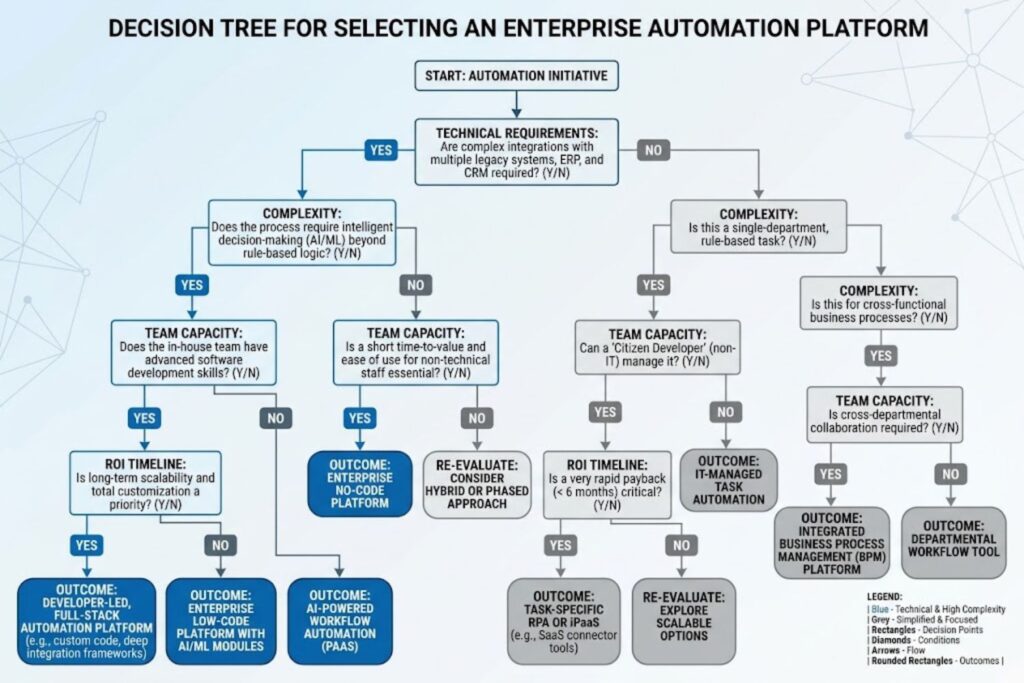
Here’s how to systematically choose the right platform:
Step 1: Define Your Automation Objectives
List specific processes you want to automate. Estimate time savings. Calculate current costs. This gives you a baseline ROI target.
Step 2: Assess Current System Architecture
Map your existing systems: CRM, accounting software, HR systems, communication tools. This determines integration complexity.
Step 3: Evaluate Integration Requirements
Simple integrations (connecting Zapier to 2-3 tools) = workflow automation platform.
Complex ecosystem (ERP, multiple legacy systems, API-first architecture) = enterprise platform.
Step 4: Calculate True Cost of Ownership
Software costs are obvious. Factor in implementation costs, training, maintenance, and ongoing support. The cheapest platform often becomes the most expensive.
Step 5: Validate ROI Timeline
Different tools have different payback periods. Fast-moving SMBs need quick wins (4-8 weeks). Enterprises can justify longer implementations.
Step 6: Test Pilot Workflows
Before committing, build a proof-of-concept with your top choice. Verify it actually solves your problem.
Implementation Strategies That Work
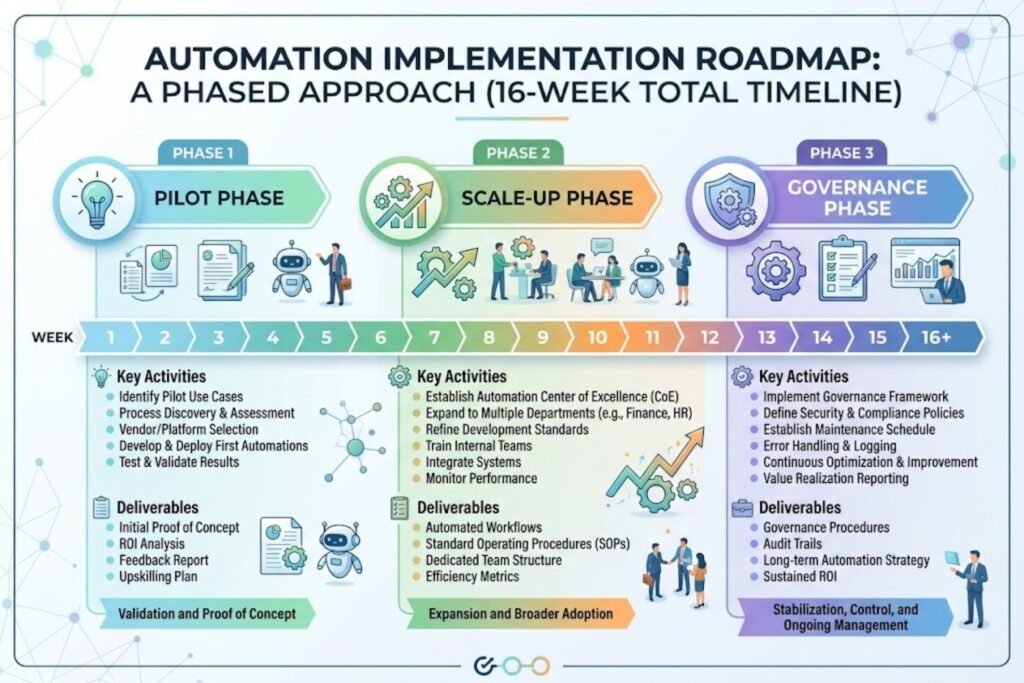
Once you’ve chosen a platform, implementation approach determines success.
The Big Bang vs. Phased Approach
Big Bang: Automate everything at once. Fast deployment, high risk, requires perfect planning.
Phased: Automate high-impact process first, then expand. Slower overall, but lower risk and better for learning.
For most organizations, phased is superior. You validate assumptions, train teams, and avoid catastrophic failures.
Common Implementation Mistakes:
- Automating the wrong process first. Start with high-frequency, low-complexity workflows. Not your most critical process.
- Underestimating integration complexity. Legacy systems often require custom API development that takes 2-3x longer than expected.
- Choosing based on price alone. The cheapest tool often requires expensive workarounds.
- Lacking change management. Employees resist automation if they don’t understand why or how it affects them.
- Not monitoring post-implementation. Automations degrade over time as systems change. You need continuous monitoring.
Real ROI: What Businesses Actually See
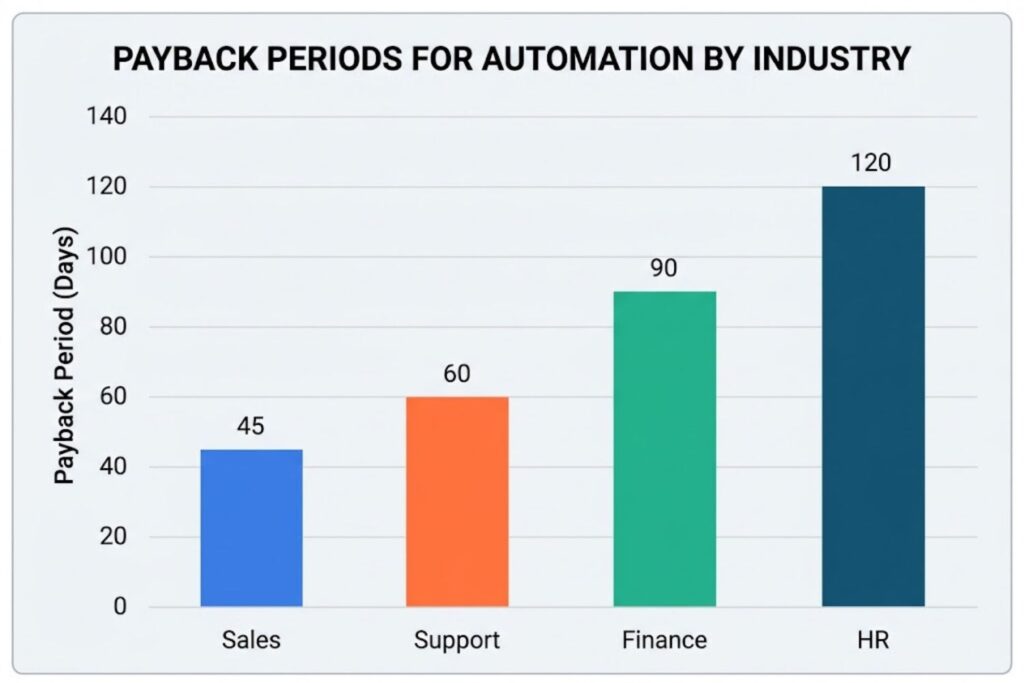
Different industries experience different ROI profiles:
Sales & Marketing Automation: 45-60 day payback. Tools like GoHighLevel handle lead capture, qualification, and follow-up, freeing sales teams for closing.
Customer Support Automation: 8-12 week payback. AI chatbots and ticket routing reduce resolution time and labor costs simultaneously.
Finance & Accounting: 12-16 week payback. Invoice processing and expense management automation reduces errors and accelerates cash flow.
HR & Onboarding: 16-24 week payback. Document generation, background check coordination, and system setup automation reduces hiring cycle time.
The pattern is clear: highest ROI comes from automating repetitive, high-frequency tasks where error rates hurt quality or speed.
How to Use Droven.io for Your Research
Droven.io’s value isn’t just educational. It’s a thinking framework for automation decisions.
Use Droven.io resources to:
- Understand platform capabilities and limitations without vendor bias
- Learn industry-specific automation strategies from real case studies
- Compare total cost of ownership across different platforms
- Identify implementation risks before you invest
The goal isn’t to memorize platform details. It’s to build decision-making muscle so you can evaluate new tools as they emerge.
9. KEY TAKEAWAYS
✓ Droven.io is a research platform, not software—it teaches you about AI automation without selling specific tools.
✓ Automation categories matter more than individual tools—understand if you need workflow automation, RPA, AI agents, or vertical-specific solutions.
✓ Platform choice is context-dependent—best for speed (Zapier), best for complexity (Make), best for control (n8n), best for enterprise (UiPath).
✓ Implementation approach determines success—phased implementation outperforms big bang approaches for most organizations.
✓ ROI varies significantly by use case—fastest payback comes from automating repetitive, high-frequency, error-prone processes.
✓ Integration complexity is frequently underestimated—legacy systems require more development than modern cloud platforms.
✓ Change management is often overlooked—employee buy-in is as critical as technical implementation.
10. FAQ SECTION (Optimized for People Also Ask & Voice Search)
Q1: What exactly is Droven.io? Is it a tool I can buy?
No. Droven.io is an editorial platform—like Consumer Reports for automation. It publishes educational guides about AI and automation tools without selling software or taking affiliate commissions. Use Droven.io to research and understand platforms before you decide which one to actually implement.
Q2: Which automation tool is best for small businesses in 2026?
For SMBs, Zapier offers the fastest time-to-value with zero coding required and 5,000+ pre-built integrations. For slightly more complexity, Make provides better AI capabilities at lower cost. The best choice depends on your specific workflows and technical expertise.
Q3: What’s the difference between workflow automation and RPA?
Workflow automation (Zapier, Make) connects cloud applications using APIs. RPA (UiPath) automates desktop applications and legacy systems by simulating human clicks and keyboard input. Use workflow automation for modern SaaS stacks; use RPA when you’re automating older, API-less systems.
Q4: How much does AI automation really cost?
Cost varies dramatically by platform type. Zapier starts at $30/month. Make at $12/month. n8n is free to self-host. UiPath costs $40,000-$300,000+ annually for enterprise. Don’t compare prices directly—compare total cost of ownership, including implementation, training, and ongoing maintenance.
Q5: How long does automation implementation typically take?
Simple integrations (Zapier): 1-4 weeks. Complex workflows (Make/n8n): 4-8 weeks. Enterprise RPA (UiPath): 3-6 months. Success depends more on your current system complexity than the tool choice.
Q6: What’s the ROI of automation? When will I see results?
Lead generation and customer support automation show ROI in 45-90 days. Finance and HR automation takes 16-24 weeks. Fastest ROI comes from automating high-frequency, repetitive tasks where manual effort is currently the bottleneck.
Q7: Do I need a developer to implement automation?
Not necessarily. Zapier and Power Automate require no coding. Make requires understanding workflow logic but not coding. n8n and UiPath require more technical expertise. Choose tools matching your team’s technical capacity.
Q8: Should I automate my most critical process first?
No. Start with high-frequency, low-complexity processes. You’ll see quick wins, build team confidence, and learn what works before tackling critical workflows. This phased approach reduces risk significantly.
Q9: What’s the difference between AI agents and workflow automation?
Workflow automation follows rules you define: if X, then Y. AI agents interpret context, make decisions, and adapt based on outcomes. AI agents are more flexible but require more setup and monitoring. Use workflow automation for predictable processes; use AI agents for complex decision-making.
Q10: Can I use multiple automation tools together?
Yes. Leading organizations use 4-5 platforms in combination. Zapier for marketing, n8n for operations, custom AI agents for complex reasoning. The key is choosing tools that integrate well and complement each other.
Q11: What common mistakes do businesses make with automation?
Automating the wrong process first, underestimating integration complexity, choosing based on price alone, lacking change management, and not monitoring post-implementation. Most failures come from process choice and change management—not technology.
Q12: How do I calculate actual ROI from automation?
Calculate: (Hours saved per month × Hourly labor cost) – (Tool costs + Implementation costs + Training costs + Maintenance). Most processes break even within 16 weeks. Faster payback means you picked the right process to automate.
Q13: Is self-hosted automation (n8n) safer than cloud-based?
Self-hosted gives you data control and privacy. Cloud platforms (Zapier, Make) offer managed infrastructure and automatic updates. Choose based on data sensitivity and technical infrastructure capacity. Self-hosting is safer for sensitive data but requires more technical investment.
Q14: Do I need a “center of excellence” to manage automation at scale?
For large organizations, yes. A dedicated automation team maintains platform standards, approves new automations, monitors performance, and prevents duplicate efforts. SMBs can typically operate without formal governance but benefit from clear ownership.
Q15: How do I stay updated on automation trends as tools evolve?
Resources like Droven.io, industry publications (TechCrunch, VentureBeat for AI trends), and vendor announcements help. Join automation communities. Attend webinars. Test new features quarterly. The landscape moves fast—continuous learning is part of the role.