Automation is no longer optional. Every business leader knows this. But the alphabet soup of automation technologies—RPA, BPA, workflow automation, hyperautomation, AI-enhanced automation—creates a paralyzing question: Which one actually solves my problem?
This is where the noise gets loud.
You’ll find vendors claiming their platform does everything. You’ll find consultants pitching $2M implementations for problems that don’t need them. And you’ll find educational resources like Droven.io trying to cut through that noise and tell you what automation can actually do.
This guide does exactly that: it explains what Droven.io covers, how RPA and business automation actually differ, what the real costs look like, and how to avoid the implementation failures that sink 30–40% of automation projects. If you’re evaluating automation for your business—or trying to understand what a platform like Droven.io is teaching—this is what you need to know.
What Droven.io Actually Is (And Isn’t)
The Confusion Problem
Search for “Droven.io” and you’ll find conflicting answers. Some articles describe it as a no-code automation platform you can deploy today. Others call it an editorial knowledge hub. Some suggest it competes directly with UiPath or Make.
This confusion is worth clarifying immediately because it changes everything about how you should evaluate what it offers.
What Droven.io Really Does
Droven.io functions as an educational platform and information resource focused on automation, artificial intelligence, and digital transformation. It is not an executable automation tool. You cannot log in and build a bot. You cannot purchase a license and deploy workflows.
Instead, Droven.io publishes guides, comparisons, and educational content covering:
- Robotic Process Automation — How software bots work, where they create value, and their real limitations
- Business Process Automation — How to automate workflows that span systems and departments
- Workflow Automation — End-to-end process orchestration using low-code platforms
- Intelligent Automation — The emerging hybrid of RPA + AI that handles unstructured work
- Digital Transformation — Strategic frameworks for implementing automation across organizations
- Platform Comparisons — Objective analysis of tools like n8n, Make, UiPath, and others
The platform targets business leaders, operations professionals, and decision-makers who need to understand automation before they evaluate vendors or hire consultants.
What It Doesn’t Do
Droven.io does not:
- Sell or deploy automation tools
- Offer implementation services
- Provide licensing for any platform
- Build custom automations for clients
- Replace hands-on technical evaluation or vendor demos
- Substitute for a real RPA implementation partner
Think of it as a well-informed guide before you enter the sales cycle—not a replacement for actually choosing and deploying a solution.
Understanding RPA Fundamentals
Before deciding whether RPA is right for your business, you need to understand what it actually does.
How Robotic Process Automation Works
Robotic Process Automation uses software to mimic human actions on a computer. A bot can:
- Log into applications
- Read data from screens
- Enter data into forms
- Copy information between systems
- Click buttons in predefined sequences
- Extract data from emails
- Generate and download reports
- Update databases and spreadsheets
- Send notifications or trigger actions
The key constraint: RPA follows rules. A bot does exactly what you tell it to do—no more, no less. It cannot interpret ambiguous instructions, make judgment calls, or adapt when something unexpected happens.
Practical example: An RPA bot can read an invoice PDF, extract the vendor name and amount, match it against a purchase order in your system, and post it to your accounting software. That’s structured, rules-based work. The bot repeats it thousands of times without error and without getting tired.
Where it breaks: If an invoice is formatted differently than expected, or if the vendor name doesn’t match exactly, or if the accounting system’s web interface changes, the bot fails. It requires human intervention or retraining.
RPA vs. Workflow Automation: The Core Difference
This is where most explanations fall apart. Here’s the real distinction:
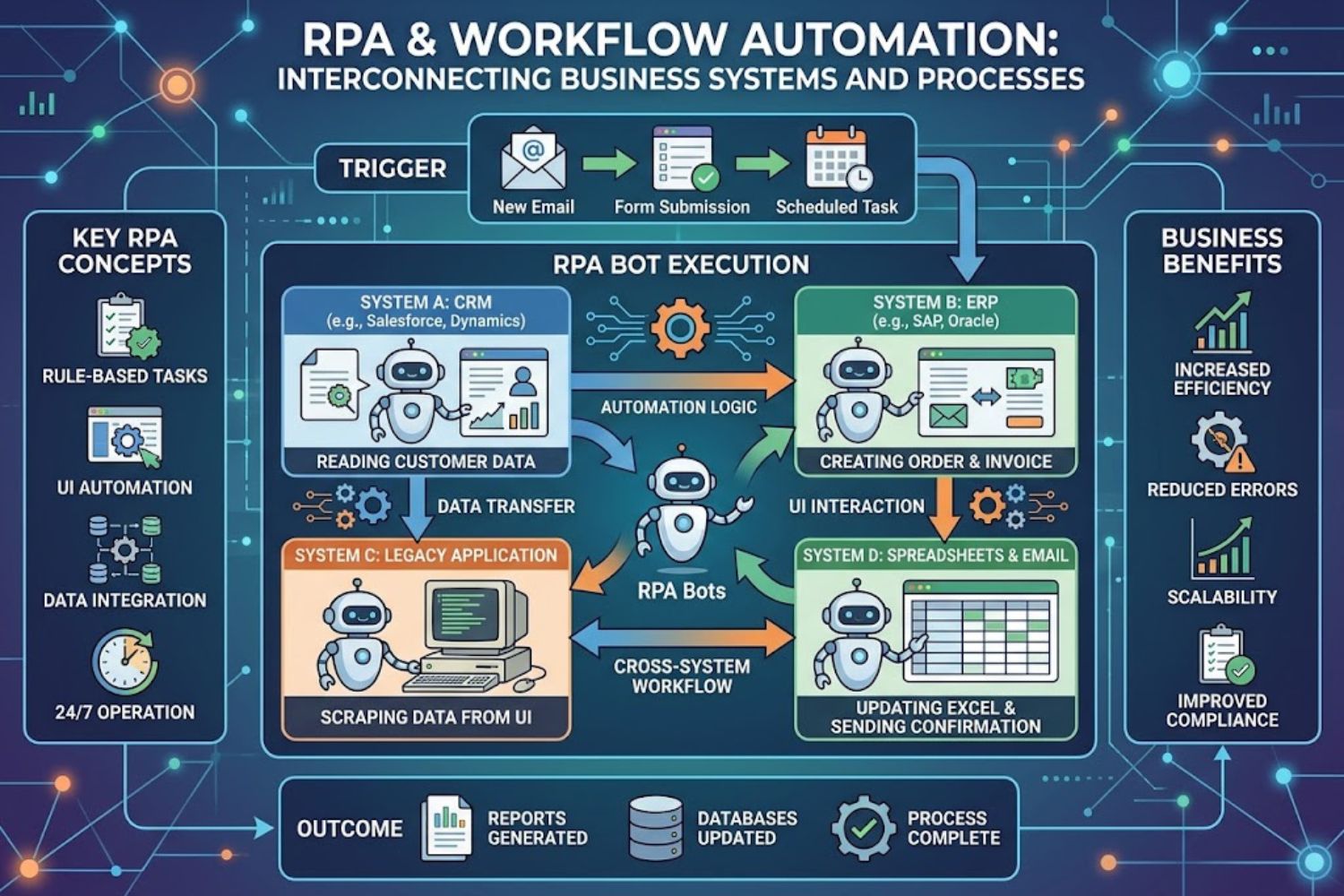
RPA = Task-level automation. A single bot does one job: enter invoices, sync data, process requests, copy files. As you automate more tasks, you need more bots.
Workflow Automation = Process-level orchestration. A single workflow connects multiple systems, people, and decision points. It handles the entire journey from trigger to completion.
The difference matters in practice:
| Aspect | RPA | Workflow Automation |
|---|---|---|
| Scope | Single repetitive task | Entire multi-step process |
| Systems connected | 2–3 systems (typically) | 5+ systems across departments |
| Human involvement | Minimal; mostly task execution | High; includes approvals, reviews, routing |
| Setup time | Weeks to months | Months to quarters |
| Maintenance | Ongoing (UI changes break bots) | Lower maintenance once designed |
| Scalability | Scales by adding more bots | Scales by improving workflow design |
| Cost per task | $1,500–$4,000 per bot | $20,000–$100,000+ per workflow |
The practical reality: Most successful automation combines both. A workflow automation platform orchestrates a process (e.g., employee onboarding). Within that workflow, RPA bots handle specific tasks that don’t have direct API access (e.g., ordering a laptop from a vendor portal).
RPA vs. AI Automation: Why Layering Matters
This is the shift happening in 2026.
Traditional RPA works on structured, predictable data. Modern automation is learning to handle unstructured work—invoices with varying formats, customer emails with unclear intent, documents that need interpretation.
This is where AI comes in.
AI-enhanced automation layers machine learning on top of RPA:
- AI interprets (reads unstructured data, classifies documents, extracts key information)
- RPA executes (enters data, triggers actions, moves files)
- Humans validate (review AI decisions before they’re committed to core systems)
The research backs this: organizations using RPA + AI together achieve 2–3x greater automation coverage than RPA alone.
Important caveat: The validation step is crucial. An AI model generating output in a customer-facing process needs human review. This is where implementation often fails—teams skip validation to move faster, then spend months fixing bad data.
Business Automation Types Explained
Not all automation is the same. Here’s how different approaches work:
Task-Level Automation (RPA)
What it does: Automates individual tasks within a larger process.
Best for:
- Data entry across systems
- Invoice and receipt processing
- Report generation and distribution
- Email-based data extraction
- Legacy system integration where APIs don’t exist
- High-volume, low-variability tasks
Example: A customer service team receives order requests via email. An RPA bot extracts order details, checks inventory in your system, and creates the order in your ERP. If stock is available, the bot sends a confirmation email. If not, it routes the request to a human for manual handling.
Cost reality: One bot handling one task typically costs $1,500–$4,000 to build and configure. Ongoing maintenance is $500–$1,500 per bot annually.
Process-Level Automation (Workflow)
What it does: Automates entire workflows that span multiple systems and include human decision points.
Best for:
- Onboarding (coordinating IT access, payroll, email, benefits)
- Procurement processes (requisition → approval → purchase → receipt → payment)
- Expense management (submission → approval chain → reimbursement)
- Contract management (creation → review → signature → archival)
- Incident management and ticketing workflows
Example: An employee resignation triggers a workflow that:
- Notifies IT to disable access (API call)
- Routes exit interview to HR manager (human task)
- Calculates final paycheck including accruals (RPA bot)
- Sends paycheck via accounting system (API call)
- Triggers offboarding checklist for team (notification)
- Archives files to compliance storage (API call)
All coordinated automatically, with humans only involved where judgment is needed.
Cost reality: A mid-complexity workflow costs $20,000–$60,000 to design and implement. High-complexity workflows can exceed $100,000, depending on system integrations.
Intelligent Automation (AI + RPA)
What it does: Combines RPA’s execution capability with AI’s ability to interpret and classify unstructured data.
Best for:
- Invoice processing with varying formats
- Document classification and extraction
- Customer email triage and routing
- Resume screening
- Claims processing with exception handling
- Content analysis and categorization
Example: Insurance claims arrive in multiple formats—some scanned PDFs, some digital documents, some with tables, some with handwriting. Traditional RPA can’t handle this variability. Intelligent automation uses:
- AI model to read the claim, extract key fields (claimant, amount, date), and classify claim type
- Validation layer for the AI’s confidence scores—if confidence is high, auto-process; if low, flag for human review
- RPA bot to post approved claims to the claims system, update customer portal, and trigger next steps
This handles 70–80% of claims automatically while humans focus on exceptions.
Cost reality: Intelligent automation projects start around $30,000–$50,000 and scale based on model training and data quality.
Hyperautomation: The Strategic Hybrid
Hyperautomation is the industry’s term for combining RPA, workflow automation, AI, and integration platforms into a coordinated strategy.
Rather than automating tasks in isolation, hyperautomation treats automation as a competitive capability—systematically identifying high-impact opportunities and combining multiple technologies to address them.
Example: A financial services company implements hyperautomation for loan processing:
- Intake layer (AI + RPA): Reads loan applications, extracts financials, flags fraud signals
- Orchestration layer (Workflow): Routes applications based on loan type, triggers credit checks, manages approval chains
- Task layer (RPA): Updates systems, generates correspondence, moves documents
- Monitoring layer (Analytics): Tracks cycle time, identifies bottlenecks, flags exceptions
Result: 85% of loans process automatically in 2 days (vs. 10 days manually), compliance improves, and humans focus on complex cases and relationship building.
Real RPA Implementation Costs & ROI
This is where most articles get vague. Let’s be concrete.
What an RPA Bot Actually Costs to Build
Scoping phase: $2,000–$5,000
- Process analysis and documentation
- Requirements gathering
- Feasibility assessment
Development and testing: $5,000–$15,000
- Bot building (low-code platforms make this faster)
- Testing across systems
- Error handling and edge case management
- Documentation
Deployment and training: $2,000–$5,000
- Production setup and monitoring
- Team training
- Change management documentation
First year total: $9,000–$25,000 per bot (depending on complexity)
Annual maintenance: $500–$2,000 per bot
- System updates (your applications change interfaces; bots need updating)
- Monitoring and troubleshooting
- Performance optimization
Hidden Costs Nobody Mentions
1. Process fragility When an application updates its interface, your bot breaks. You discover this when users report missing data or failed runs. Fixing it costs $2,000–$5,000.
If you have 10 bots touching the same legacy system and that system updates quarterly, you’re in a cycle of permanent maintenance.
2. Change management and resistance Employees whose work is being automated sometimes resist. They worry about job security. They don’t follow the new process. They enter data in ways that break the bot. Training and support costs add $3,000–$8,000.
3. Governance and compliance Your bots need monitoring. You need audit logs. You need someone managing bot credentials. You need change control. For regulated industries, this adds $5,000–$15,000 annually.
4. Data quality problems RPA works on garbage-in, garbage-out principles. If your source data is messy (inconsistent formats, missing fields, typos), the bot will propagate those errors at scale. Fixing data quality first can cost $10,000–$40,000.
5. Exception handling Your bot handles the happy path perfectly. But 5–10% of cases are exceptions. Someone still needs to handle those manually. Plan for this instead of being surprised.
Time to ROI: Realistic Timelines
Scenario 1: Low-complexity task (data entry bot)
- Cost: $12,000
- Annual labor savings: $30,000 (one FTE doing this work 30% of the time)
- Time to ROI: 5 months
- Reality: This usually works. Clear tasks, predictable savings.
Scenario 2: Medium-complexity process (invoice processing)
- Cost: $35,000
- Annual labor savings: $50,000 (one FTE handling invoices)
- Expected ROI: Break-even after 8 months
- Reality: Delays happen. Data quality issues push this to 12–15 months. But it usually does work.
Scenario 3: Complex workflow (enterprise onboarding)
- Cost: $80,000
- Annual labor savings: $60,000 (reduction in manual coordination)
- Expected ROI: 16 months
- Reality: Complex workflows face 40% higher failure rates. Scope creep adds months. True ROI might be 24 months.
The honest assessment:
- Simple, well-defined tasks break even in 6–8 months
- Medium-complexity processes break even in 12–15 months
- Complex enterprise workflows often take 18–24 months
- Many projects fail to hit ROI targets and become “lessons learned”
How to Choose Between RPA Platforms
The platform you choose matters enormously. This is where a resource like Droven.io becomes valuable—comparing what’s actually available.
Legacy RPA Tools vs. Modern Cloud Platforms
Legacy tools (UiPath, Automation Anywhere, Blue Prism):
- Strength: Mature, handle complex legacy system automation, strong governance
- Challenge: Expensive licenses ($50K–$500K+ annually), require IT expertise, slow to deploy
- Best for: Large enterprises automating critical legacy systems
Modern cloud platforms (n8n, Make, Zapier, Workato):
- Strength: Low-code, fast setup (days vs. months), API-first design, affordable
- Challenge: Weaker at browser-based automation, limited for complex legacy systems
- Best for: SMBs and departments starting automation
The truth: You probably don’t need legacy RPA unless you’re automating systems from 2010 or earlier that have no API access.
API-Based Automation vs. Browser-Based Automation
This is critical and often misunderstood.
API-based automation (recommended):
- Connects directly to systems via official APIs
- Reliable, fast, and doesn’t break when interfaces change
- Works with modern SaaS platforms (Salesforce, HubSpot, Slack, etc.)
- Lower maintenance
Browser-based automation (legacy approach):
- Simulates a human using a mouse and keyboard
- Works with any system (even if no API exists)
- Fragile—breaks when interface changes
- Slower than API calls
- Caught by bot detection (most enterprise SaaS now blocks this)
The shift in 2026: Modern platforms prioritize API connections. Browser automation is increasingly a fallback for old systems, not the primary strategy.
Decision Framework for Platform Selection
Ask these questions in order:
1. Do the systems you’re automating have APIs?
- Yes → Use API-based platform (n8n, Make, Workato)
- No → You need browser automation or RPA → Droven.io can help you evaluate this trade-off
2. What’s your team’s technical skill level?
- Engineers available → UiPath, Workato, custom solutions
- Business users only → Make, n8n, Zapier (low-code)
- Mixed → Workato or Zapier with occasional engineering support
3. Are you automating legacy systems?
- Yes, complex legacy → Consider traditional RPA (UiPath, Automation Anywhere)
- Yes, but simple → Try modern platforms first (cheaper, faster to prove value)
- No → Modern cloud platforms are the best choice
4. What’s your automation scope?
- 1–3 simple tasks → Make or Zapier (cheapest entry)
- 5–10 medium tasks → n8n or Workato
- 20+ tasks + complex workflows → Plan for traditional RPA or enterprise platform
5. Do you need compliance and audit trails?
- Heavily regulated (finance, healthcare, legal) → Traditional RPA with governance features
- Standard compliance needs → Modern platforms have audit logs
- Minimal compliance → Any platform works
Red Flags and Common Mistakes
Red flag #1: Choosing based on free trial success Many platforms shine in trials because trials are clean, controlled environments. Real automation hits data quality issues, integration snags, and exception cases. Trial success ≠ production success.
Red flag #2: Platform as a substitute for process improvement If your process is broken, automating it faster makes it broken faster. Fix process first, then automate.
Red flag #3: Building too many bots without governance Start with 2–3 pilot bots. Establish monitoring, maintenance, and change control before scaling to 20 bots.
Red flag #4: Picking a platform because “everyone uses it” You want the right tool for your systems and team skills, not the most popular tool.
Common RPA Implementation Failures
30–40% of RPA projects fail or underdeliver. Understanding why prevents you from becoming a statistic.
Why RPA Projects Fail
Reason #1: Misaligned expectations Executives expect 90% automation; reality is 70% at best. The remaining 30% are exceptions requiring human judgment or manual intervention.
Fix: Define success as “remove 70% of manual effort while improving accuracy.”
Reason #2: Choosing the wrong process to automate You automate your messiest, most broken process expecting RPA to fix it. Instead, RPA amplifies the mess.
Fix: Automate clean, well-defined processes first. Prove value. Use that success to fund process improvement work.
Reason #3: Underestimating maintenance You build the bot. It works for six months. Then the target application updates. The bot fails. No one’s allocated budget or time to fix it. It stays broken.
Fix: Budget 15–20% of the original development cost annually for maintenance.
Reason #4: Fragmented approach Different departments build different bots using different platforms with no governance. One department’s bot creates data that breaks another’s. No one knows what’s automated.
Fix: Start with a center of excellence. One team governs platforms, standards, and sharing.
Reason #5: Poor change management People affected by automation aren’t consulted. They don’t understand the new process. They sabotage it subtly. The bot fails because users aren’t following the expected workflow.
Fix: Involve affected teams early. Train them thoroughly. Listen to their concerns about job security.
The Bot Detection Problem
Here’s a problem that’s rarely discussed openly:
Modern enterprise SaaS actively prevents browser automation. Salesforce, Workday, ServiceNow, and others use bot detection to block automated access. This makes browser-based RPA extremely unreliable.
What happens:
- You build a bot that logs into Salesforce and updates records
- It works in your test environment
- In production, Salesforce’s bot detection flags it
- The bot gets blocked
- You’re back to manual work
The solution: Use APIs where they exist. If APIs don’t exist, negotiate API access with the vendor. Browser automation should be a last resort, not a first strategy.
Maintenance Creep and Technical Debt
Every bot you build creates ongoing maintenance burden. Your application updates. The bot breaks. Someone spends 10 hours fixing it. This happens 4–5 times per year per bot.
With 10 bots, that’s 400–500 hours annually in maintenance alone.
This is rarely budgeted. Teams assume they build it and it runs forever. Reality is that bots require constant care.
Prevention:
- Prioritize API-based automation (less maintenance than UI-based)
- Build monitoring to catch failures immediately
- Allocate dedicated resources for maintenance
- Plan bot retirement (some bots deliver value for 3–5 years, then become debt)
Process First, Technology Second
The most successful automation projects follow this sequence:
- Map the current process — Document every step, every system touch, every decision point
- Identify waste — Where does it slow down? Where do errors occur? Where is manual rework highest?
- Redesign before automating — Eliminate unnecessary steps. Simplify handoffs.
- Then automate — Automate the cleaned-up process, not the messy one
The mistake: Technologies like Droven.io educate you on automation capabilities. But if your process is broken, technology won’t fix it. You’ll just automate the broken process faster.
Building a Smart Automation Strategy
This is where Droven.io’s educational value becomes practical. Understanding concepts is step one. Building a strategy is step two.
Audit Your Current Processes
Start with a simple inventory:
| Process | Volume/Month | Time per Instance | Total Hours/Month | Error Rate | Automation Candidate? |
|---|---|---|---|---|---|
| Invoice processing | 500 | 10 min | 83 hours | 5% | Yes—high volume |
| Expense approvals | 200 | 8 min | 27 hours | 2% | Yes—rules-based |
| Data entry (reports) | 50 | 45 min | 38 hours | 8% | Maybe—high errors |
| Customer onboarding | 80 | 30 min | 40 hours | 0% | Yes—low error |
| Claims review | 120 | 25 min | 50 hours | 15% | No—too many exceptions |
Scoring for automation potential:
High volume + low variability + high manual effort = automation gold
Low volume + high judgment required = leave it manual
Priority order:
- High-volume, low-complexity tasks (quick wins, clear ROI)
- High-error processes (automation improves quality)
- Cross-system workflows (workflow automation gives biggest ROI)
Identify High-Impact Automation Opportunities
Not all automation is equal. Focus on processes where automation creates disproportionate value:
Type 1: High-volume repetitive tasks
- 500+ instances monthly
- Simple, rule-based work
- 15–30 minutes per instance currently
- Value: Quick ROI, clear cost savings
Type 2: High-error processes
- Current error rate >3%
- Errors create downstream rework
- Errors create compliance risk
- Value: Improved quality, reduced risk
Type 3: Cross-system workflows
- Manual coordination between 3+ systems
- Causes bottlenecks
- Requires approvals and handoffs
- Value: Speed, accuracy, reduced bottlenecks
Type 4: Compliance-critical work
- Regulated industry requirements
- Audit trails needed
- Consistency critical
- Value: Compliance, reduced audit risk
Combine RPA and Workflow Automation Strategically
The hybrid approach usually wins:
Example: Employee onboarding automation
| Layer | Technology | What it does |
|---|---|---|
| Trigger | Workflow platform | New hire created in HRIS |
| Task 1 | API connection | Create email account (Active Directory) |
| Task 2 | Workflow approval | Route manager checklist for system access approval |
| Task 3 | API connection | Provision Salesforce license |
| Task 4 | RPA bot | Order laptop from vendor portal (no API) |
| Task 5 | Workflow notification | Send onboarding tasks to team |
| Task 6 | API connection | Update accounting system with new hire data |
| Task 7 | Workflow completion | Archive documentation, mark complete |
This hybrid approach:
- Handles both structured (APIs) and unstructured (bot order) work
- Involves humans where judgment is needed (approval)
- Provides visibility and audit trail
- Scales more reliably than pure RPA
Plan for Scaling and Change Management
Phase 1: Pilot (Months 1–3)
- Pick 1 simple high-volume process
- Automate 70% of it
- Measure results, celebrate wins
- Build internal support
Phase 2: Expansion (Months 4–9)
- Add 2–3 more processes
- Establish governance and monitoring
- Train a dedicated automation team
- Document standards
Phase 3: Strategic scale (Months 10+)
- Systematically automate high-impact processes
- Combine RPA, workflow, and AI strategically
- Monitor and optimize continuously
- Plan for emerging technologies
Change management critical tasks:
- Communicate benefit to affected teams early
- Train people on new processes before rollout
- Keep a human path for exceptions
- Celebrate wins and address concerns openly
FAQ: Automation Questions People Actually Ask
Q1: Is Droven.io a tool I can actually use?
A: No. Droven.io is an educational resource—like a guide or reference site. It helps you understand automation concepts and evaluate options. You’ll need to choose and implement a separate platform (like n8n, Make, UiPath, etc.) to actually build automations. Think of Droven.io as the research phase before you enter a vendor evaluation.
Q2: What’s the difference between RPA and workflow automation?
A: RPA automates individual tasks. Workflow automation orchestrates entire processes. RPA is “do one thing repeatedly.” Workflow automation is “coordinate multiple systems and people.” Most successful automation uses both: workflow automation provides the orchestration, RPA handles specific task execution where it’s needed.
Q3: If I use workflow automation, do I still need RPA?
A: Probably yes. Workflow platforms connect via APIs, which work great for modern SaaS. But if you’re touching legacy systems without APIs, you need RPA (or browser automation) to interact with them. The hybrid approach—workflow orchestration + RPA task execution—handles 90% of real-world scenarios.
Q4: How much does it cost to automate a process?
A: A simple, single-task RPA bot costs $10K–$25K to build (including testing and deployment). A medium-complexity workflow costs $30K–$60K. Complex enterprise workflows can exceed $100K. Annual maintenance typically runs 10–20% of build cost. ROI timeline is usually 6–15 months for simple processes, 12–24 months for complex ones.
Q5: We tried RPA and it failed. What went wrong?
A: Common reasons: (1) You automated a broken process instead of fixing it first. (2) Underestimated maintenance burden when systems change. (3) Picked bot detection-prone browser automation instead of APIs. (4) Had poor change management—users sabotaged the new process. (5) Chose a process with too many exceptions (30%+ exceptions means automation won’t help). The fix: Map and improve your process first, then automate the cleaned version.
Q6: What’s the difference between AI automation and RPA?
A: RPA follows rules. AI learns from patterns. RPA is “if this, then that.” AI is “interpret this and decide.” The best modern automation combines both: AI interprets unstructured data (invoices, emails, documents), then RPA executes the tasks. However, AI outputs need human validation before they affect your business.
Q7: Should we build our own automation or hire a consultant?
A: Small projects (1–3 bots)? Build internally using low-code platforms (Make, n8n, Zapier). Medium projects (5–10 automations)? Hire a consultant to set up standards and governance. Large enterprise transformations? Partner with a firm that specializes in your industry. The key: don’t outsource all knowledge. Build internal capability so you’re not vendor-dependent.
Q8: What automation should we tackle first?
A: High-volume, low-complexity tasks with clear costs (invoice processing, data entry, report generation). These deliver quick ROI, build organizational support, and fund more ambitious projects. Avoid starting with complex workflows or processes with high exception rates.
Q9: How do we prevent automation projects from becoming technical debt?
A: (1) Budget for maintenance (15–20% annually). (2) Use API-based automation over browser automation. (3) Start with a center of excellence for governance. (4) Monitor bot performance and system changes. (5) Plan bot retirement cycles. (6) Prioritize low-code platforms that business users can maintain.
Q10: We’re regulated (finance, healthcare, legal). Can we automate safely?
A: Yes, but with more infrastructure. You need audit trails, approval workflows, exception handling, and human review for sensitive decisions. Workflow automation platforms with strong governance are better here than pure RPA. Build change controls and validation steps into automations. Don’t automate and pray—automate and verify.
Q11: How does Droven.io help us choose between platforms?
A: Droven.io provides objective information about different automation approaches, emerging trends, and platform comparisons. It helps you understand concepts deeply so when you do vendor demos, you ask smarter questions and aren’t misled by marketing. Use it for education; then conduct hands-on trials with platforms matched to your specific systems.
Q12: What’s the future of automation?
A: Hyperautomation (combining RPA, workflow, AI, and analytics). More AI handling unstructured work. Better bot detection = more reliance on APIs. Low-code tools getting more powerful. Automation shifting from IT project to business capability. By 2027, most mid-market companies will have some form of automation running; the question isn’t whether to automate, but how to do it well.
Key Takeaways & Next Steps
What You Now Understand
- Droven.io is an educational resource, not a deployable platform. It helps you learn automation concepts and evaluate options.
- RPA and workflow automation are different. RPA handles tasks; workflow automation orchestrates processes. Most real automation uses both.
- Real automation costs are $10K–$60K per process, plus 15–20% annual maintenance. ROI is typically 6–15 months for simple processes.
- Platform choice matters. API-based automation is more reliable than browser automation. Modern cloud platforms are usually better than legacy tools unless you’re automating pre-2010 systems.
- Implementation failure is common. 30–40% of projects underdeliver because teams skip process improvement, underestimate maintenance, or choose the wrong process to automate.
- Successful automation follows a sequence: Map → Improve → Automate → Measure → Iterate. Not: Automate → Hope.
Your Next Steps
If you’re just exploring automation:
- Read more on Droven.io or similar educational resources
- Identify 3–5 high-volume, repetitive processes in your business
- Calculate current manual cost (hours × labor cost)
- Estimate automation cost and ROI timeline
If you’ve chosen a technology:
- Audit your processes for automation candidates
- Pick one simple process as a pilot project
- Run a trial with your chosen platform
- Measure results and plan for scale
If you’ve had automation failures:
- Conduct a blameless postmortem on what went wrong
- Fix underlying process issues before trying automation again
- Consider hiring a consultant for the next attempt
- Build in governance and change management
If you’re scaling automation:
- Establish a center of excellence for standards
- Invest in monitoring and maintenance infrastructure
- Combine RPA, workflow, and AI strategically
- Plan for emerging tech (AI-enhanced automation)