
Attackers now use AI to write convincing phishing emails in seconds, while defenders use it to sort through millions of security events. AI cybersecurity is no longer a future concept. It is a daily reality for security operations centers, developers, and IT leaders. The question is not whether AI will change your security posture, but whether it will change it in your favor.
This guide explains what AI does well, where it fails, and how to evaluate tools without falling for vendor hype.
Quick Definition: AI in cybersecurity refers to machine learning and related techniques that detect threats, analyze behavior, and automate responses to security incidents. It helps teams process large volumes of data faster than manual review allows, though it still requires human judgment to act on its findings.
What AI Actually Does in Cybersecurity
Much of the marketing around AI security is vague. In practice, it helps with three specific jobs.
Finding Threats in Noisy Data
A mid-sized company’s security tools can generate a huge number of logs and alerts every day. Most are harmless. Machine learning models can learn what normal traffic looks like and rank events by risk, so analysts see the most suspicious ones first.
Spotting Unusual Behavior
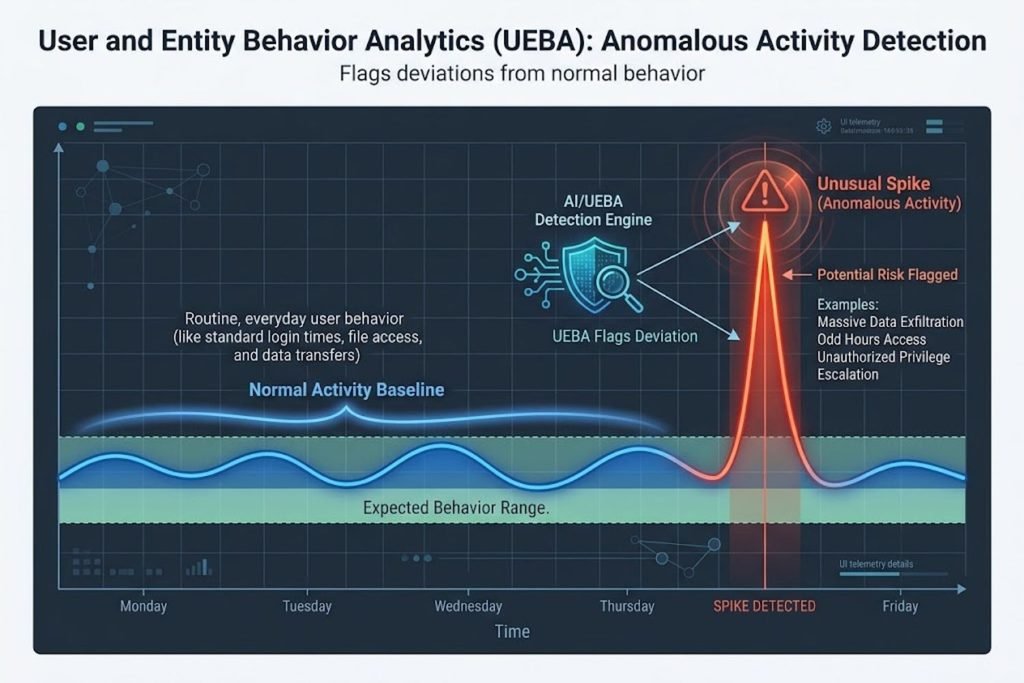
Traditional tools rely on known signatures, meaning patterns of previously identified malware. AI-based behavioral analytics, often called UEBA (user and entity behavior analytics), builds a baseline for each user and device. If an account suddenly downloads gigabytes of data at 3 a.m., the system flags it even when no signature matches.
Automating First-Response Actions
Security orchestration platforms (often called SOAR tools) use AI to take initial steps automatically, such as isolating an infected laptop or disabling a compromised account. Automating these early steps shortens response time. Human analysts still handle investigation and final decisions.
How Attackers Are Using AI
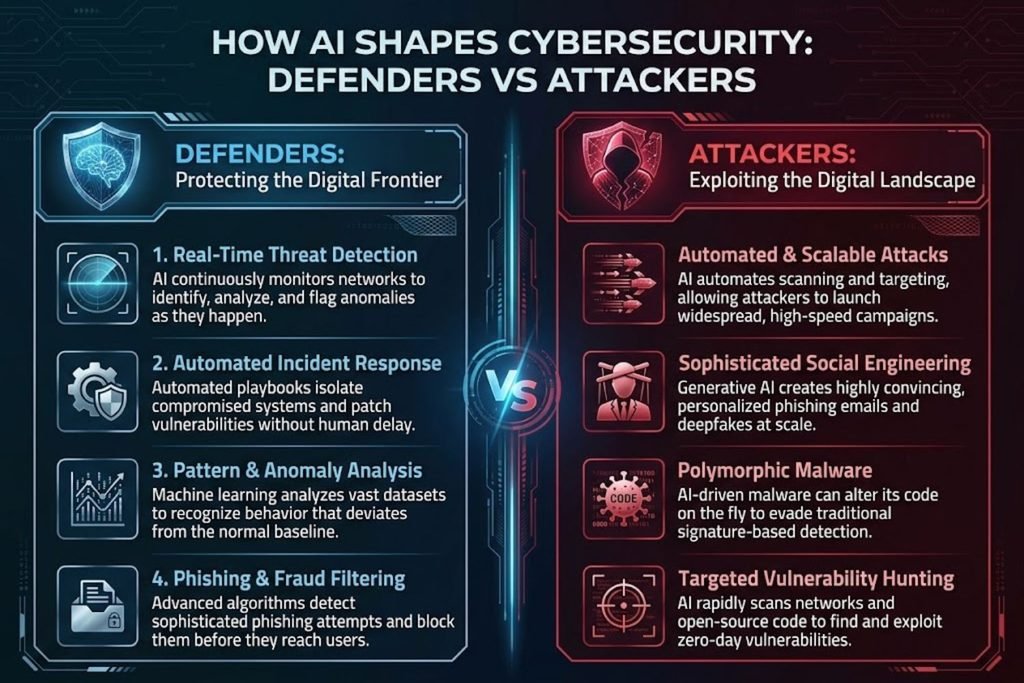
Defense is only half the story. The same technology gives attackers new capabilities.
Phishing That Reads Like a Real Colleague
Generative AI removes the spelling mistakes and awkward phrasing that once made phishing easy to spot. Attackers can tailor messages using public information from company websites and social profiles. The result is fewer obvious red flags.
Voice and Video Deepfake Fraud
Synthetic voice and video can impersonate executives in payment requests or urgent instructions. Finance and HR teams are the most common targets. Verification procedures, not just employee awareness, are the strongest defense.
Faster Vulnerability Discovery
AI tools can help attackers scan code and configurations for weaknesses more quickly. This shrinks the window between a vulnerability being disclosed and it being exploited, which makes timely patching more important than ever.
Where AI Delivers the Most Value
| Security Task | AI’s Contribution | Human Role Still Required? |
|---|---|---|
| Log triage | Ranks and groups alerts by risk | Yes, to validate high-priority cases |
| Malware classification | Identifies new variants by behavior | Yes, to confirm and contain |
| Phishing detection | Analyzes writing style and sender patterns | Yes, to handle edge cases and user reports |
| Incident response | Automates initial containment steps | Yes, for investigation and decisions |
| Vulnerability management | Prioritizes patches by likely exploitability | Yes, to weigh business impact |
Pattern to notice: AI works best where there is high volume and clear historical data. It works least well where decisions depend on business context that the model cannot see.
Where AI Falls Short
Vendors rarely discuss these limits, but experienced teams plan for them.
Alert Fatigue and False Positives
A model that flags too many events creates more work, not less. Analysts start ignoring alerts, and real threats get lost. Tuning thresholds and reviewing outcomes regularly matters as much as buying the tool.
Poor Data Produces Poor Decisions
AI models learn from the data they receive. Incomplete logs, missing asset inventories, or inconsistent labeling reduce accuracy. Before expecting results, audit whether your data is complete enough to support the model.
AI Systems Become a New Attack Surface
When your company deploys AI tools, those tools can be targeted too. Common risks include:
- Prompt injection, where malicious text in a document or web page tricks an AI assistant into leaking data or taking unwanted actions
- Data poisoning, where attackers corrupt the training data a model learns from
- Excessive permissions, where an AI agent has more access than its task requires
Expert Tip: Treat every AI tool like a new employee. Give it the minimum access needed, log what it does, and review its permissions on a regular schedule.
A Decision Framework for Evaluating AI Security Tools
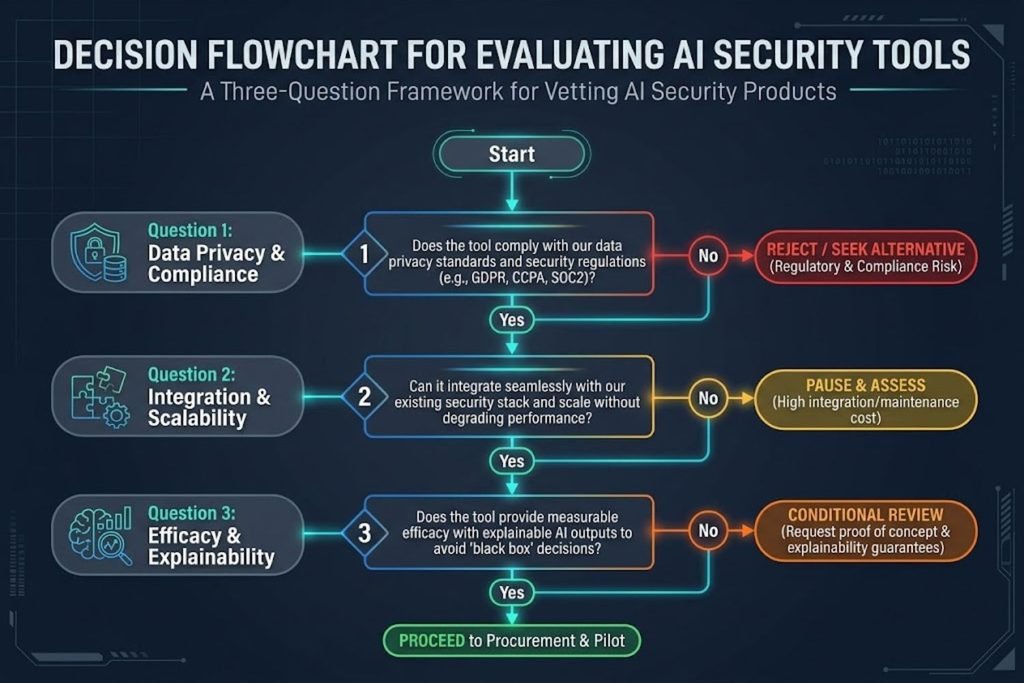
Use these three questions before buying any AI-powered security product:
- Can I explain what it detects? If the vendor cannot describe the detection logic in plain language, you cannot audit its results.
- Can I measure its accuracy in my environment? Run a proof of concept on your own data. Track false positives and missed detections, not just a demo.
- Does it reduce my team’s workload or add to it? Ask how alerts are routed, how analysts give feedback, and how the model improves over time.
If you answer “no” to two or more, delay the purchase and fix your data and processes first.
Common Mistakes Teams Make
- Buying on the “AI” label alone. Many products use simple rules and call them AI. Ask for specifics.
- Skipping the tuning phase. Out-of-the-box settings rarely fit your environment.
- Ignoring the human side. Analysts need training to question and correct model outputs.
- Forgetting AI in their own products. Developers often add AI features without a security review.
A Practical Starting Checklist
- Inventory your data sources (logs, endpoints, cloud accounts, identity systems)
- Identify your top three alert categories that cause the most wasted time
- Run a 30-day pilot of one AI tool against a defined set of metrics
- Write a verification procedure for payment and access requests, independent of email or chat
- Review permissions for every AI tool your company uses
- Schedule a quarterly review of model accuracy and false positive rates
Key Takeaways
- AI helps defenders by ranking alerts, spotting unusual behavior, and automating first responses.
- Attackers use AI to make phishing more convincing and to impersonate people through voice and video.
- AI tools need good data, regular tuning, and clear human oversight to be useful.
- Your own AI systems create new risks that need access controls and monitoring.
- Evaluate tools by testing them on your own data, not by their marketing claims.
Frequently Asked Questions
Is AI replacing cybersecurity jobs?
AI is taking over repetitive tasks such as alert sorting and basic triage. Demand for skilled analysts who investigate, tune systems, and make decisions is likely to continue. The work is shifting toward higher-level judgment.
Can AI stop phishing completely?
No. AI filters catch many phishing attempts, but no filter is perfect. Combine technical controls with employee reporting and verification steps for high-risk actions.
What is AI-powered threat detection?
It is the use of machine learning to identify threats by analyzing patterns and behavior rather than relying only on known malware signatures.
How do deepfakes threaten businesses?
Attackers can imitate an executive’s voice or video to request urgent payments or sensitive data. Strong verification procedures for financial and access changes reduce this risk.
What is UEBA?
User and entity behavior analytics uses AI to learn normal activity for users and devices, then flags deviations that may signal compromise.
Does AI reduce response time?
It can, especially for automated containment steps. Results depend on how well the tools are configured and integrated with your existing systems.
What are the risks of using AI in cybersecurity?
Key risks include false positives, poor data quality, overreliance on automated decisions, and new attack paths such as prompt injection.
Should small businesses invest in AI security?
Smaller teams often benefit most from managed services that include AI-based monitoring. Start with a clear use case and a measurable goal.
What is prompt injection?
It is an attack where hidden instructions in content trick an AI system into ignoring its rules or exposing data.
How do I start with AI cybersecurity?
Begin with data inventory, define one problem to solve, run a controlled pilot, and measure results before expanding.
Can AI find vulnerabilities in my code?
AI-assisted tools can help identify some vulnerabilities. They should complement, not replace, code review and security testing.
Is AI cybersecurity expensive?
Costs vary widely. Many vendors price by data volume or users, so estimate your data growth before signing a contract.
Conclusion
AI is changing cybersecurity on both sides of the battle. It helps defenders work faster and see more, but it also gives attackers better tools for deception. The teams that benefit most will be the ones that treat AI as a capability to manage, not a magic solution.
Start by understanding your data and defining one problem worth solving. If you want help building a security roadmap that fits your team, contact the TechWoid team at https://techwoid.com/ to talk through your options.