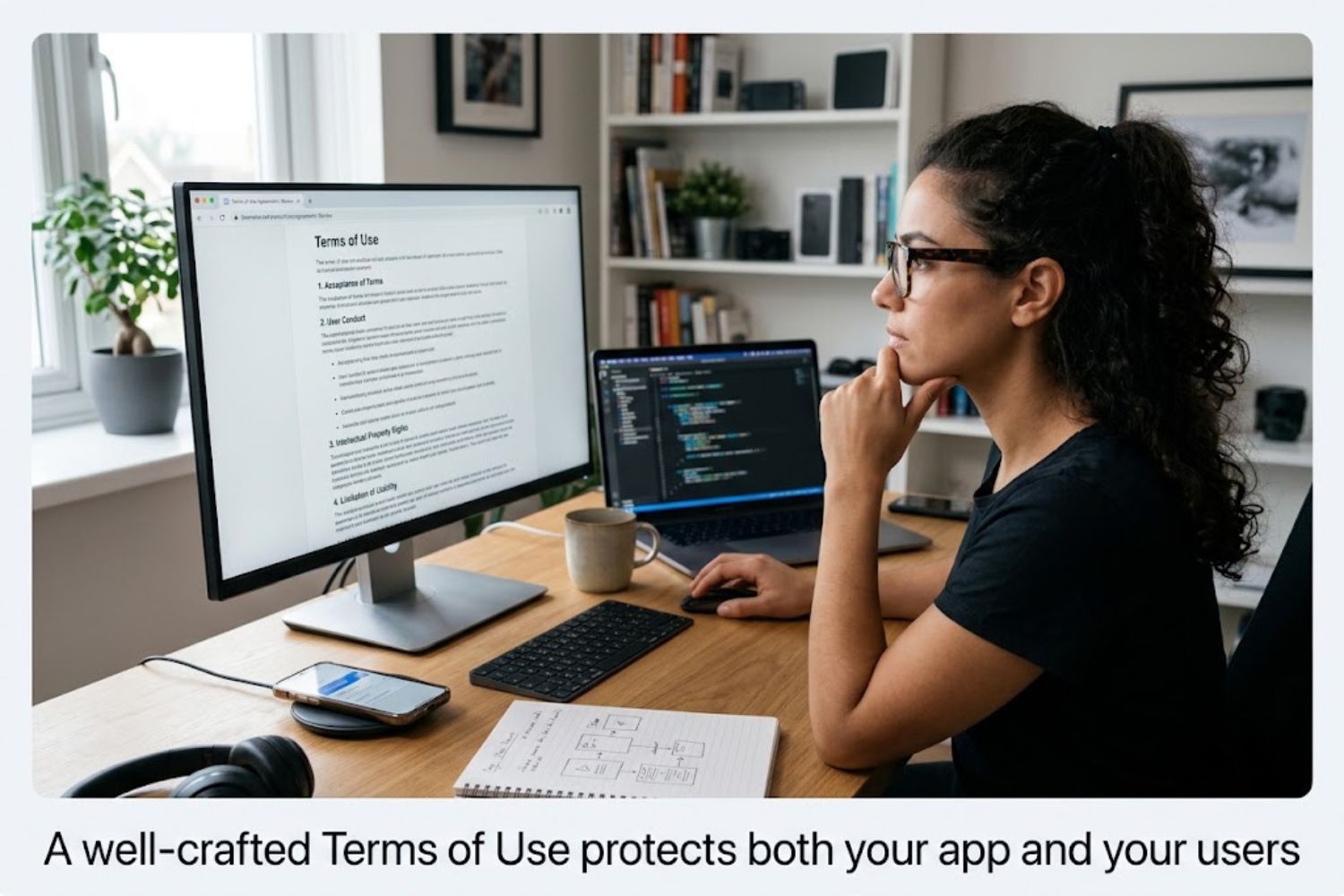
Your app’s Terms of Use is a binding contract between you and every person who downloads your application. It establishes the rules for how users can interact with your app, what you’re legally liable for, and what rights you retain over your intellectual property.
Unlike a website’s terms of service, mobile app T&Cs must navigate a more complex ecosystem. You’re not just protecting yourself legally—you’re also complying with Apple App Store and Google Play Store requirements, which have their own mandatory provisions.
Think of it this way: A strong Terms of Use is the difference between building a sustainable business and facing lawsuits, app store rejections, and user backlash.
Why Generic Templates Fail
Many developers grab a template from an online legal service, change the company name, and call it done. This almost always backfires.
Here’s why: Templates are one-size-fits-all. They don’t account for your specific monetization model (ads, in-app purchases, subscriptions), your target audience’s location, or your app’s unique features. A fitness app’s T&Cs shouldn’t read identically to a social network’s.
Worse, generic templates often include outdated language that creates more liability than protection.
T&Cs vs Privacy Policy vs Community Guidelines
These three documents serve different purposes, and developers often confuse them.
Terms of Use define the legal relationship and app rules. Privacy Policy explains how you collect, use, and protect user data. Community Guidelines set behavioral expectations for user interactions (relevant for social apps, gaming, or content platforms).
You need all three. A privacy policy doesn’t replace a terms of use.
Why Your App Needs a Strong Terms of Use Agreement
Legal Liability Protection
Without clear T&Cs, you’re personally liable for almost anything that happens in your app. Your terms of use limits that liability by:
- Disclaiming warranties (you’re not responsible if the app has bugs)
- Capping damages (users can’t sue for unlimited amounts)
- Defining what “acceptable use” means
- Establishing indemnification clauses (users agree not to hold you responsible for their actions)
Many startups skip this and discover too late that one upset user with a lawyer can cost them tens of thousands in legal fees.
Revenue & Payment Terms
If your app generates revenue—through in-app purchases, subscriptions, or advertising—your T&Cs must clearly define payment obligations.
Without this:
- Users dispute charges claiming they didn’t authorize them
- App stores reject your app for unclear pricing
- You can’t enforce subscription terms or cancel service
Your T&Cs should specify refund policies, how charges will appear on user statements, when subscriptions auto-renew, and how users can cancel.
User Trust & Credibility
Counterintuitive fact: Users who see transparent, honest T&Cs trust your app more than users who see nothing.
Why? Transparency signals professionalism. It shows you’ve thought through edge cases, you respect user rights, and you’re not hiding something.
Apps with confusing or predatory T&Cs suffer higher churn. Users delete them and leave bad reviews.
Platform Compliance Requirements
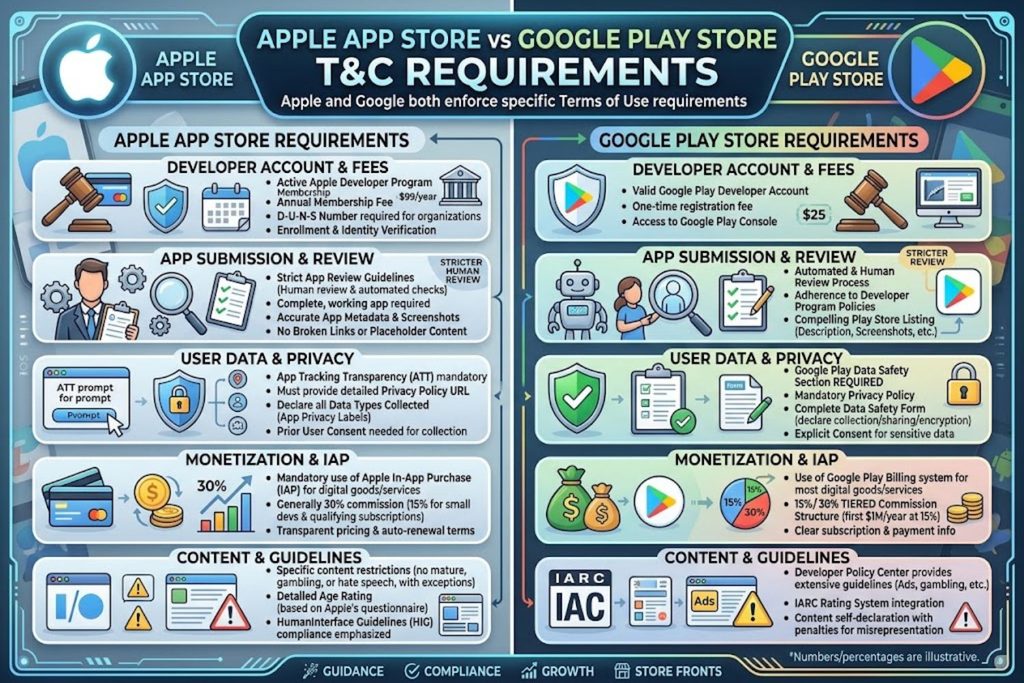
Before your app goes live, both Apple and Google review your T&Cs against their own guidelines. Meeting these requirements isn’t optional.
Apple App Store Requirements
Apple requires that your T&Cs clearly state:
- Your app’s price or whether it’s free
- What content users are getting
- How you handle user data
- What happens if users violate terms
- Your refund policy for in-app purchases
- Any age restrictions or content warnings
Apple also mandates that you include their standardized refund language if you offer in-app purchases.
Google Play Store Requirements
Google’s requirements overlap with Apple’s but have distinct points:
- Clear explanation of what your app does
- Visible, accessible T&Cs (can’t be buried)
- Compliance with Google’s policies on content, payments, and user safety
- Clear language around any permissions the app requests
Both platforms reject apps with vague, missing, or non-compliant T&Cs.
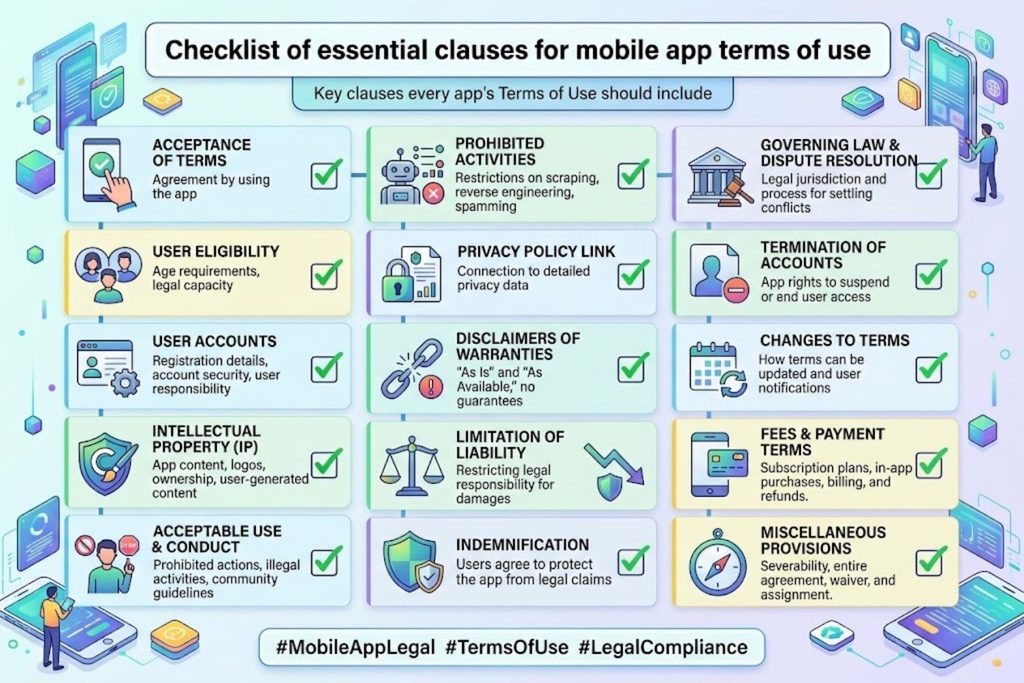
Essential Clauses Every App Needs
User Rights & Restrictions
Define what users can and can’t do with your app. This might include:
- Users can’t decompile, reverse engineer, or hack your app
- Users can’t resell access or share accounts
- Users can’t use the app for illegal purposes
- Users can’t harass, spam, or abuse other users (if applicable)
- Users can’t use bots, scrapers, or automated tools
Be specific. “Users will follow all laws” is too vague. “Users can’t use automated tools to extract data” is clear.
Intellectual Property & Content Ownership
Clarify who owns what:
- You own all app code, design, branding, and features
- Users retain ownership of content they create (photos, posts, etc.)
- Users grant you a license to use their content to provide the service
- Users can’t claim your app features or design as their own
This is crucial if users upload or create content within your app. A social platform needs clear language about this. A weather app doesn’t.
Limitation of Liability
This clause shields you from catastrophic lawsuit exposure:
- “We provide the app ‘as-is’ without warranties”
- “We’re not responsible for lost data, missed notifications, or business losses”
- “Our total liability is limited to the amount you paid us”
- “We’re not responsible for third-party content or services”
This doesn’t make you immune from legitimate lawsuits, but it does prevent someone from claiming they lost a million-dollar business deal because your app crashed.
Modification & Termination Rights
Reserve the right to:
- Update app features, remove features, or change functionality
- Modify these T&Cs (with reasonable notice to users)
- Terminate user accounts if they violate terms
- Take down content that violates your community guidelines
- Shut down the app entirely (yes, this needs to be in there)
Apps disappear. Better to have already told users this might happen.
Payment, Refunds, & Subscription Terms
If you charge money, your T&Cs must explicitly cover:
- How charges are calculated and presented
- When payments are processed
- Your refund policy (if any)
- How subscriptions auto-renew and how to cancel
- How you handle failed payments
- What happens if a user requests a chargeback
This section protects both you and users. It reduces payment disputes and chargebacks.
Dispute Resolution & Jurisdiction
Specify how conflicts get resolved:
- Which state or country’s laws govern the agreement
- Whether disputes go to arbitration or court
- Whether class-action lawsuits are prohibited
Most apps choose arbitration because it’s faster and cheaper than court. But you must make this clear.
User-Generated Content Guidelines
If users create or upload content (photos, messages, reviews, etc.):
- You need permission to host, display, and use that content
- You need the right to moderate and remove content
- You need protection from liability if content harms someone
- Users should know content might be publicly visible
Common Mistakes That Cost Developers Money
Overly Restrictive Terms That Damage Trust
Some developers get paranoid and create T&Cs that sound hostile. “Users are not allowed to…”—repeated endlessly.
This backfires. Users feel treated like criminals. They leave bad reviews, don’t renew subscriptions, and tell others the app is unfriendly.
Balance protection with transparency. Tell users what you need to protect your business. Don’t sound defensive.
Missing Compliance With Regional Laws
A U.S. developer launching in Europe needs to address GDPR. A California-based app needs CCPA language. Missing these isn’t just a legal risk—app stores will reject your app.
Many developers learn this the hard way after spending weeks on development and marketing.
Vague Payment & Subscription Language
“Users may be charged fees” is too vague. Users dispute these charges, and app stores force you to issue refunds.
Better: “Your subscription renews automatically every 30 days on the anniversary of your purchase date. You’ll be charged $9.99 USD. You can cancel anytime in [app settings/account page]. Cancellation takes effect at the end of your current billing period.”
Specificity prevents disputes.
Unclear Intellectual Property Ownership
If your app involves user-generated content and you don’t clearly define ownership, disputes happen.
A creator might claim you stole their idea. A user might claim their photos are yours to do whatever you want with. Clear language prevents both.
No Dispute Resolution Mechanism
Without a clear dispute process, even minor disagreements escalate to lawsuits.
Good T&Cs say: “Before filing a lawsuit, let’s try to resolve this through arbitration. If that fails, you can sue in [specific court].”
This actually reduces litigation because most disputes settle in arbitration.
Mobile App T&Cs vs Desktop Software: Key Differences
App Store Ecosystem Requirements
Desktop software might never face app store review. Mobile apps do, and the gatekeepers (Apple, Google) enforce specific T&C standards.
Your T&Cs can’t conflict with app store policies. If you do, your app gets rejected or removed.
Mobile-Specific Privacy & Location Data
Mobile apps request sensitive permissions: location, camera, contacts, health data. Your T&Cs must explicitly explain why you need these and how you’ll protect them.
This isn’t optional—it’s a requirement for App Store approval.
Subscription & In-App Purchase Specifics
Mobile monetization heavily relies on subscriptions and in-app purchases. Both require very specific T&C language mandated by app stores.
Desktop software handles this differently. Your T&Cs must reflect mobile’s unique ecosystem.
Regional & Legal Considerations
GDPR Compliance for EU Users
If any users are in the EU, you must:
- Explain what personal data you collect
- Justify the legal basis for collecting it
- Allow users to access, modify, or delete their data
- Describe your data retention policy
- Explain their rights
Your T&Cs should reference your privacy policy and confirm GDPR compliance.
CCPA for California Users
California’s Consumer Privacy Act is less strict than GDPR but still requires you to:
- Disclose what data you collect
- Let users opt-out of data sales (if applicable)
- Honor user deletion requests
California users must see this prominently in your app.
Platform-Specific Jurisdiction Rules
Apple and Google’s terms govern some disputes over their platforms. Your T&Cs can’t override these.
For example, if someone disputes a purchase through the App Store, Apple’s terms may apply even if your T&Cs say otherwise.
How to Write Terms of Use That Users Actually Read
Plain Language vs Legal Jargon
You need legal protection, but that doesn’t mean writing like a 1980s lawyer.
Instead of: “The licensor shall indemnify and hold harmless the licensee…”
Write: “You agree not to sue us for problems caused by someone else’s content or actions.”
Clear language is actually more legally defensible. It shows you were transparent about your terms.
Structure That Works for Mobile
Mobile screens are small. Long walls of text don’t work.
Structure your T&Cs:
- Use short sections
- Break up content with headers
- Use bullet points instead of dense paragraphs
- Make the document scannable
Mobile-Friendly Formatting
Your T&Cs should be accessible within the app itself. Some best practices:
- Include a searchable table of contents
- Use a readable font size (not too small)
- Make the document scrollable and easy to navigate
- Highlight key sections users care about
- Allow users to save or email a copy
T&Cs & User Retention: The Business Impact
How Confusing T&Cs Drive Users Away
You’d think legal disclaimers don’t affect user behavior. You’d be wrong.
Apps with confusing or hostile-sounding T&Cs see higher churn. Users who sense hidden terms are more likely to delete the app and try competitors.
Transparent T&Cs actually improve retention because users feel respected.
Transparency as a Competitive Advantage
Your competitors probably have generic, confusing T&Cs. This is an opportunity.
A well-written, user-friendly T&Cs signals that you care about user experience. It builds trust. It can even become a differentiator in a crowded app market.
Best Practices Checklist
Before Launch Checklist
- T&Cs clearly define what users can and cannot do
- Payment terms are specific (amounts, dates, cancellation process)
- Liability limitations are clearly stated
- Regional laws (GDPR, CCPA) are addressed if applicable
- IP ownership is unambiguous
- T&Cs align with App Store and Play Store requirements
- Language is clear and accessible (not just legal jargon)
- Dispute resolution process is defined
- T&Cs reference your privacy policy
- A lawyer has reviewed the document
After Launch: Regular Review Cycle
- Review T&Cs every 6-12 months
- Update after major feature changes
- Monitor app store policy updates
- Track user complaints related to unclear terms
- Update for new regional laws or regulations
- Notify users of material changes
When to Get Professional Legal Help
You don’t need a lawyer to write T&Cs, but you might want one if:
- Your app handles payments or health data
- You operate in multiple countries
- You process user-generated content
- You’ve been threatened with legal action
- Your app faces regulatory requirements (finance, healthcare, etc.)
- You’re raising venture funding (investors require reviewed T&Cs)
A basic legal review from a tech attorney typically costs $500-$2,000 and can prevent expensive problems.
Key Takeaways
Terms of Use aren’t optional formalities. They’re foundational business documents that protect your liability, define your revenue model, and communicate trust to users.
Strong T&Cs aren’t hostile. They’re clear, transparent agreements that benefit both you and your users.
App store compliance is non-negotiable. Apple and Google enforce specific requirements. Missing them means rejection or removal.
Specificity matters more than length. A 1,000-word T&Cs that clearly defines your payment terms beats a 5,000-word generic template.
Transparency improves retention. Users trust apps with honest, readable T&Cs more than apps with buried, complex terms.
Start now, refine later. You don’t need a perfect T&Cs at launch. Get something solid in place, review it after a few months of user feedback, and refine.
Frequently Asked Questions
Q1: Can I use a free T&Cs template?
A: Yes, as a starting point. But customize it for your app’s specific features, monetization model, and target regions. A generic template won’t address your unique risks.
Q2: Do I legally need a Terms of Use if my app is free?
A: Yes. Even free apps need T&Cs to limit your liability, define acceptable use, and comply with app store requirements.
Q3: How long should my Terms of Use be?
A: 1,000-3,000 words is typical. Longer isn’t better. Aim for clarity and completeness, not length.
Q4: What happens if I update my T&Cs after users have downloaded the app?
A: Users should be notified of material changes. Most apps show an “updated T&Cs” notification at launch. Users typically must accept the new terms to continue using the app.
Q5: Are arbitration clauses enforceable?
A: In most U.S. states and many countries, yes. But some regions limit arbitration clauses. Check your jurisdiction.
Q6: Should my T&Cs be different on iOS vs Android?
A: The core terms should be identical. But you can have platform-specific sections addressing iOS and Android differences (like different refund policies if required by each store).
Q7: Can users sue me if they agree to my T&Cs?
A: Yes, but it’s much harder. Your T&Cs establish the legal relationship. A strong limitation of liability clause significantly reduces lawsuit risk.
Q8: What’s the difference between Terms of Use and an End-User License Agreement (EULA)?
A: Functionally, they’re similar. EULA is more common in desktop software. “Terms of Use” is standard for mobile apps and web services.
Q9: Do I need to include accessibility options in my T&Cs?
A: Your T&Cs document itself should be accessible (readable text, good contrast). The content should also be understandable to users without legal expertise.
Q10: How do I handle T&Cs for accounts created by minors?
A: Address age restrictions clearly. If users under 13 can create accounts (COPPA regulated in the U.S.), include specific language about parental consent and data protection for minors.
Q11: Should I include a “right to modify” clause?
A: Yes. Reserve the right to modify your app features, remove features, or change your T&Cs. But provide reasonable notice to users.
Q12: What if my app is only available in one country?
A: Specify that in your T&Cs. But remember: app stores distribute globally unless you explicitly block regions. Consider whether users outside your target country might access your app.