Roborock is a Chinese robotics company specializing in intelligent robot vacuums and mopping systems. Founded in 2014 and now operating globally, Roborock manufactures autonomous cleaning robots that use AI-driven navigation, smart mapping, and app-based control to handle home cleaning with minimal human intervention. The company bridges consumer accessibility with enterprise-grade technology—combining sophisticated LiDAR navigation with affordable pricing that undercuts premium competitors like iRobot while matching or exceeding feature sets.
Think of Roborock as the brand that made premium robot vacuum technology accessible without requiring a second mortgage.
Why Roborock Stands Out in the Robot Vacuum Market
The robot vacuum market is crowded. So why does Roborock consistently rank among the top choices for tech-savvy consumers?
Advanced AI and Machine Learning
Roborock doesn’t just vacuum randomly. Their devices use machine learning algorithms that improve over time, learning your home’s layout, traffic patterns, and optimal cleaning routes. Each cleaning cycle feeds data back into the system, making subsequent runs more efficient.
This isn’t marketing speak—it’s practical. After three to four cleaning cycles, most Roborock models understand your home better than you do. They know which rooms get dirtier faster, where to spend extra attention, and how to minimize wasted battery on unnecessary passes.
Smart Mapping and Room Recognition
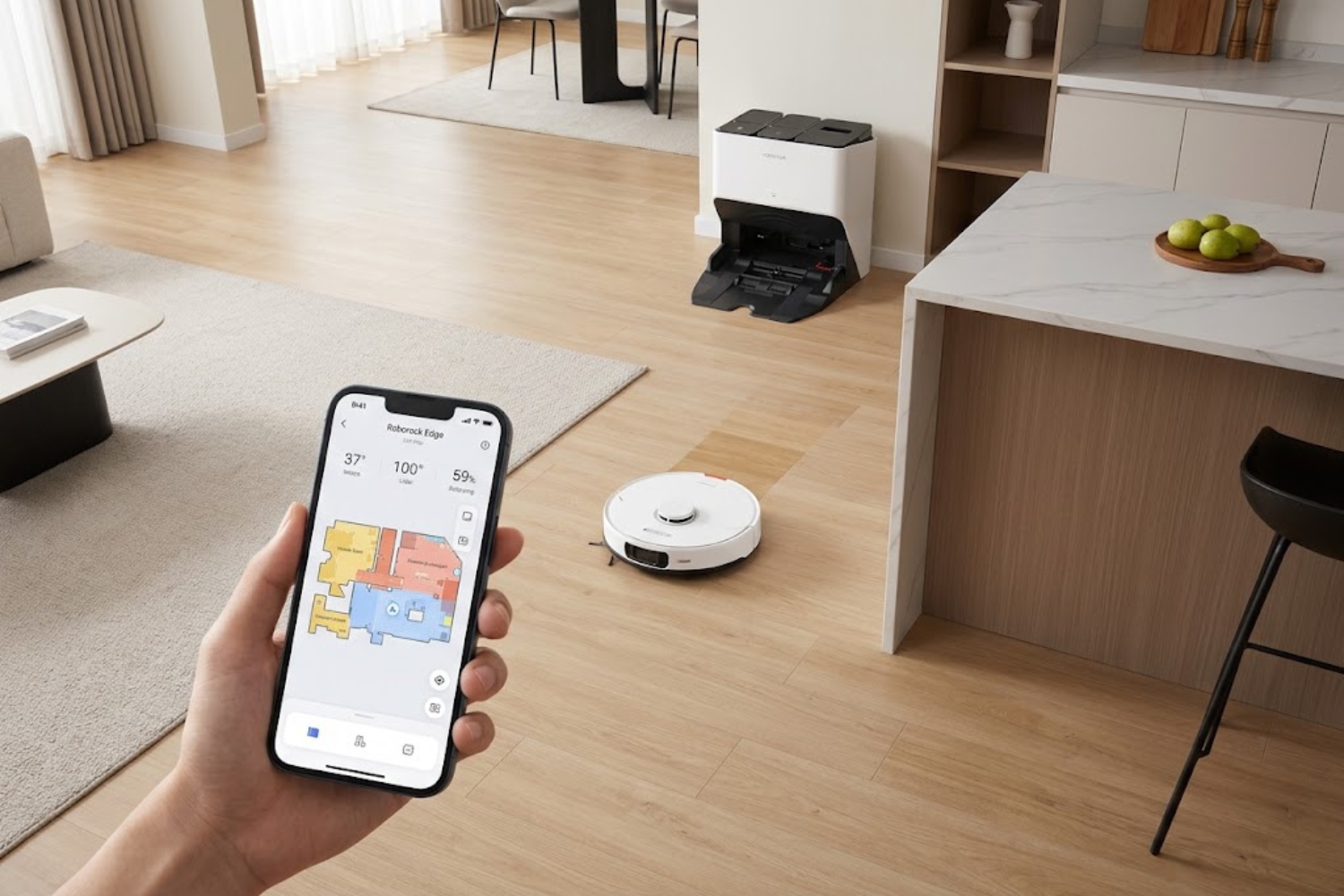
Roborock’s multi-floor mapping technology means a single device can handle multiple levels of your home (when physically transported between floors). The app breaks down room-by-room cleaning into actionable tasks—you can tell the robot to clean only the kitchen before dinner or focus on bedrooms overnight.
Competitors offer mapping, sure. But Roborock’s implementation feels less like a gimmick and more like a genuinely useful feature. The saved maps persist, improving efficiency every cycle.
Ecosystem Integration and App Control
The Roborock app is what separates “nice feature” from “daily essential.” Real-time tracking shows exactly where your robot is. Scheduling works intuitively. Integration with Google Home, Alexa, Apple Siri, and Home Assistant means you can control cleaning with voice commands from anywhere.
Advanced users can create automation routines—have the robot start automatically when you leave home, or pause if someone gets home unexpectedly.
Value Proposition vs. Premium Competitors
Here’s the uncomfortable truth competitors don’t want you to know: a $400–$600 Roborock often outperforms a $1,200 iRobot in real-world testing. Roborock aggressively innovates in features (AI, mapping, mopping) while keeping prices reasonable. They compete on value, not brand prestige.
Roborock’s Product Lineup Explained
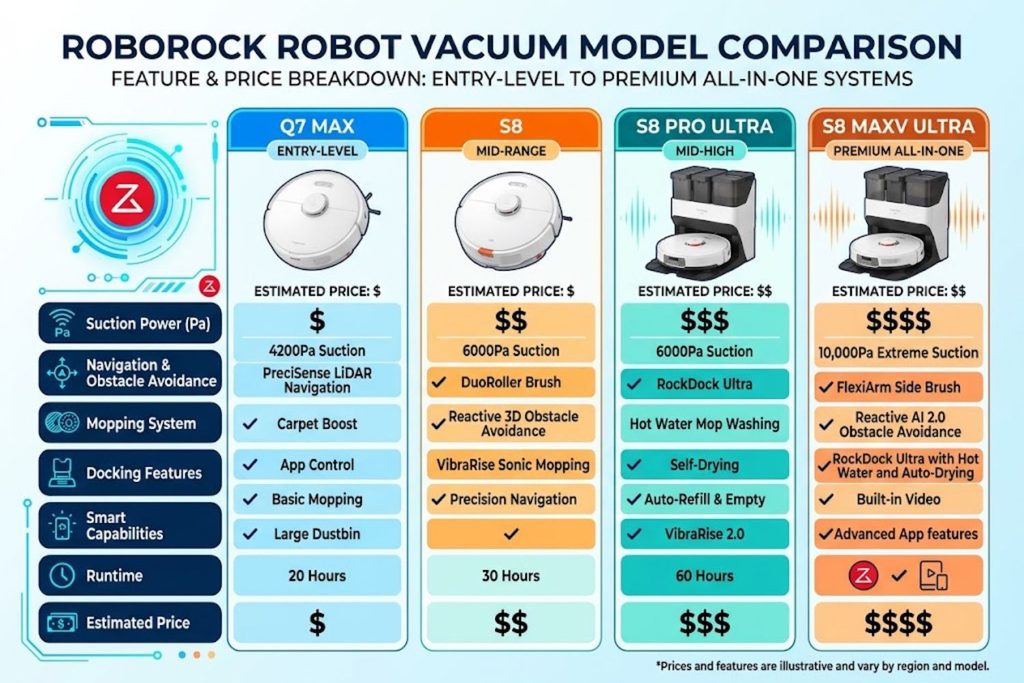
Roborock doesn’t make a single “robot vacuum.” They make a fleet with different price points and capability levels.
Entry-Level Models ($250–$400)
Roborock’s budget-friendly options skip some premium features but keep the core technology: LiDAR navigation, basic room mapping, and app control. These are perfect for small apartments or first-time robot vacuum buyers who want to test the market without huge investment.
Don’t mistake “entry-level” for “weak.” Even budget Roborock models outclean many mid-range competitors from other brands.
Mid-Range Smart Performers ($500–$750)
This is where Roborock shines. Mid-range models add mopping capabilities, larger dustbins, more powerful suction, and multi-floor mapping. Most homes find their ideal device here—premium features without premium price tags.
Premium All-in-One Systems ($800+)
The flagship models integrate vacuuming, mopping, self-emptying, auto-mop washing, and obstacle avoidance so advanced it feels like science fiction. These target homes prioritizing maximum automation and minimal maintenance.
Choosing the Right Model for Your Home
Home size matters. Pet owners should prioritize suction power and pet-obstacle avoidance. Multi-floor homes benefit from saved mapping. If mopping appeals to you, verify water control quality—cheaper models sometimes struggle with wet floors.
Start by asking: “What’s the main problem I’m solving?” Allergies? Get the model with the best filtration. Pets? Prioritize suction and obstacle avoidance. Multiple floors? Ensure strong mapping capabilities.
Key Technologies That Drive Roborock’s Performance
Understanding how Roborock works matters if you’re making a purchase decision in the $400–$1,000 range where performance variations matter.
LiDAR Navigation vs. Camera-Based Systems
Roborock uses LiDAR (Light Detection and Ranging)—essentially radar for vacuums. It spins a laser sensor that maps everything in the room with precision. This is more expensive than camera-based navigation but dramatically more reliable in low-light conditions and complex layouts.
Camera-based systems struggle in dim lighting. LiDAR doesn’t care if your lights are off. That’s a meaningful advantage for nighttime cleaning or homes with poor lighting.
Smart Mapping and Room Recognition
After the first run, Roborock’s software auto-detects walls, doorways, and room boundaries. You can then customize room definitions in the app—renaming rooms and setting individual cleaning schedules or suction levels per room.
Advanced feature: no-go zones and no-mop zones. Create invisible boundaries that the robot refuses to cross. Protect your cat’s litter box or stop the mopping in areas where water causes problems.
Mopping Integration and Wet-Dry Capabilities
Roborock’s mopping isn’t an afterthought—it’s genuinely good. Many models feature intelligent water flow control, adjusting moisture levels based on surface type (tile vs. hardwood). Some premium models even include hot water and mop washing between cleaning cycles.
The limitation? Carpet and mopping don’t mix well. Most models detect carpeted areas and skip mopping automatically, but this isn’t 100% foolproof.
Obstacle Avoidance and Pet-Friendly Features
Premium Roborock models use additional cameras and sensors for real-time obstacle detection. They recognize pet toys, cables, and even pets themselves—pausing or rerouting to avoid frightened animals.
It’s not perfect. A cable draped just right can still cause confusion. But for homes with pets and scattered clutter, this feature prevents the dreaded “the robot got stuck” situation.
Real-World Setup and Integration Strategies
Buying a Roborock is one thing. Setting it up to work seamlessly with your home is another.
Home Network Requirements
Roborock devices need stable 2.4GHz WiFi (not 5GHz). Your WiFi needs to reach everywhere the robot operates. Weak signal means navigation errors and missed cleaning spots.
Pro tip: if your home WiFi struggles, add a mesh system before investing in Roborock. A $100 mesh upgrade will improve the robot’s performance more than upgrading the robot itself.
Smart Home Platform Compatibility
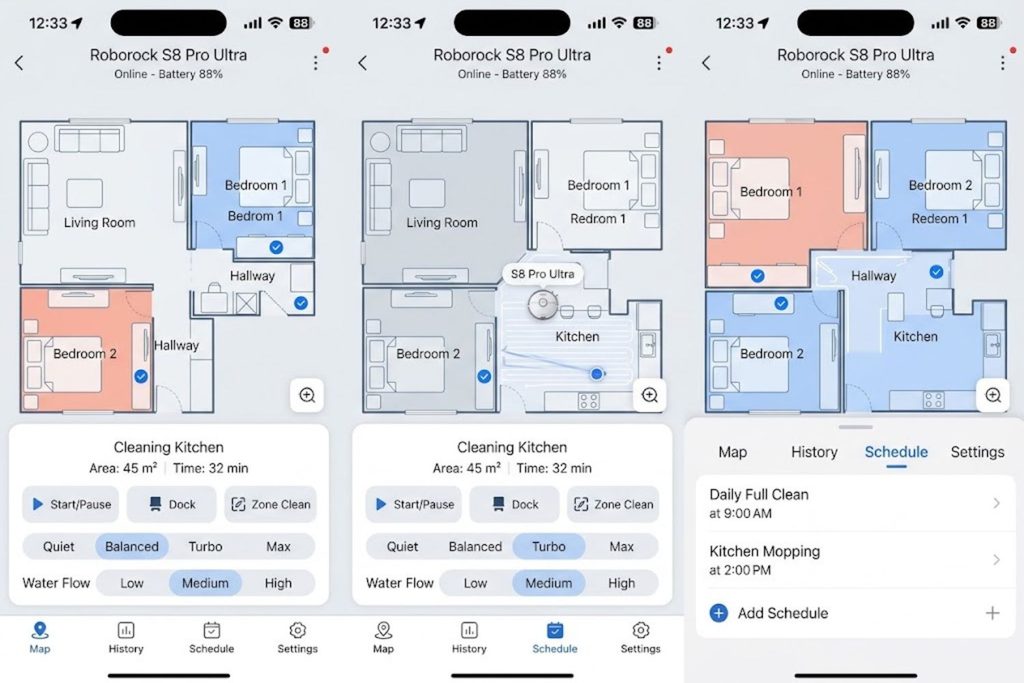
Roborock integrates with major platforms, but functionality varies. Google Home and Alexa support basic voice commands (start, stop, dock). Home Assistant enthusiasts get deeper integration through community-maintained plugins, enabling complex automations.
If your home runs HomeKit exclusively, integration options are limited. This matters if ecosystem consistency is your priority.
Optimizing Room Layouts for Maximum Efficiency
Robots clean better when paths are clear. Thin cables become obstacles. Decorative items blocking entry points create dead zones. Most users see a 30% efficiency improvement after their first week, simply by identifying and clearing problem areas.
Run the robot during mapping with lights on and doors open. Watch it work and note where it struggles. Usually, minor furniture adjustment solves 80% of issues.
Maintenance Workflows That Actually Work
Roborock’s appeal includes automation, but maintenance still matters. Empty the dustbin after 2–3 cleaning cycles. Check for tangled hair weekly. Clean the sensors monthly.
Smart users put these tasks on calendar reminders. The robot does 95% of the work, but you still need to do 5%.
Common Mistakes People Make (And How to Avoid Them)
Mistake #1: Expecting it to handle stairs. Robots don’t climb stairs. If your home has stairs splitting the cleaning area, you’ll need to physically move the robot between levels or live with some areas uncleaned.
Mistake #2: Ignoring the app settings. The robot works out of the box, but it’s optimized through app configuration. Users who take 30 minutes to understand settings see dramatically better results.
Mistake #3: Placing it in high-traffic zones. The dock needs stable, accessible placement. Kitchens or hallways near the dock create obstacles and navigation confusion. A corner spot with clear approach paths works best.
Mistake #4: Assuming it replaces traditional vacuuming. Robots handle maintenance cleaning beautifully. But deep cleaning thick carpets or post-party messes still requires a traditional vacuum. Think “robot handles 90% of routine cleaning, you handle 10% of deep cleaning.”
Mistake #5: Skipping firmware updates. Roborock regularly releases software improvements that enhance navigation, add features, and fix bugs. Check for updates monthly. Many performance improvements come through software, not hardware.
Is Roborock Right for Your Home? A Decision Framework
Roborock works best if you have:
- Primarily hard flooring (tile, hardwood) or short-pile carpet
- A single or two-story home (with tolerance for manual multi-floor movement)
- Relatively consistent room layouts (not excessively cluttered)
- Stable WiFi coverage throughout the home
- Time to invest in initial setup and monthly maintenance
Roborock is problematic if you have:
- Multiple pet families producing excessive hair (consider suction power carefully)
- Extremely complex multi-level layouts
- Unreliable home WiFi
- Extensive thick carpeting (robots struggle with deep pile)
- Minimally maintained environments (robot needs some basic care)
Roborock vs. Alternatives: Honest Comparison
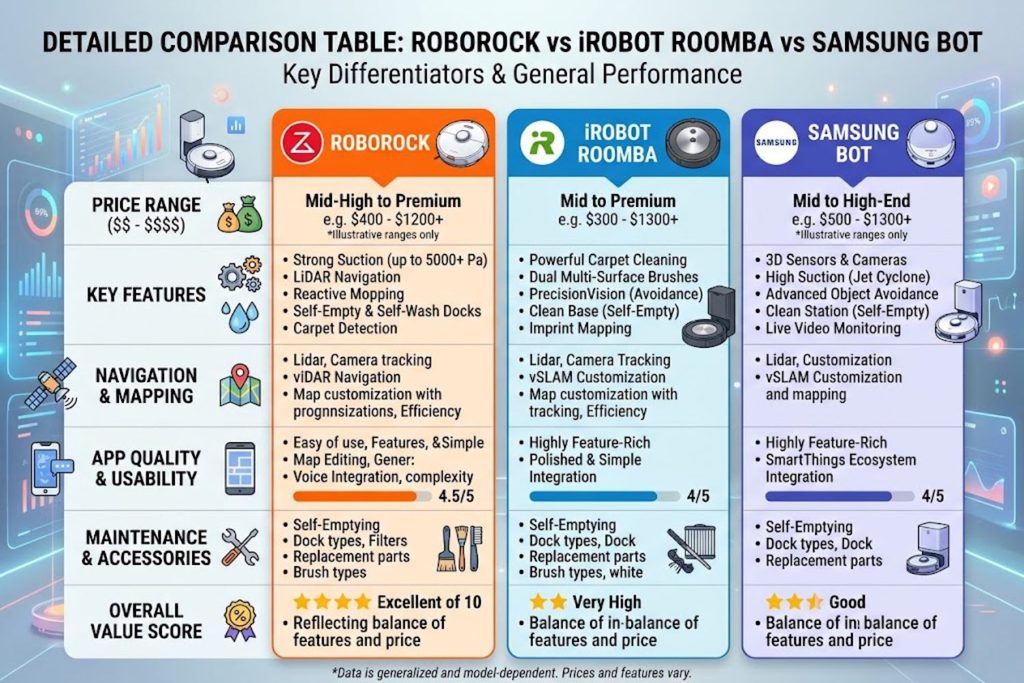
vs. iRobot Roomba: iRobot dominates brand recognition but charges premium pricing for similar features. Roomba’s advantage: superior long-term support and accessories ecosystem. Roborock’s advantage: better value and more aggressive feature innovation.
vs. Samsung Bot: Samsung’s robots are excellent but region-locked and have limited app functionality outside specific markets. Roborock’s advantage: global support and consistent feature parity worldwide.
vs. Budget Brands (Eureka, BISSELL): Budget brands offer lower prices but less reliable navigation and worse app experiences. Roborock offers the best balance of affordability and quality in the $400–$800 range.
The Verdict: If you want innovation and value, Roborock wins. If you want nostalgic brand recognition and don’t mind paying for it, Roomba still appeals.
Frequently Asked Questions
Q: How often should I charge a Roborock?
Most modern Roborock models charge to full in 2–3 hours and run for 1.5–2 hours per cycle. For typical homes, charging every 1–2 days is normal. Self-charging docks return automatically, so daily charging is habitual, not intentional.
Q: Will Roborock damage hardwood floors?
No, not if properly maintained. Occasional water exposure from mopping isn’t damaging. Extended water damage could be a problem, but correct water-level settings prevent this. Hardwood is a Roborock sweet spot—vacuuming and light mopping work perfectly.
Q: Can I control Roborock when away from home?
Yes. The app provides real-time control worldwide if your home WiFi connects to the internet. Start cleaning from the office, check status from vacation, or schedule cleaning days in advance.
Q: How does Roborock perform with pet hair?
Excellently with frequent maintenance. Pet-owning households should empty the dustbin after each cycle and check the brush for hair tangles weekly. Models with larger dustbins and higher suction (S7 MaxV and above) handle pets better than budget models.
Q: Is Roborock mopping as good as regular mopping?
No, not quite. Roborock mopping handles light dust and crumb removal beautifully. It maintains floor cleanliness between deep mopping cycles. But stubborn stains or sticky spills still require traditional mopping.
Q: What’s the warranty coverage?
Roborock typically offers 1–2 year warranties depending on region. Some models qualify for extended warranties. Check specific model documentation, as this varies.
Q: Can Roborock navigate dark homes?
Yes—this is where LiDAR excels. Unlike camera-based systems, LiDAR doesn’t need visible light. Night-time cleaning works seamlessly.
Q: Do I need a separate app for each room?
No, one app controls everything. The main Roborock app manages all connected devices and stores mapping for multiple homes.
Key Takeaways
- Roborock offers best-value robot vacuum technology, combining advanced AI navigation, smart mapping, and mopping capabilities at mid-range pricing that undercuts premium competitors.
- LiDAR navigation is superior to camera-based alternatives for reliability in variable lighting conditions, making Roborock’s technical choice meaningfully better for real-world homes.
- The ecosystem matters more than any single feature—app quality, smart home integration, and software updates deliver ongoing value beyond initial purchase.
- Entry-level Roborock models outperform mid-range competitors, but optimal choice depends on home size, floor type, and pet situation.
- Setup and configuration drive results more than hardware alone—users investing time in app settings see 30–50% better performance than those using defaults.
- Roborock isn’t a traditional vacuum replacement; it handles 90% of routine maintenance cleaning, leaving 10% for occasional deep cleaning.
- Regular firmware updates continuously improve performance, making older models more capable over time—a meaningful advantage over static competitors.